Changelog
Kürzlich veröffentlicht.
Seite 7
feature
Bird introduces self-serve signup for AI agents
Bird launches a headless signup path for agents that don't already have a Bird account. Three commands take an agent from nothing to a stored, working credential: bird auth signup creates the account and emails a six-digit code, bird auth verify-email confirms it and returns a one-time onboarding ticket, and bird auth create-org consumes that ticket to create the first organization and workspace. No browser and no dashboard involved at any step. The same flow is exposed as the signup, verify_email, and create_org tools on the MCP server. See Self-serve signup.
Also in this release:
- The dashboard's navigation is redesigned around a left sidebar: channels are grouped under Products (Voice, Push, Lookup, and Realtime now sit in a coming-soon row), shared records live under Resources (Contacts, Numbers, Verification), and API Keys, Webhooks, and Logs are pinned at the bottom and stay visible no matter which channel you're in. See the dashboard tour.
- WhatsApp message endpoints (get, list, list message events, send) now return
last_error.meta_error_code, the raw error code from the WhatsApp Cloud API, for lower-level debugging of failed sends. - Corrected docs: enabling email receiving on a domain is dashboard-only, through the Receiving toggle on the domain's detail page. The previously documented
PATCH /v1/email/domains/{domain_id}call for this doesn't do that. Separately, the 422 error returned for preview email fields (references, attachmentpath,contact_id,topic_id) used ahead of general availability isUnsupportedEmailFeature, notunsupported_featureas previously documented.
feature
SMS: send text messages and templates, now available to all workspaces
SMS sending is now available to every Bird workspace. Send a message in seconds and follow it all the way to delivery, on whichever surface you build on.
Getting started
What's available
- Free-form text SMS: send your own message text with an alphanumeric sender, gated by per-country policy and your workspace's enabled destination countries.
- Send by template: send a ready-made Bird SMS template by name, with your own variables.
- Delivery tracking: get a message, list your messages, and follow each message's delivery timeline — or receive
sms.*webhooks as status changes. - Everywhere you build: the SMS API, the dashboard (message log, send, templates, metrics, and destination settings), the
bird smsCLI, and the Go, TypeScript, and Python SDKs.
More is on the way — customer-authored templates and additional languages among them.
feature
WhatsApp messages now support tags and metadata
The WhatsApp messaging API brings tags and metadata in line with the rest of the platform. When you send a WhatsApp message, you can now attach:
- Tags: structured
{name, value}labels, up to 20 per send, for low-cardinality dimensions likecategoryorexperiment_variant - Metadata: an arbitrary JSON object (up to 2 KB) for your own per-send context, such as internal IDs
Both are echoed back on the message resource and on list results, which also gain a tag query parameter to filter by tag name or an exact name:value pair, matching the filtering already available for email and SMS messages.
feature
Bird Platform update: Redesigned organization user management
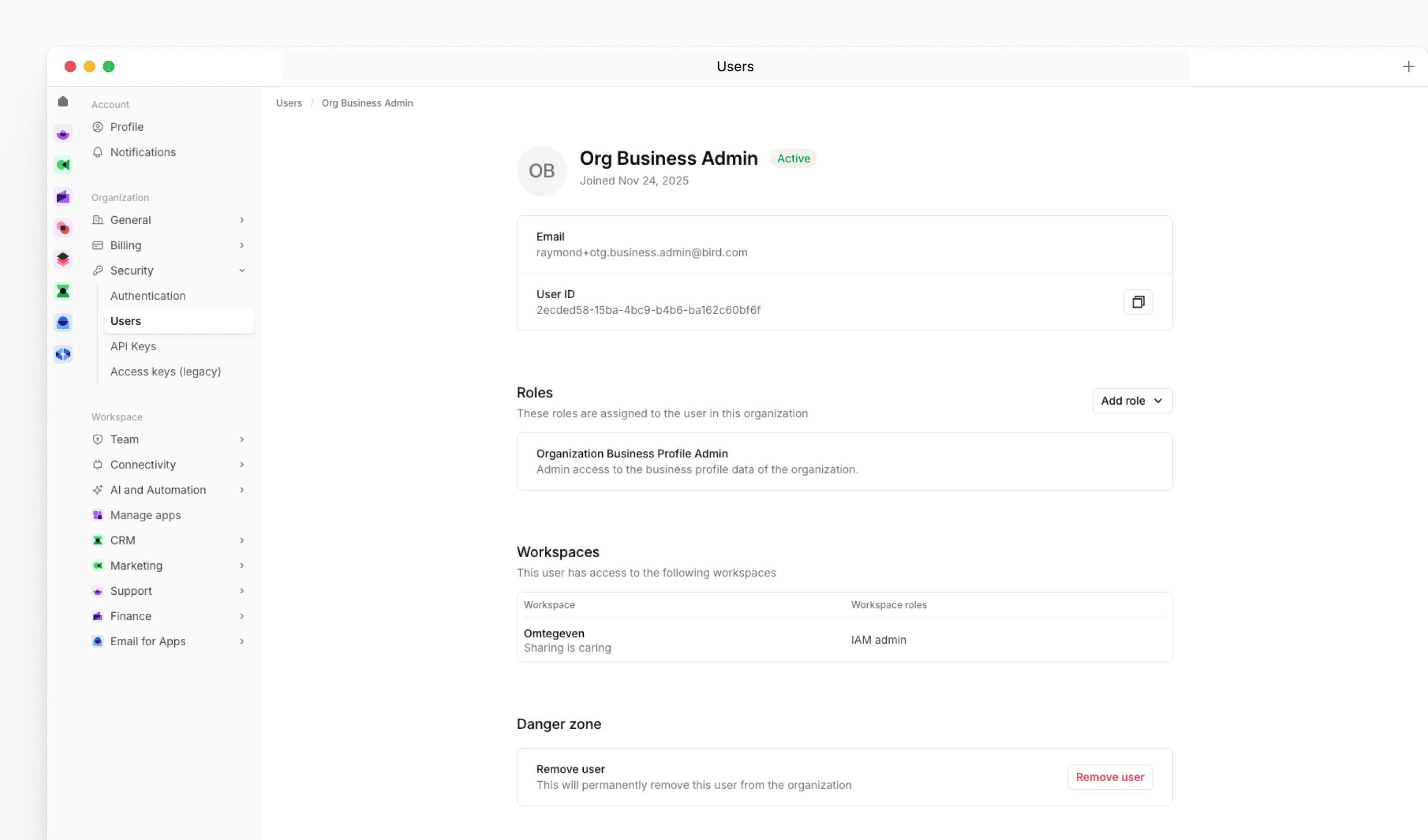
We've replaced the admin management screen with a new user management experience that gives organization admins a clearer overview of their team and more control over roles and access.
New features
The new Users page under Organization Settings shows each user's role assignments, workspace access, and account status in a single table. Clicking a user opens a detail page where you can add or remove organization roles, review their workspace memberships, and remove them from the organization if needed.
When inviting a new user, you can now assign one or more organization roles as part of the invite flow. For users who haven't accepted their invitation yet, you can resend it directly from their profile page.
What this means for you
If you manage users in your organization, navigate to Settings > Security > Users to find the new experience. The actions available to you depend on your permissions - organization admins can manage roles and remove users from this page.
Good to know
Removing a user from the organization will revoke their access to all workspaces and resources within it. Workspace memberships are managed at the workspace level and are not affected by role changes made here.
feature
Momentum 5.2 release
Momentum 5.2 is now available for download via the MessageSystems customer portal. This release delivers platform upgrades, enhanced security, and improved observability across your email infrastructure.
New features
- RHEL 10 Support (Intel x86_64 & ARM aarch64) – Deploy on Red Hat Enterprise Linux 10 across both Intel and ARM platforms for broader OS compatibility
- TLS v1.3 for SMTP – Strengthened encryption and faster handshake performance for SMTP connections using GnuTLS
- New DNS Configuration Options – Finer control over DNS behavior with configurable UDP buffer sizes and dynamic source port reuse limits
Improvements
- Enhanced Observability – New message fields for better delivery diagnostics, smarter log throttling, and streamlined metrics management
- Platform & Dependency Updates – Updated bundled components and streamlined packaging for improved performance, security, and easier maintenance
Fixes
Several bug fixes for improved stability.