WhatsApp-Telefonnummern
Eine WhatsApp-Nachricht wird von einer von zwei Arten von Nummern gesendet: einer, die Bird in Ihrem Namen betreibt, oder einer, die Ihr eigener Workspace besitzt. Welche Sie haben, bestimmt, was Sie senden können und ob ein Versand seinen Absender überhaupt benennt.
Die Seite Numbers listet beide auf. Das Feld from in der Sendeantwort und im Nachrichtenprotokoll identifiziert die Nummer, die eine bestimmte Nachricht verwendet hat.
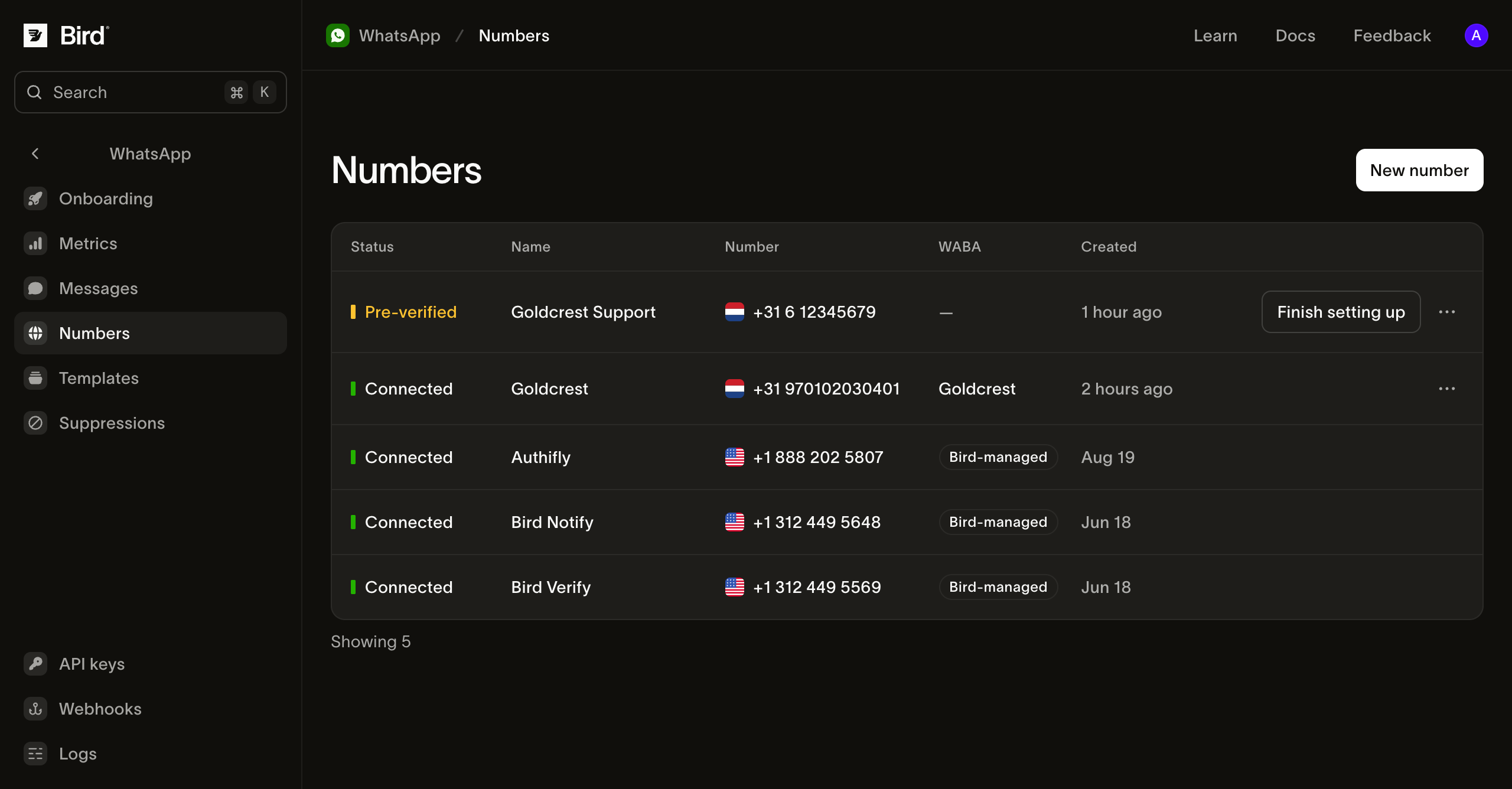
Von Bird verwaltete Nummern
Die eigenen Nummern von Bird erfordern kein Setup und enthalten die vorab genehmigten Templates, deren Slugs mit bird_ beginnen. Bird wählt eine nach der Kategorie des Templates und Ihrer Region aus: Authentication-Templates verwenden eine dedizierte Authentifizierungsnummer, Utility-Templates eine Benachrichtigungsnummer. Ein Versand mit verwaltetem Template hat daher kein from-Feld, und das Setzen eines solchen wird abgelehnt.
Diese Nummern verwenden von Bird verwaltete Sendeinfrastruktur. Der Absender, den Ihr Empfänger sieht, ist daher der von Bird und nicht Ihrer, und Freitext-Inhalte können über sie nicht versendet werden. Sie sind in der WABA-Spalte als Bird-managed gekennzeichnet.
Ihre eigene Nummer
Eine eigene Nummer zu verbinden ermöglicht den Versand unter Ihrer eigenen Marke: eigene Templates und Freitext-Inhalte innerhalb eines offenen Kundenservice-Fensters. Jeder Versand von dieser Nummer benennt sie in from.
Sie verbinden sie über die Seite Numbers im Embedded-Signup-Popup von Meta. Es gibt zwei Wege, und sie unterscheiden sich darin, wer den Verifizierungscode liest, den Meta an die Nummer sendet:
- Ich habe eine eigene Nummer. Sie empfangen Metas Code per SMS oder Sprachanruf und geben ihn selbst im Embedded-Signup-Fenster ein. Wählen Sie den unterstützten Migrations- oder berechtigten Business-App-Koexistenzpfad, bevor Sie eine bestehende Registrierung ändern, und setzen Sie eine Phone registration PIN nur, wenn die Nummer bereits eine auf WhatsApp hinterlegt hat.
- Eine Nummer, die Ihr Workspace bei Bird hält. Wählen Sie sie stattdessen aus der Number-Liste. Bird empfängt den Code und erledigt Metas Verifizierung für Sie, sodass die Nummer als Pre-verified ankommt und Sie sie nur noch im Embedded-Signup-Fenster auswählen.
Verifizierung einer Nummer, die Bird hält
Die Auswahl einer gehaltenen Nummer startet die Verifizierung, bevor das Embedded-Signup-Popup erscheint. Bird fordert Meta auf, eine SMS an die Nummer zu senden, und liest den Code dann in Ihrem Namen zurück.
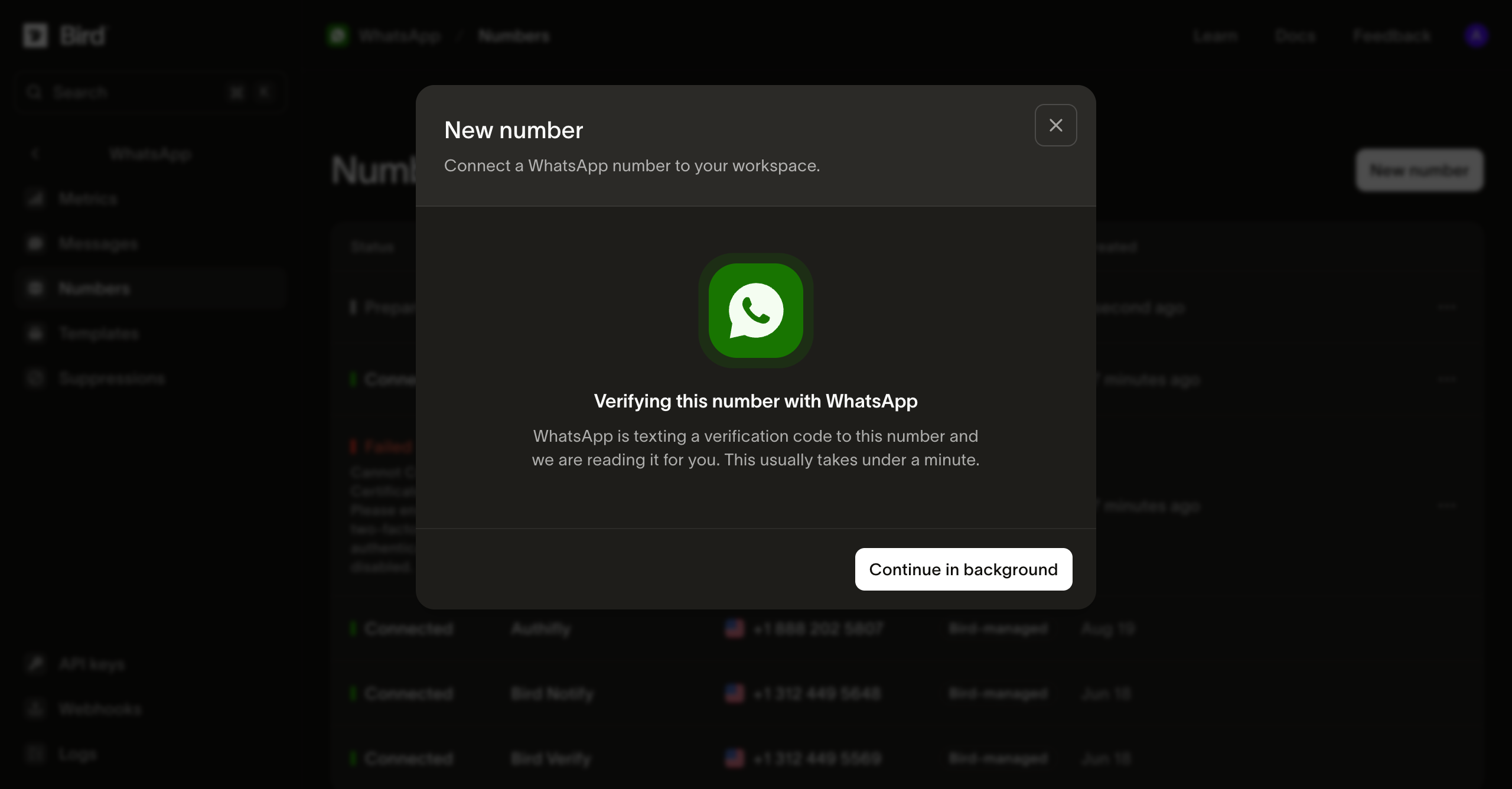
Das dauert in der Regel weniger als eine Minute. Sie müssen nicht im Dialog warten: Continue in background schließt ihn, und die Zeile auf der Numbers-Seite verfolgt denselben Fortschritt.
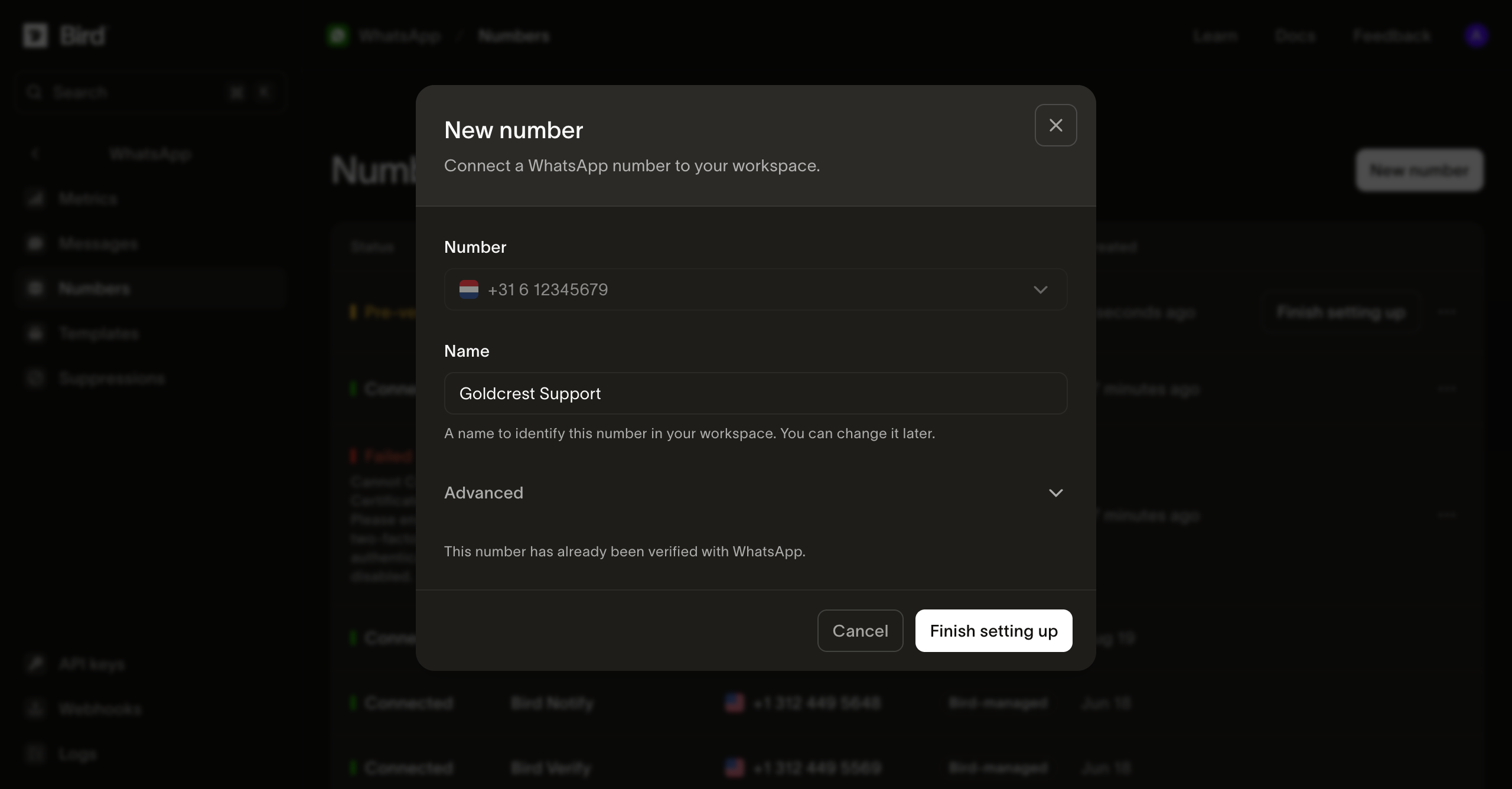
Sobald der Code gelesen wurde, ist die Nummer bei Meta verifiziert und wartet darauf, dass Sie den Vorgang in Embedded Signup abschließen. Finish setting up öffnet Metas Popup, in dem Sie die Nummer und das Geschäftskonto auswählen, dem sie zugeordnet werden soll.
Was der Status einer Nummer bedeutet
Eine Nummer durchläuft mehrere Zustände, bevor sie senden kann, und die Status-Spalte zeigt den aktuellen an:
| Status | Bedeutung |
|---|---|
| Preparing | Bird erledigt Metas Verifizierung für eine Nummer, die Ihr Workspace hält. |
| Pre-verified | Bird hat Metas Verifizierung abgeschlossen. Schließen Sie die Nummer in Embedded Signup ab. |
| Pending | Embedded Signup ist abgeschlossen und Bird registriert die Nummer bei Meta. |
| Connected | Die Nummer kann senden. |
| Failed | Das Setup wurde abgebrochen. Die Zeile enthält den Grund. |
Beide Wege können unterwegs fehlschlagen, bei Metas Verifizierung oder im Popup. Wie Sie das Problem beheben, hängt vom Grund ab, den die Zeile anzeigt.
Wenn die Zeile verification_code_not_received oder verification_rate_limited anzeigt, öffnen Sie die Nummer und wählen Sie Try again, anstatt sie zu trennen. Warum die Prä-Verifizierung fehlschlägt und wann Sie es erneut versuchen sollten erklärt, wann der Button verfügbar wird und was zu tun ist, wenn auch der erneute Versuch fehlschlägt.
Bei jedem anderen Grund trennen Sie die Nummer über ihre Zeilenaktionen und verbinden Sie sie erneut: Die fehlgeschlagene Zeile hält die Nummer als beansprucht, sodass ein zweiter Versuch ohne vorheriges Entfernen abgelehnt wird.
Kann ich WhatsApp senden, ohne eine Telefonnummer zu kaufen? erläutert die Auswahl.
Was eine verbundene Nummer zeigt
Die Seite einer Nummer zeigt, was WhatsApp ihr erlaubt, plus einen Activity-Bereich, der das bisherige Sendeverhalten abdeckt.
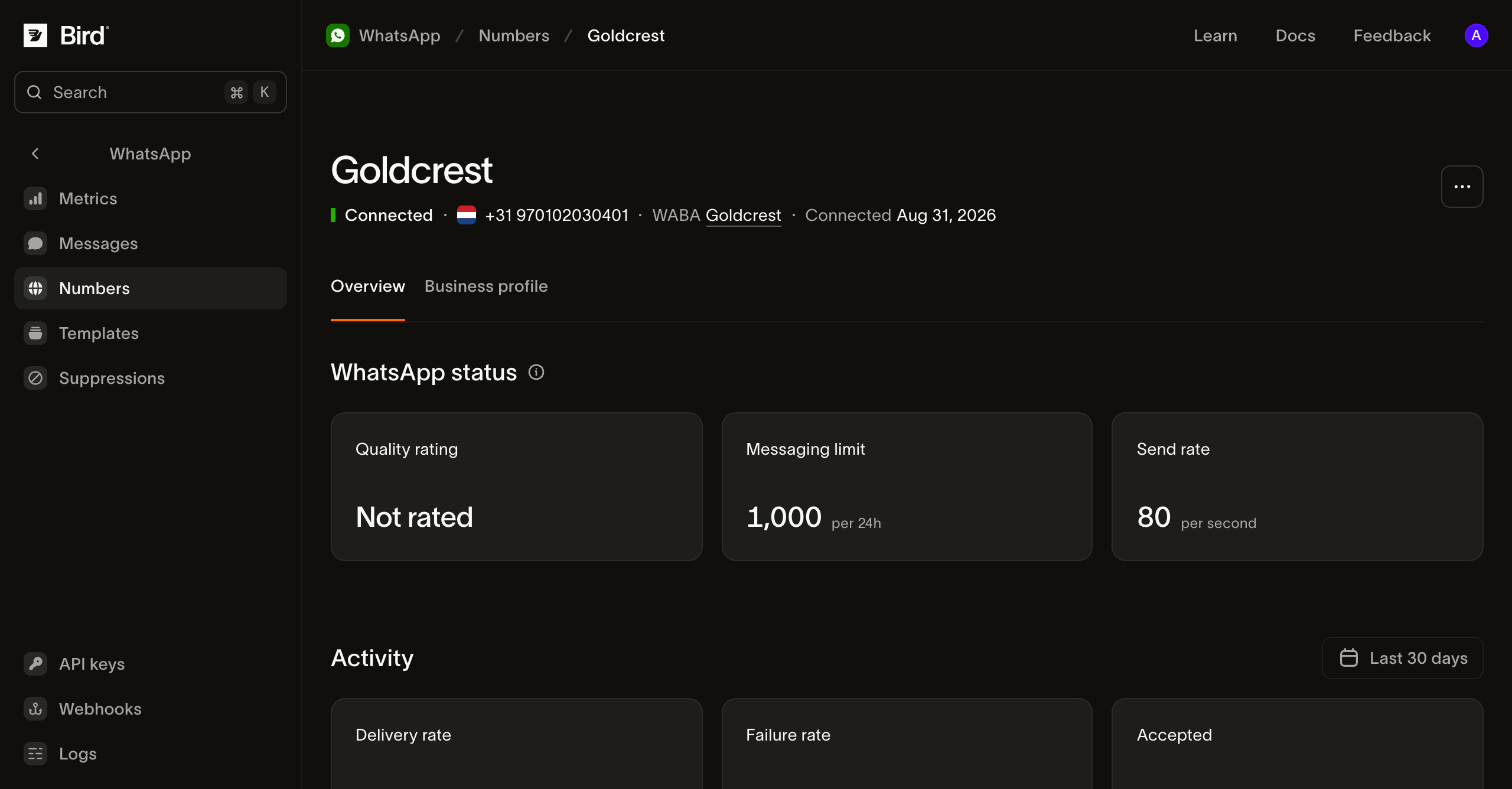
Quality rating, Messaging limit und Send rate sind die Werte von WhatsApp, nicht von Bird. Das Messaging limit ist die Anzahl der von Unternehmen initiierten Konversationen, die WhatsApp in 24 Stunden erlaubt, und es steigt, wenn die Nummer gut sendet. Quality rating zeigt Not rated an, bis WhatsApp genug Zustellverlauf hat, um eine Bewertung zu vergeben.
Der Tab Business profile enthält, was Empfänger in WhatsApp über Sie sehen: den Anzeigenamen, die Beschreibung, die Adresse und das Profilbild.
Das Geschäftskonto hinter einer Nummer
Jede verbundene Nummer gehört zu einem WhatsApp Business Account, und die WABA-Spalte verlinkt darauf. Das zugehörige Datenblatt zeigt Metas Prüfungen des Unternehmens selbst, nicht der Nummer.
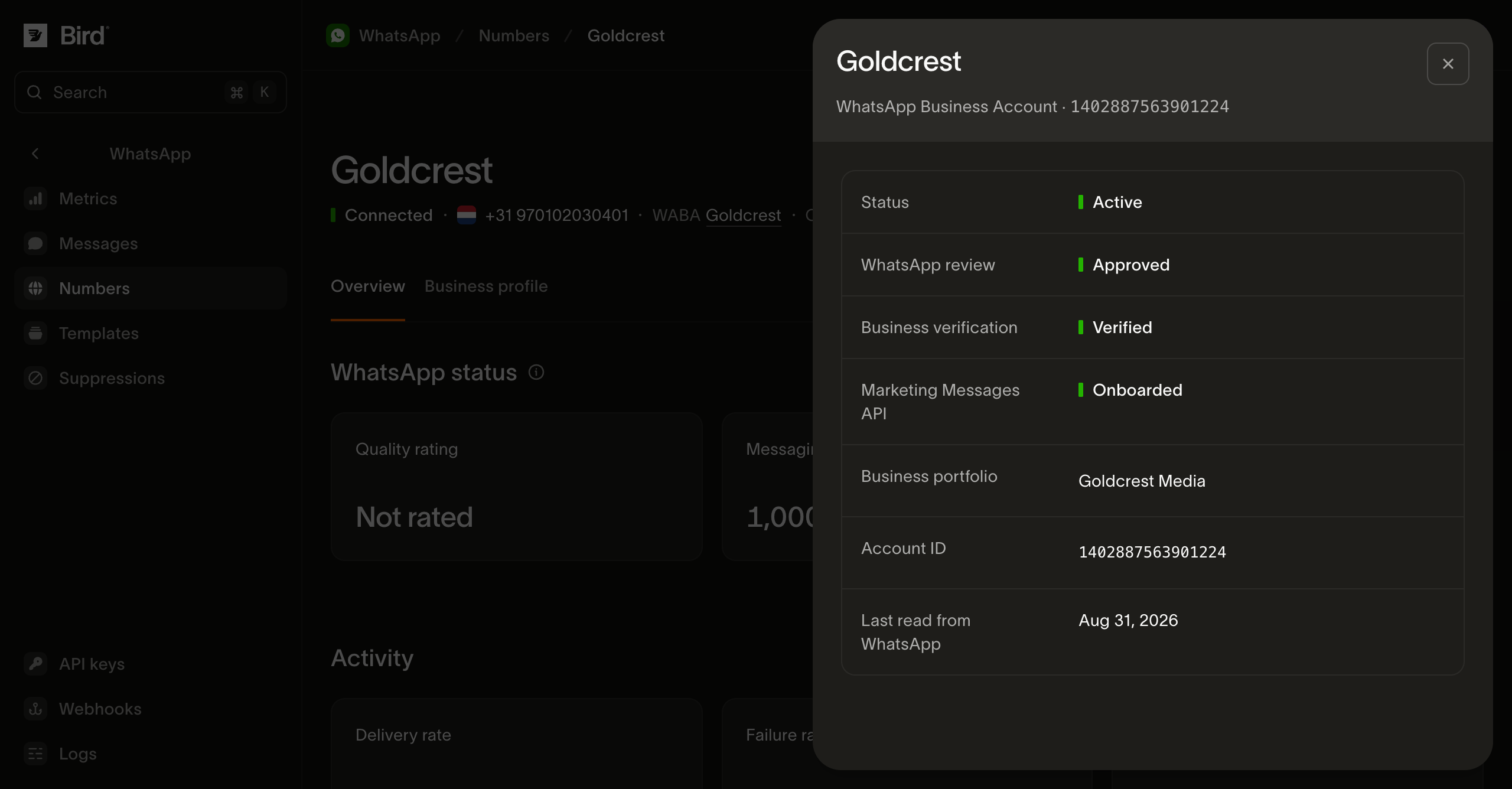
Diese Zustände bestimmen, was das Konto tun kann. Business verification ist insbesondere Voraussetzung für Authentifizierungs-Templates: Ein nicht verifiziertes Unternehmen kann keines erstellen. Marketing Messages API zeigt Onboarded an, sobald Meta das Konto akzeptiert hat. Marketing-Sendungen warten nicht darauf. Das Onboarding schaltet Metas Zustellungsoptimierungen frei sowie einen gif-Header, der bei WhatsApp fehlschlägt, wenn das Konto das Onboarding nicht abgeschlossen hat. Ein Workspace kann mehrere Geschäftskonten enthalten, jedes mit mehreren Nummern. Prüfen Sie die Ergebnisse für das Konto, das den beabsichtigten Absender besitzt; ein verbundenes Konto hat einen bestimmten Workspace und regionalen Inhaber.
Bird liest diese Daten planmäßig von Meta, nicht kontinuierlich. Last read from WhatsApp datiert daher die darüber angezeigten Ergebnisse.
Ihre Nummern über die API auslesen
Alles, was das Dashboard oben zeigt, ist über die API und die SDKs abrufbar. Die Abfragen erfordern einen API-Schlüssel mit whatsapp_management-Lesezugriff.
GET /v1/whatsapp/numbers gibt Ihre Absender als Cursor-Seite zurück. Jeder Eintrag enthält den Status, den WhatsApp dafür meldet. Dieser Aufruf zeigt Ihnen also, welche from-Werte ein Versand verwenden kann.
GET /v1/whatsapp/numbers/{id} liest eine einzelne Nummer mit denselben Werten für Quality rating, Messaging limit und Durchsatzstufe, die die Detailseite anzeigt. GET /v1/whatsapp/numbers/{id}/profile liest das Unternehmensprofil hinter dem Tab Business profile, einschließlich description, address und websites.
GET /v1/whatsapp/numbers/{id}/events gibt zurück, wie eine Nummer ihren aktuellen Status erreicht hat, neueste zuerst: wann sie hinzugefügt wurde, jede Statusänderung und jede Entscheidung zu Messaging limit, Quality rating und Anzeigename. Jedes Ereignis enthält type, summary und created_at. type ist ein offenes Enum. Behandeln Sie einen Ihnen unbekannten Wert als künftigen Ereignistyp und nicht als Fehler.
GET /v1/whatsapp/business-accounts und GET /v1/whatsapp/business-accounts/{id} lesen die Kontozustände, die diese Seite oben beschreibt: account_review_status, business_verification_status und marketing_messages_onboarding_status. Eine Nummer meldet ihr Konto im eigenen Feld waba, das Metas Konto-ID enthält und nicht eine Bird-ID.
Zwei Details, die Sie kennen sollten, bevor Sie auf diese Abfragen aufbauen. meta_synced_at datiert die von WhatsApp gemeldeten Felder, passend zu Last read from WhatsApp im Dashboard, und fehlt bei einer Nummer, die Bird in Ihrem Namen betreibt. Eine Nummer mitten im Signup ist abrufbar: status meldet preparing und awaiting_signup, next sagt, was mit diesem Zustand zu tun ist, und finish_setup_url enthält den Link zum Abschließen. So können Sie das Setup abfragen und einer Person den letzten Schritt übergeben. Das einzige zurückgehaltene Feld ist meta_preverified_id, die eigene ID von WhatsApp für eine Nummer, die wir vorbereiten. Sie bleibt im Dashboard.
Das Verbinden, Umbenennen und Trennen einer Nummer gehört nicht zur öffentlichen API und nicht zu den SDKs. Diese Aktionen sind im Dashboard und über die CLI (bird whatsapp numbers create|update|delete und bird whatsapp numbers profile update) verfügbar. Nur ein Schritt ist browsergebunden: Eine neue Verbindung wird auf Metas eigenem Zustimmungsbildschirm abgeschlossen. Deshalb übergibt create Ihnen eine finish_setup_url, anstatt den Vorgang selbst zu beenden.
Eingehende Nachrichten
Eingehende Nachrichten erreichen Ihren Workspace nur über Ihre eigenen Nummern. Bird zeichnet sie im WhatsApp-Protokoll auf, und der Tab Inbound auf der Metrics-Seite zeigt das empfangene Volumen pro Nummer. Jede eingehende Nachricht öffnet außerdem das 24-Stunden-Fenster, das Freitext-Inhalte benötigen. Von Bird verwaltete Nummern empfangen keine Nachrichten für Ihren Workspace.
Nächste Schritte
- WhatsApp-Nachrichten senden: der Sendeaufruf, den diese Nummern verwenden, und wann from erforderlich ist
- WhatsApp-Templates: der verwaltete Katalog und Ihre eigenen Templates
- Das WhatsApp-Kundenservice-Fenster: wann Freitext-Inhalte zustellbar sind
- WhatsApp-Protokoll: sehen Sie, über welche Nummer eine Nachricht gesendet wurde
- WhatsApp mit Bird verbinden: vom Nummernkauf bis zum aktiven Kanal: ein Video, das denselben Weg im Dashboard zeigt
for await (const number of bird.whatsapp.numbers.list({ limit: 25 })) {
  console.log(number.id, number.phone_number, number.status);
}
for number in client.whatsapp.numbers.list(limit=25):
print(number.id, number.phone_number, number.status)for number, err := range client.Whatsapp.Numbers.List(ctx, bird.WhatsappNumbersListParams{Limit: 25}) {
if err != nil {
log.Fatal(err)
}
fmt.Println(number.Id, number.PhoneNumber, number.Status)
}foreach ($bird->whatsapp->numbers->list() as $number) {
echo $number->getId(), ' ', $number->getPhoneNumber(), ' ', $number->getStatus(), PHP_EOL;
}curl -sS "https://us1.platform.bird.com/v1/whatsapp/numbers?limit=25" \
-H "Authorization: Bearer $BIRD_API_KEY"Verwandte Ressourcen
Weiter mit der Dokumentation, Anleitungen und Beispielen zu diesem Thema. Die Ressourcen sind auf Englisch.