Länderkonfiguration
Wenn Sie eine Telefonnummer verifizieren, bestimmt das Zielland, wie der Code zugestellt wird: welche Kanäle dort verfügbar sind, welcher zuerst versucht wird, ob Verifizierung überhaupt erlaubt ist und welche Sprache die Nachricht standardmäßig verwendet. Auf der Seite Countries verwalten Sie das, eine Zeile pro Land. Empfänger, die nur eine E-Mail-Adresse haben, sind davon nicht betroffen: Eine E-Mail-Adresse hat kein Land, daher gilt die Länderkonfiguration nur für Verifizierungen, deren Empfänger eine Telefonnummer enthält.
Standardmäßig ist jedes Land mit dem Plattform-Routing von Bird aktiviert. Nutzen Sie diese Seite, um Länder zu deaktivieren, die Sie nicht bedienen, Kanäle neu zu ordnen oder einen länderspezifischen Absender zu pinnen. Das Deaktivieren ungenutzter Ziele reduziert auch die Anfälligkeit für SMS-Pumping.
Die Countries-Seite
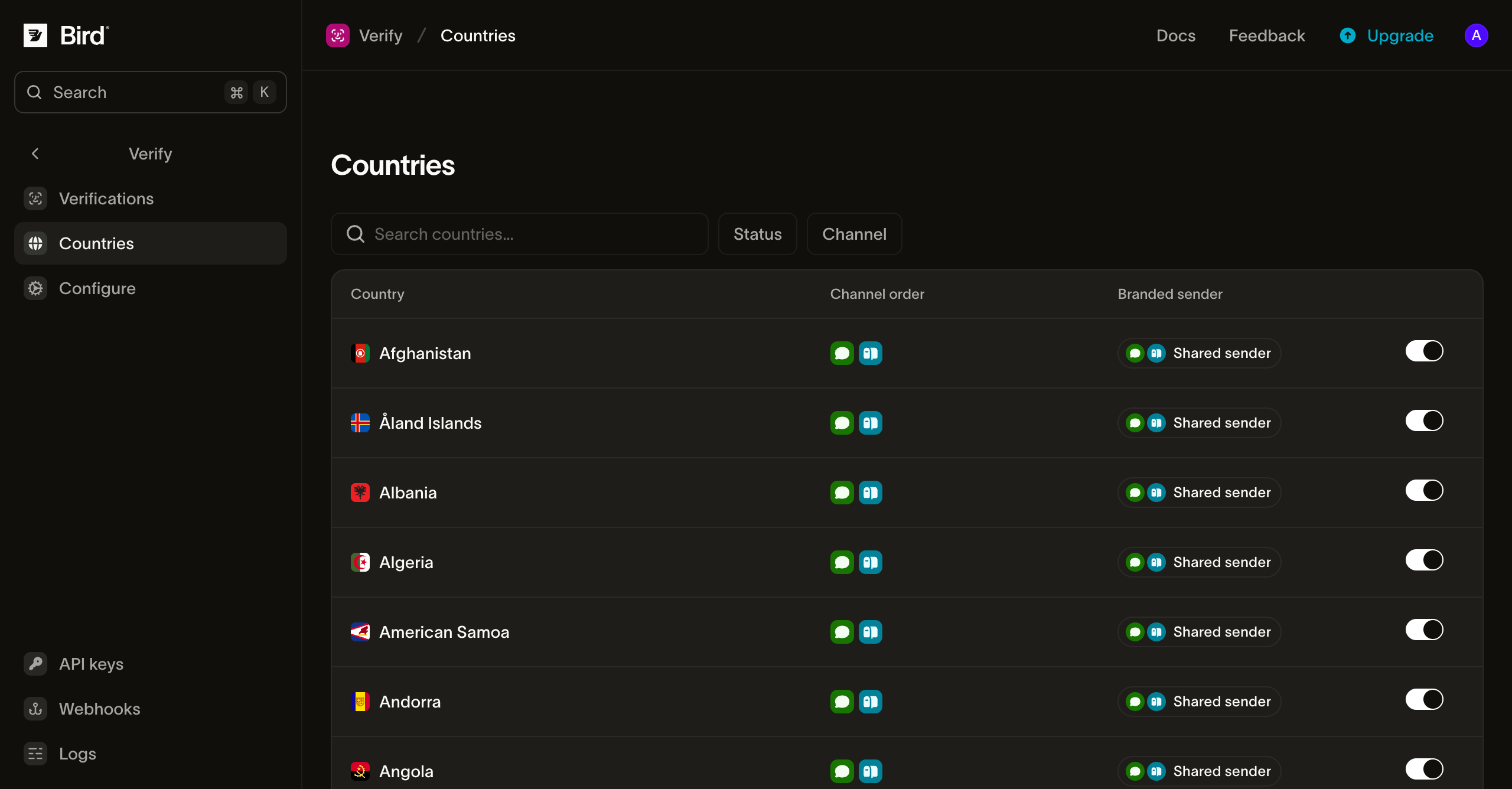
Jede Zeile zeigt das Land, seine effektive Kanalreihenfolge, unter welchem Absender jeder Kanal zustellt, und einen Ein-/Aus-Schalter. Filtern Sie nach Status oder Kanal oder suchen Sie nach Ländername. Ein deaktiviertes Land zeigt seine Kanalreihenfolge weiterhin ausgegraut an, sodass Sie sehen, was bei erneuter Aktivierung wiederhergestellt wird.
Der Schalter aktiviert oder deaktiviert das gesamte Land. Enthält ein Empfänger eine Telefonnummer in einem deaktivierten Land, ermittelt die Verifizierung keine Kanäle und die Erstellung schlägt mit 422 fehl. Eine E-Mail-Adresse beim selben Empfänger umgeht die Sperre nicht. Beim erneuten Aktivieren wird die Aus-Markierung entfernt, statt "on" zu pinnen, sodass das Land dem Plattform-Routing von Bird folgt. Pins für Kanalreihenfolge und Absender bleiben beim Umschalten erhalten.
Länderspezifisches Routing
Klicken Sie auf eine Zeile, um das Routing-Sheet des Landes zu öffnen:
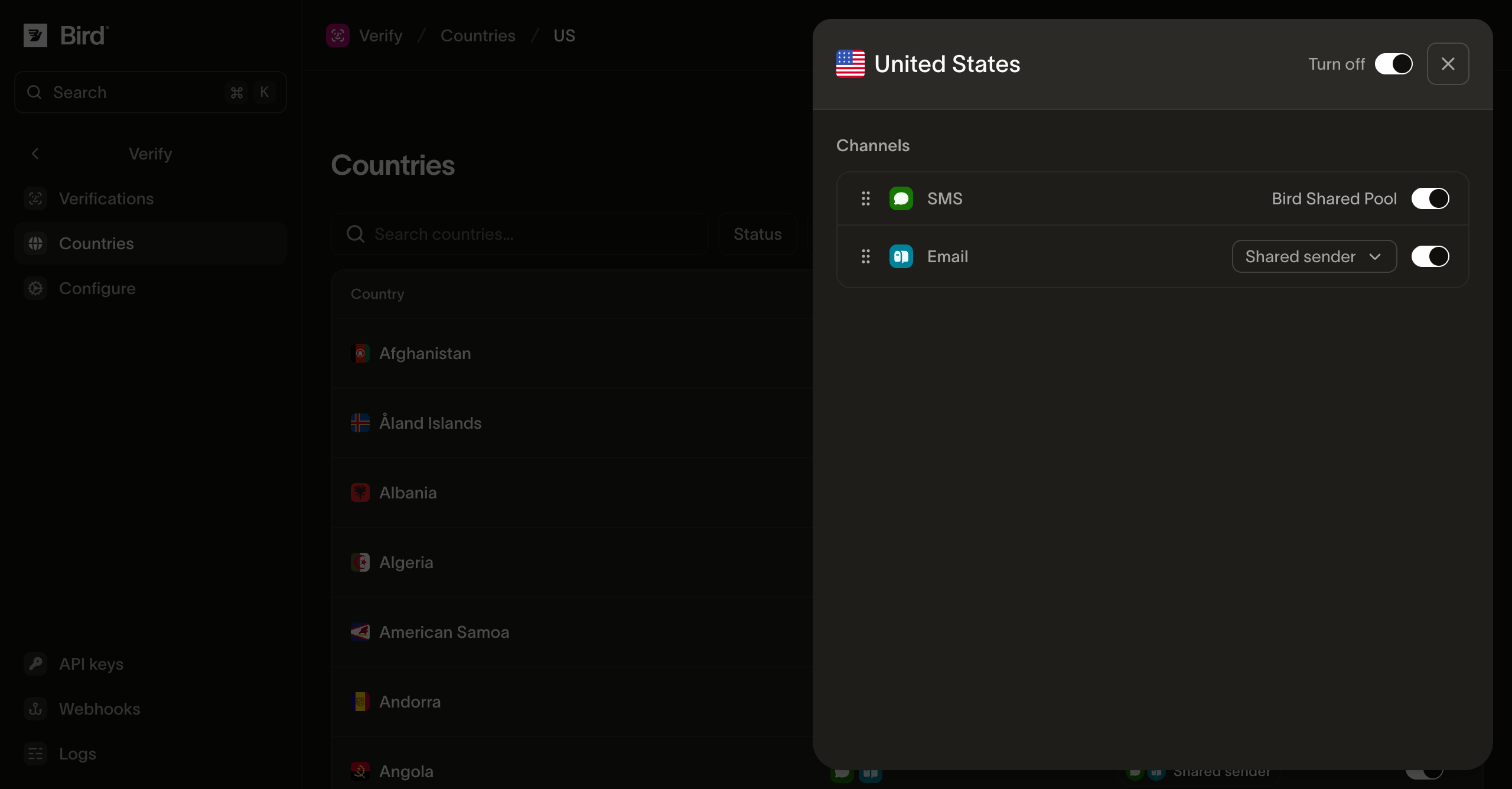
- Kanalreihenfolge: Ziehen Sie Kanäle, um die Reihenfolge festzulegen, in der Bird sie für dieses Land versucht, zum Beispiel SMS vor WhatsApp. Eine Verifizierung arbeitet die Liste ab, bis ein Versand erfolgreich ist.
- Kanal aktivieren/deaktivieren: Schalten Sie einen einzelnen Kanal ab, ohne das Land zu deaktivieren. Kanäle, die Bird in einem Land nicht verfügbar gemacht hat, können nicht aktiviert werden; die Plattform legt diese Obergrenze pro Land fest. Sprachanrufe sind anfangs ausgeschaltet. Schalten Sie sie hier für jedes Land ein, in dem Codes in einem Telefonanruf vorgelesen werden sollen.
- Absender pro Kanal: Wählen Sie den Absender für E-Mail, SMS oder WhatsApp in diesem Land. Sie können den Konfigurationsstandard übernehmen, eine von Bird verwaltete Identität wählen oder Ihre verifizierte E-Mail-Domain, eine SMS-Sender-ID oder eine verbundene WhatsApp-Nummer mit genehmigtem Authentifizierungstemplate verwenden. Eine länderspezifische Wahl hat Vorrang vor dem Konfigurationsstandard. Eine länderspezifische SMS-Sender-ID verwendet nicht den Standard-Absender-Fallback.
Wo WhatsApp keinen Bestätigungscode zustellen kann
Der gemeinsame WhatsApp-Absender von Bird stellt keine Bestätigungscodes nach Bangladesch, Ägypten, Indien, Indonesien, Irak, Kasachstan, Kuwait, Malaysia, Marokko, Nepal, Nigeria, Oman, Pakistan, Saudi-Arabien, Südafrika, Sri Lanka, in die Ukraine oder in die Vereinigten Arabischen Emirate zu. WhatsApp erscheint weiterhin in der Kanalreihenfolge dieser Länder und Sie können es an die erste Stelle setzen, aber der Versand wird abgelehnt, wenn Verify diesen Kanal erreicht, und die Verifizierung fährt mit der Liste fort.
Der abgelehnte Versuch wird wie jeder andere Fehler aufgezeichnet, mit dem Grund channel_restricted, sodass ein verify.attempt.undelivered-Event erklärt, warum WhatsApp nicht zugestellt hat. Siehe Events und Webhooks.
Halten Sie in diesen Ländern mindestens einen weiteren Kanal aktiviert. Eine Verifizierung, deren einziger Kanal WhatsApp ist, hat keinen Kanal, auf den sie ausweichen kann, und die Erstellung schlägt mit 422 fehl.
Warum ein Land deaktivieren
SMS-Pumping-Angriffe lösen Bestätigungscode-Versendungen an Nummern in Ländern aus, die Ihr Unternehmen nicht bedient, und verbrauchen Wallet-Guthaben. Wenn Ihr Produkt eine bekannte Gruppe von Märkten bedient, deaktivieren Sie den Rest. Die Plattform-Obergrenzen von Verify bieten ein weiteres Limit, aber ein deaktiviertes Land kann keine Zustellkosten verursachen.
Nächste Schritte
| Seite | Inhalt |
|---|---|
| Absender und Branding | Gemeinsame und gebrandete Absender sowie das Aussehen der Code-Nachrichten |
| Verifizierungen senden | Die Send- und Check-Aufrufe, kanalspezifische Überschreibungen pro Anfrage und Limits |
| Verify-Übersicht | Die Übersichtskarte und wie eine Verifizierung funktioniert |
Verwandte Ressourcen
Weiter mit der Dokumentation, Anleitungen und Beispielen zu diesem Thema.