SMS-Templates
Ein Template ist eine wiederverwendbare Nachricht, die Sie per Referenz senden und dabei Werte wie einen Bestätigungscode oder eine Bestellnummer mitgeben. Die integrierten System-Templates von Bird decken Authentifizierungs- und Transaktionsnachrichten ab. Die Workspace-Template-Erstellung befindet sich in der API-Vorschau; das Dashboard zeigt weiterhin den integrierten Katalog.
Ein Template liefert die Nachrichtenkategorie, die für Zielland-Compliance-Prüfungen verwendet wird. Integrierte Templates wählen außerdem den Absender für das Ziel, sodass Sie from weglassen. Workspace-Templates erfordern einen eigenen Absender, wie es auch ein Freitext-Versand tut.
Templates im Dashboard durchsuchen
Die Seite Templates unter SMS listet die integrierten Templates auf. Suchen Sie nach Name oder filtern Sie nach Status und Kategorie.
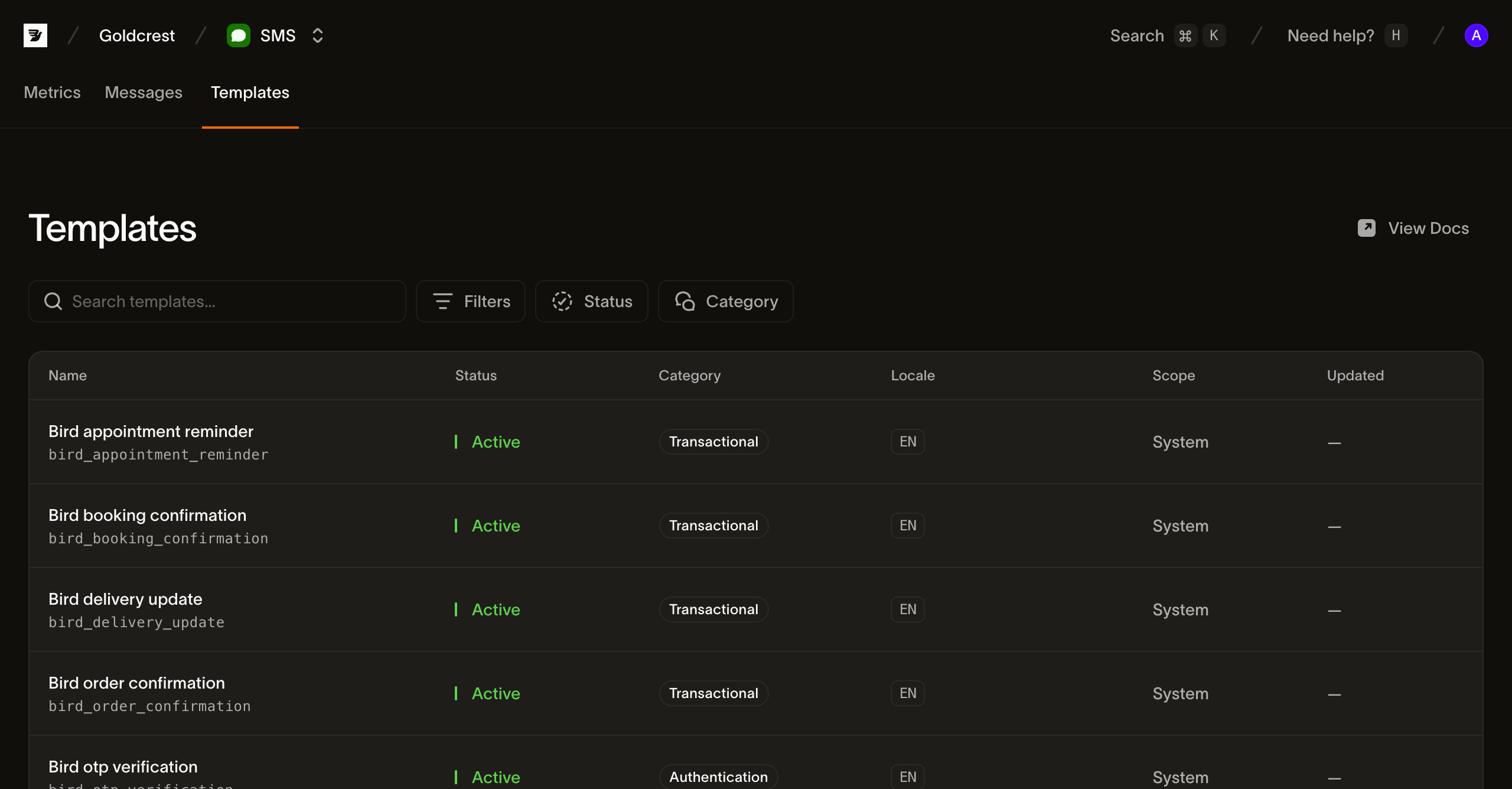
Jede Zeile zeigt die Felder, die Sie zum Auswählen und Senden eines Templates benötigen:
- Name: der Anzeigename des Templates und sein
slug(zum Beispielbird_order_confirmation). Der Slug ist die Kennung, die Sie beim Senden übergeben; er wird bei der Erstellung festgelegt. - Status: Integrierte Templates sind Active und versandbereit. Workspace-Templates sind Draft, bis sie veröffentlicht werden, dann Active. Behandeln Sie das gemeinsame Statusfeld als offene Menge.
- Category: Die Inhaltsklassifikation (
transactional,marketingoderauthentication), die auf über das Template versendete Nachrichten angewendet wird. - Language: die Sprachen, in denen das Template vorliegt, als BCP-47-Tags. Die ersten werden als Chips angezeigt, mit einem
+N-Überlauf, wenn ein Template in viele Sprachen lokalisiert ist. - Scope: System für die integrierten Templates von Bird. Workspace kennzeichnet Templates, die Sie über die API-Vorschau erstellen.
- Updated: wann das Template zuletzt geändert wurde. Integrierte Templates zeigen kein Datum.
Was ein Template enthält
Neben Name, Kategorie und Sprachen definiert jedes Template die Variablen, die es beim Versand befüllt. Eine Variable hat einen key, type, ein required-Flag und eine lesbare constraint. Integrierte Templates besitzen typisierte Slots; Workspace-Templates leiten generische text-Slots ab und akzeptieren skalare Parameterwerte. Eine sensitive-Variable wird im gespeicherten Nachrichteninhalt ersetzt. Transport-Warteschlangen enthalten weiterhin den für die Zustellung benötigten Text. Geben Sie jede erforderliche Variable an und keine nicht deklarierten Schlüssel.
Ein Template ist in einer oder mehreren Sprachen hinterlegt, und seine default_language ist das, was ein Versand erhält, wenn er keine Sprache angibt. Fordern Sie eine Sprache an, in der das Template nicht hinterlegt ist, und Bird fällt zurück: zuerst auf eine breitere Form derselben Sprache, dann auf die Standardsprache, weil SMS-Templates on_missing_language standardmäßig auf fallback setzen. Integrierte Templates verwenden language_source_required: false. Workspace-Templates können eine Sprache erzwingen oder on_missing_language: fail setzen; diese Richtlinien greifen sofort, während Inhalts- und Standardsprache-Änderungen erst bei der Veröffentlichung wirksam werden.
Templates über die API auflisten
GET /v1/sms/templates gibt eine cursor-paginierte Seite mit Template-Zusammenfassungen zurück. Folgen Sie next_cursor über starting_after, bis der Wert null ist; eine Seite ist nicht der gesamte Katalog. Das Lesen von Templates erfordert einen API-Schlüssel mit dem Scope sms_management, der vom Scope sms für den Versand getrennt ist. Filtern Sie nach scope, category, status oder language, oder suchen Sie mit q:
for await (const tpl of bird.smsTemplates.list({ scope: "system" })) {
  console.log(tpl.id, tpl.slug);
}
for template in client.sms_templates.list(scope="system"):
print(template.id, template.slug)for tpl, err := range client.SmsTemplates.List(context.Background(), bird.SMSTemplateListParams{
Scope: "system",
}) {
if err != nil {
log.Fatal(err)
}
fmt.Println(tpl.Id, *tpl.Slug)
}foreach ($bird->smsTemplates->list(['scope' => 'system']) as $template) {
echo $template->getId(), ' ', $template->getSlug(), "\n";
}bird sms templates listcurl "https://eu1.platform.bird.com/v1/sms/templates?category=authentication" \
-H "Authorization: Bearer bk_eu1_..."Template-Zusammenfassungen enthalten Identität, Kategorie, Status, verfügbare Sprachen und Verweise auf Draft-/Live-Versionen. Quelltext und Variablen fehlen. Rufen Sie ein Template per Slug oder ID mit GET /v1/sms/templates/{template_ref} ab. Verwenden Sie draft_version_id, um bearbeitbare Workspace-Inhalte einzusehen, oder live_version_id, um zu prüfen, was beim Versand verwendet wird. Ein neues Workspace-Template hat bis zur Veröffentlichung keine Live-Version.
Lesen Sie die ausgewählte Version über GET /v1/sms/templates/{template_ref}/versions/{version_id}. Die Antwort enthält Variablen und eine nach Sprachen geschlüsselte Inhaltsübersicht. Um eine einzelne Sprache abzurufen, hängen Sie /languages/{language} an. Der Filter language der Liste erfasst veröffentlichte Inhalte; Sprachen, die nur als Draft vorliegen, werden nicht erfasst.
Integrierte Templates stellen eine schreibgeschützte Version bereit. Ihre stabile ID identifiziert den Katalogeintrag; ihr Content-Hash unterscheidet Quellaktualisierungen. Veröffentlichte Workspace-Versionen bewahren eine unveränderliche Historie. Versionslisten verwenden ebenfalls Cursor-Paginierung und enthalten keinen Quelltext.
Workspace-Erstellung in der API-Vorschau
Verwenden Sie einen API-Schlüssel mit sms_management-Schreibzugriff. Senden Sie JSON-Anfragen an den regionalen API-Host Ihres Schlüssels, mit Authorization: Bearer <API_KEY> und Content-Type: application/json. Geben Sie jeder Mutation einen eigenen Idempotency-Key; verwenden Sie denselben Schlüssel nur, wenn Sie dieselbe Anfrage erneut versuchen.
- Erstellen Sie das Template mit
POST /v1/sms/templatesund{"slug":"order-shipped","category":"transactional"}. Die201-Antwort enthältidunddraft_version_id; das Template beginnt mit einem leeren englischen Draft. Speichern Sie beide IDs für die nächsten Aufrufe. - Speichern Sie Text mit
PUT /v1/sms/templates/{id}/versions/{draft_version_id}/languages/enund{"text":"Your order {{ order_number }} has shipped."}. Die200-Antwort enthältdraft_revision. - Veröffentlichen Sie mit
POST /v1/sms/templates/{id}/versions/{draft_version_id}/submitund übergeben Sie die Revision als{"expected_revision":1}(ersetzen Sie1durch den zurückgegebenen Wert). Eine200-Antwort mitvalid: trueidentifiziert die veröffentlichte Version. Ein422meldet ungültigen Draft-Inhalt; beheben Sie die zurückgegebenen Sprachprobleme und senden Sie die Anfrage erneut mit einem neuen Idempotenzschlüssel.
Die Veröffentlichung erfordert nicht-leeren Text und dieselben Variablen in jeder Sprache. Sie wird synchron wirksam, ohne Provider-Freigabe. Die API unterstützt außerdem Vorschau, Duplizierung, Zurücksetzen des Drafts auf den Live-Inhalt und Rollback auf eine veröffentlichte Version. Bearbeitung im Dashboard ist nicht verfügbar.
Lesen Sie die aktuelle Revision, bevor Sie Template-Einstellungen ändern oder ein Rollback durchführen. Sprachspeicherungen können auch einen Revisions-Guard enthalten; ein veralteter Guard gibt 409 zurück. Die Vorschau verwendet die ausgewählte Version und Parameter, um gerenderten Text, aufgelöste Sprache, Kodierung und Segmentanzahl vor dem Versand zu melden.
Versand mit einem Template
Setzen Sie das template-Objekt des Versands anstelle von text. Lassen Sie category und media_urls weg. Für das folgende integrierte Template lassen Sie auch from weg. Ein Workspace-Template erfordert from und muss eine veröffentlichte Version besitzen.
Ein integriertes Authentifizierungs-Template wählt außerdem die gemeinsame Absendermarke: bird_otp_verification_ttl verwendet Authifly, während bird_otp_verification_ttl_bird_verify Bird Verify verwendet. Das Ziel bestimmt, ob der Absender als Markenname, Kurzwahl oder Telefonnummer erscheint.
Integriertes Template senden:
await bird.sms.send({
  to: "+14155550100",
  template: { slug: "bird_otp_verification", parameters: { code: "123456" } },
});client.sms.send(
to="+14155550100",
template="bird_otp_verification",
parameters={"code": "123456"},
)msg, err := client.Sms.Send(context.Background(), bird.SmsSendParams{
To: "+14155550100",
Template: "bird_otp_verification",
Parameters: map[string]any{"code": "123456"},
})
if err != nil {
log.Fatal(err)
}
fmt.Println(msg.Id)$message = $bird->sms->send(
to: '+14155550100',
template: 'bird_otp_verification',
parameters: ['code' => '123456'],
);
echo $message->getId(), ' ', $message->getStatus();bird sms send \
--parameters '{"code":"123456"}' \
--template bird_otp_verification \
--to +14155550100curl -X POST "https://eu1.platform.bird.com/v1/sms/messages" \
-H "Authorization: Bearer bk_eu1_..." \
-H "Content-Type: application/json" \
-d '{
"to": "+14155550100",
"template": {
"slug": "bird_otp_verification_ttl",
"language": "en",
"parameters": { "code": "481920", "ttl": "10" }
}
}'slug ist das Handle des Templates aus dem Katalog (Sie können ein Template alternativ über seine id identifizieren). language wählt den lokalisierten Text; lassen Sie es für die Standardsprache des Templates weg. parameters liefert einen Wert für jede Variable des Templates, geschlüsselt nach Variablenname. Eine fehlende erforderliche Variable, ein nicht deklarierter Schlüssel, ein Wert, der nicht zur Einschränkung seiner Variable passt, oder ein serialisiertes parameters-Objekt über 16 KB wird mit einem 422 abgelehnt.
Die 202-Antwort enthält die ausgewählte from, Template-Kategorie, Template- und Versions-IDs, Quell-Hash sowie angeforderte/aufgelöste Sprachen. Text von Authentifizierungsnachrichten wird als **REDACTED** zurückgegeben. Akzeptierte Nachrichten behalten den gerenderten Inhalt und die ausgewählte Version bei, auch wenn Sie das Template später veröffentlichen, zurücksetzen oder löschen.
Alles Weitere am Versand (Empfänger, Tags, Metadaten, die Ziel-Allowlist und das asynchrone 202-Modell) funktioniert genau wie bei einem Freitext-Versand.
Nächste Schritte
- SMS senden: Fügen Sie das Feld
templatezu einem Versand-Payload hinzu. - SMS-Log: Finden Sie eine gesendete Nachricht und verfolgen Sie ihren Lebenszyklus.
- Events: Empfangen Sie die Zustellereignisse jeder Nachricht.
- Eine SMS mit einem Template senden: Ein Video, das eines der vorab genehmigten Templates von einem Terminal aus versendet
Verwandte Ressourcen
Weiter mit der Dokumentation, Anleitungen und Beispielen zu diesem Thema.