Reageer op je eerste Apple Messages-gesprek
Stuur een bericht vanaf een Apple-testapparaat naar je bedrijf en reageer vervolgens vanuit het Bird-dashboard. Deze quickstart gebruikt het dashboard; ontwikkelaars kunnen de antwoordgids van API volgen.
Gebruik de onboardinggids voor het volledige traject van serviceplanning tot lancering.
Voordat je begint
Je hebt nodig:
- Een Bird-werkruimte met rechten om Apple Messages te lezen en antwoorden te versturen.
- Een gekoppeld bedrijf. Een bedrijf met de status Draft kan vóór goedkeuring testberichten versturen. Volg de registratie als je het nog niet hebt gekoppeld.
- Een Apple-apparaat dat is ingelogd op een geautoriseerd testaccount terwijl je Apple-account in testmodus staat. Registreer de tester in Apple Business Register voordat je hem gebruikt.
Dit stuurt een echt bericht via het gekoppelde kanaal en kan kosten met zich meebrengen. Gebruik een gesprek waarvoor je testrechten hebt.
1. Start het klantgesprek
Open Apple Messages > Businesses en selecteer je bedrijf. Kopieer het Apple Business ID. Dit is de Apple-UUID, niet het business-record-ID van Bird.
Open op het testapparaat het volgende adres en vervang APPLE_BUSINESS_ID door dat UUID:
https://bcrw.apple.com/urn:biz:APPLE_BUSINESS_IDBerichten opent je zakelijke gesprek. Typ een kort verzoek, zoals Ik wil graag een winkelbezoek plannen, en verstuur het. Alleen de link openen stuurt geen klantbericht.
2. Zoek het bericht in Bird
Open Apple Messages > Conversations in dezelfde werkruimte. Filter op je bedrijf en open het nieuwe gesprek. Controleer of het transcript het verzoek bevat dat je hebt verstuurd en of het gesprek Open is.
Als het gesprek ontbreekt, wis je de andere filters en vernieuw je de pagina. Als het nog steeds niet verschijnt, gebruik dan de controles voor ontbrekende gesprekken.
3. Antwoord de klant
Typ in Reply to the customer een kort antwoord, zoals We kunnen je bezoek helpen plannen. Welke dag past je? Selecteer Send reply.
Bird bevestigt dat het antwoord is geaccepteerd en voegt het toe aan het gesprek. Als de invoer niet beschikbaar is, controleer dan de bedrijfsgoedkeuring, de gespreksstatus en je verzendrechten voordat je verdergaat.
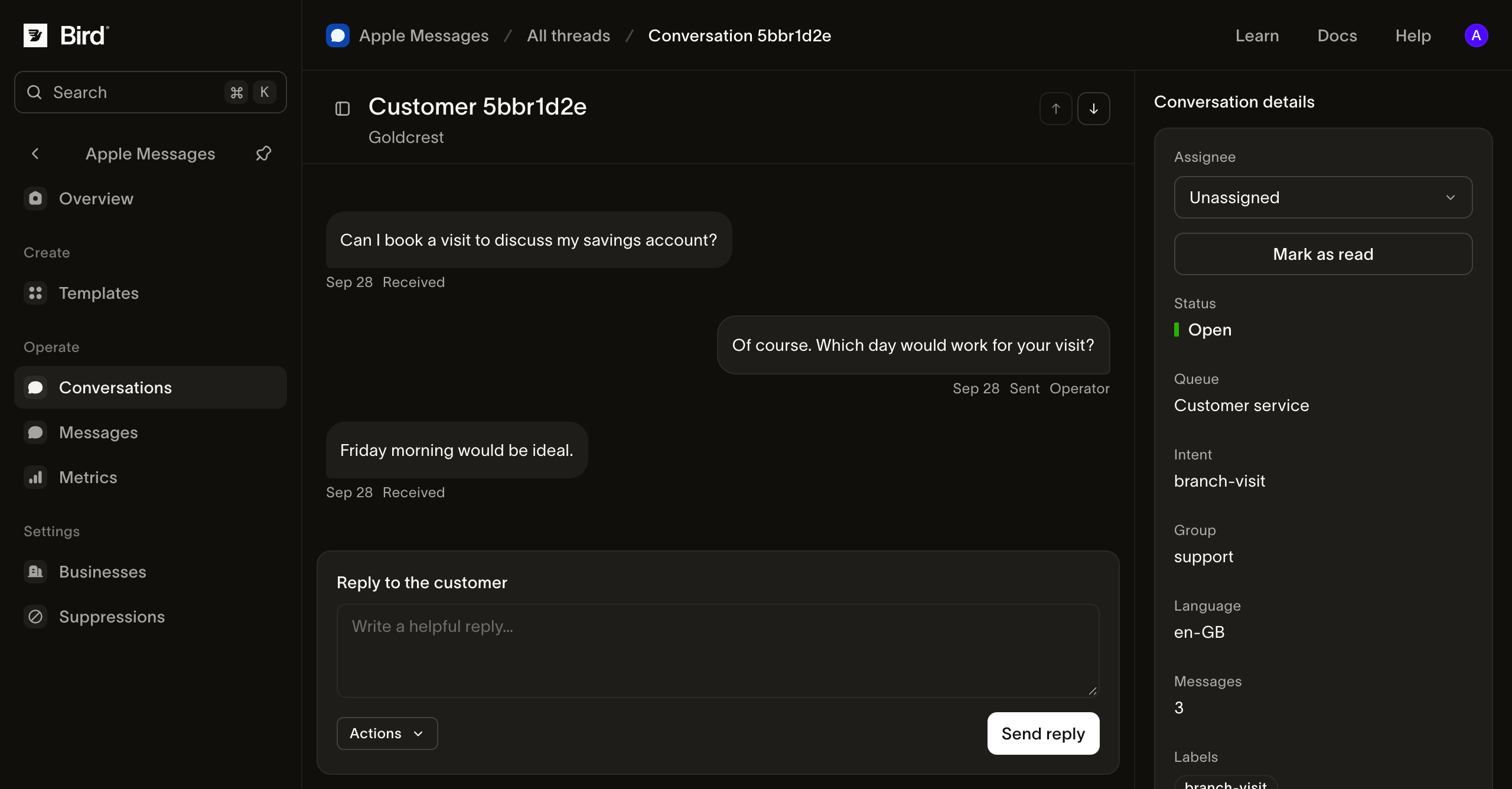
Bekijk de schermafbeelding op volledige grootte.
4. Controleer het resultaat
Open Apple Messages > Messages en selecteer je antwoord. Bekijk de status en gebeurtenisgeschiedenis met behulp van de berichtgeschiedenisgids.
Sent registreert de acceptatie door de gateway van Apple. Controleer het testapparaat apart om te bevestigen dat je antwoord correct is weergegeven. Bird biedt geen Apple-bezorg- of leesbevestiging.
Reageer opnieuw vanaf het testapparaat. Het inkomende bericht verschijnt in hetzelfde Bird-gesprek. Je hebt nu beide richtingen van de uitwisseling gecontroleerd.
Volgende stappen
- Beheer gesprekken met je serviceteam.
- Verstuur een opgeslagen template met native keuzes of media.
- Voeg toegangspunten toe na goedkeuring voor lancering.