Competitive Insights
See what gets their attention.
Build a watchlist of brands and explore the campaigns a measurement panel captures. Competitive Insights brings subject lines, creative, sending patterns and estimated inbox placement beside your own program, so you can choose a better-informed content or timing experiment for your next campaign.
Create your account, then review access and choose the brands you want to research.
Part of the Bird Email platformYour brand watchlist
Example campaigns
What caught your attention?
Watchlist
A little more outside.
Your weekend starts here
Friday · 09:00
Room for something new.
Meet the new collection
Thursday · 17:30
Creative. Cadence. Placement.
Fictional brands and creative. Real campaign coverage and estimates depend on the measurement panel.
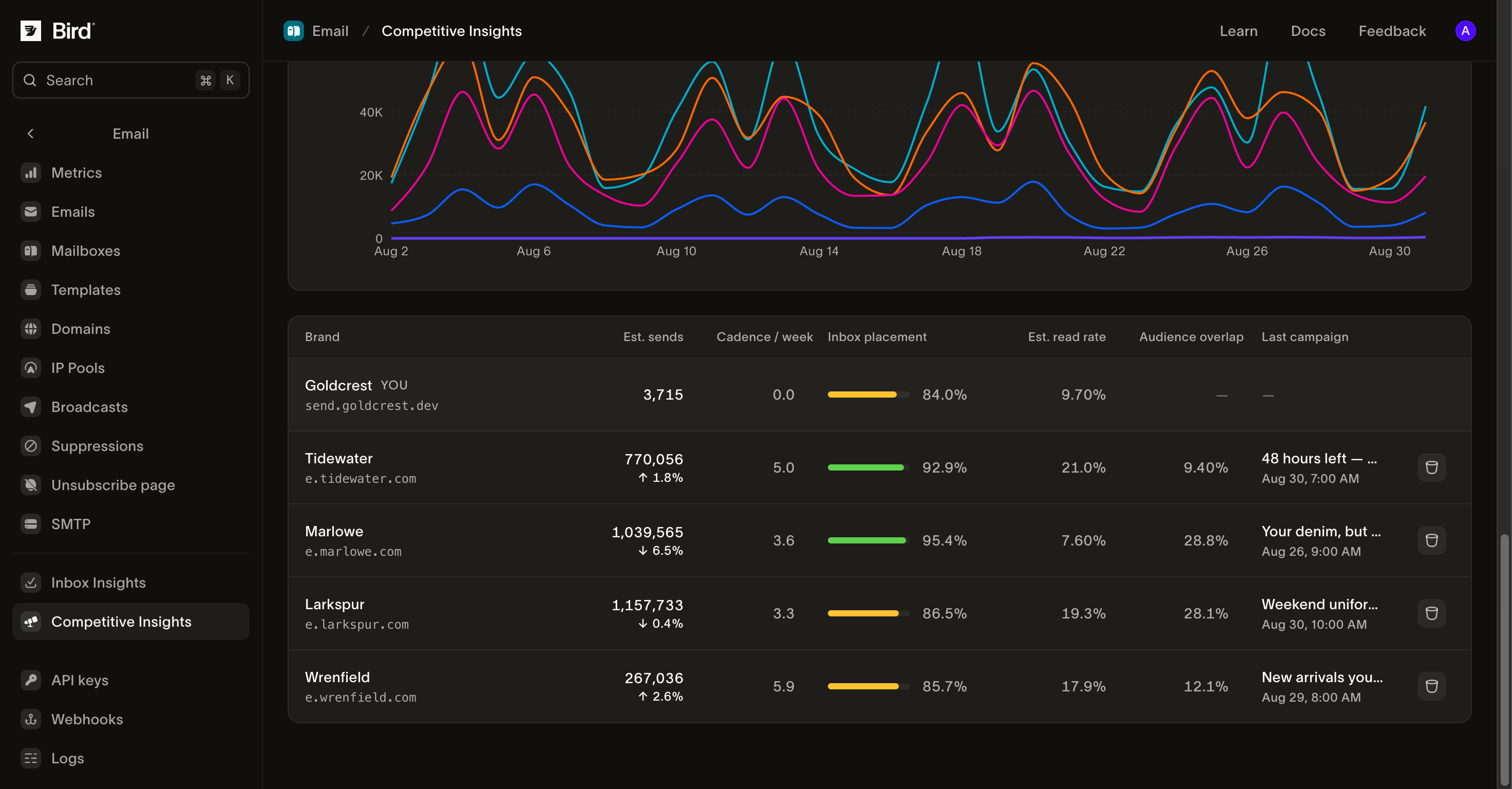
Product screenshot from the Competitive Insights guide. Competitor figures are panel estimates; the examples are not a census of those brands’ email.
Research the program behind the campaign.
Start with a brand, then examine its sending pattern and captured content.
Build a brand watchlist
Search by brand name or sending domain. Each watched brand tracks its highest-volume sending domain, so its other domains can fall outside the view.
Browse captured campaigns
Read subject lines, send dates and campaign-level estimates. Open the captured creative at full size when the panel has an image.
Compare sending cadence
Review estimated volume and campaigns per week alongside your own sending. Use the change over time to plan a frequency experiment.
Investigate placement by provider
See the inbox and spam rates observed for a brand, with a comparison to your domain where both have measurements.
Study send-time patterns
Explore the brand’s weekday and hour pattern in your timezone. The grid covers the last 90 days, independently of the report’s selected range.
Compare brands head to head
Put your program beside up to five watched brands across estimated sends, cadence, placement and read rate. The source of each figure stays visible.
Build a watchlist around your market.
Create an account, review access and choose the brands you want to follow.
Turn competitor research into your next campaign test.
Review captured subject lines and creative, look at cadence and send-time patterns, then choose one change to test with your own audience. A competitor’s observed performance is context for that decision; it does not establish what caused the result or what will work for your customers.
Know what the panel can measure.
Competitor figures are estimates from a sample of mailboxes. A brand’s highest-volume domain represents it, and some campaigns have no captured creative. Panel read rate differs from Bird’s open tracking. Missing coverage appears as a gap, so an unmeasured brand is never mistaken for an inactive one.
Start with the watchlist you can use today.
The dashboard includes Overview, brand profiles and Compare. Add brands by name or sending domain, inspect captured campaigns and compare your program with watched brands. Your organization’s allowance determines the size of the watchlist.
Questions about Competitive Insights
Is Competitive Insights the current product name?
Do these figures cover everything a competitor sends?
Can I see competitors’ actual emails?
Can I compare competitor read rate with my open rate?
Can I see the platform a competitor uses?
How do I start?
Choose the next step for your email program
Read the product guide or continue into a related workflow.
Give your next campaign a better brief.
Explore watched brands, compare their sending cadence and study captured campaigns. Bring the findings into your next planning session.
Create your account, then review access and choose the brands you want to research.