Modèles d'e-mail
Un modèle est un objet et un corps d'e-mail que vous enregistrez une fois et envoyez autant de fois que nécessaire. Vous rédigez les parties variables sous forme de substituants {{ variable }}, vous publiez le modèle, puis vous l'envoyez par slug au lieu de coller le même HTML dans chaque appel API. Un modèle appartient à votre espace de travail.
Créez et gérez vos modèles dans Email > Templates, via /v1/email/templates, avec le CLI bird, ou via le serveur MCP. Des méthodes typées sont disponibles dans les SDK TypeScript, Python, PHP et Go sous email.templates. Les schémas complets de requête et de réponse se trouvent dans la référence API. Envoyez un modèle publié via le point de terminaison d'envoi habituel.
Contenu d'un modèle
Chaque modèle possède deux noms, et ils remplissent des rôles différents :
slugest le nom par lequel vous envoyez le modèle, par exemplewelcome-email. Vous le choisissez à la création du modèle et il ne peut plus être modifié ensuite. Un slug peut contenir des lettres minuscules, des chiffres, des tirets et des traits de soulignement, doit commencer et se terminer par une lettre ou un chiffre, et peut compter jusqu'à 63 caractères. Deux préfixes sont interdits :bird_, réservé à nos modèles intégrés, etemt_, le format utilisé pour les identifiants de modèle. Le tableau de bord appelle ce champ Alias.nameest un libellé d'affichage en texte libre. Il prend par défaut la valeur du slug, et vous pouvez le modifier à tout moment. Aucune résolution ne passe par le nom, donc renommer un modèle pour l'affichage ne casse jamais un envoi.
En plus de ceux-ci, un modèle possède un identifiant emt_ permanent, fixé pour toute sa durée de vie. Il possède aussi une category, soit marketing soit transactional, et une source de création : html, du balisage finalisé que vous fournissez, éventuellement personnalisé avec Liquid. La catégorie et la source sont toutes deux fixées à la création du modèle.
Nous fournissons un catalogue de modèles intégrés, dont les slugs commencent tous par bird_. Un modèle intégré n'appartient à aucun espace de travail, ne peut pas être modifié et peut toujours être envoyé tel quel. Copiez-en un dans votre espace de travail pour vous l'approprier : il devient alors un modèle ordinaire que vous pouvez modifier. La copie arrive sous forme de brouillon non publié qui hérite de la catégorie, de la source et des paramètres de langue de l'original ; publiez-le avant de l'envoyer.
Brouillons et versions publiées
Chaque template possède exactement un brouillon, la copie de travail que vous modifiez. Il possède aussi un nombre quelconque de versions publiées, chacune numérotée (1, 2, 3, et ainsi de suite) et jamais modifiée une fois créée. Les modifications s'appliquent au brouillon sur place. La publication prend un instantané du brouillon actuel, le transforme en version numérotée suivante et fait de cette version celle utilisée par les envois. Le brouillon reste modifiable, vous pouvez donc continuer à travailler sur le suivant.
La règle importante pour l'envoi est celle-ci : un envoi utilise toujours la version publiée du template, et un brouillon n'est jamais envoyé seul. Vous pouvez continuer à modifier le brouillon pendant qu'une version stable est envoyée, puis publier quand la modification est prête. Publier une nouvelle version change ce que les envois suivants produisent. Un envoi déjà accepté n'est pas affecté par une publication ultérieure.
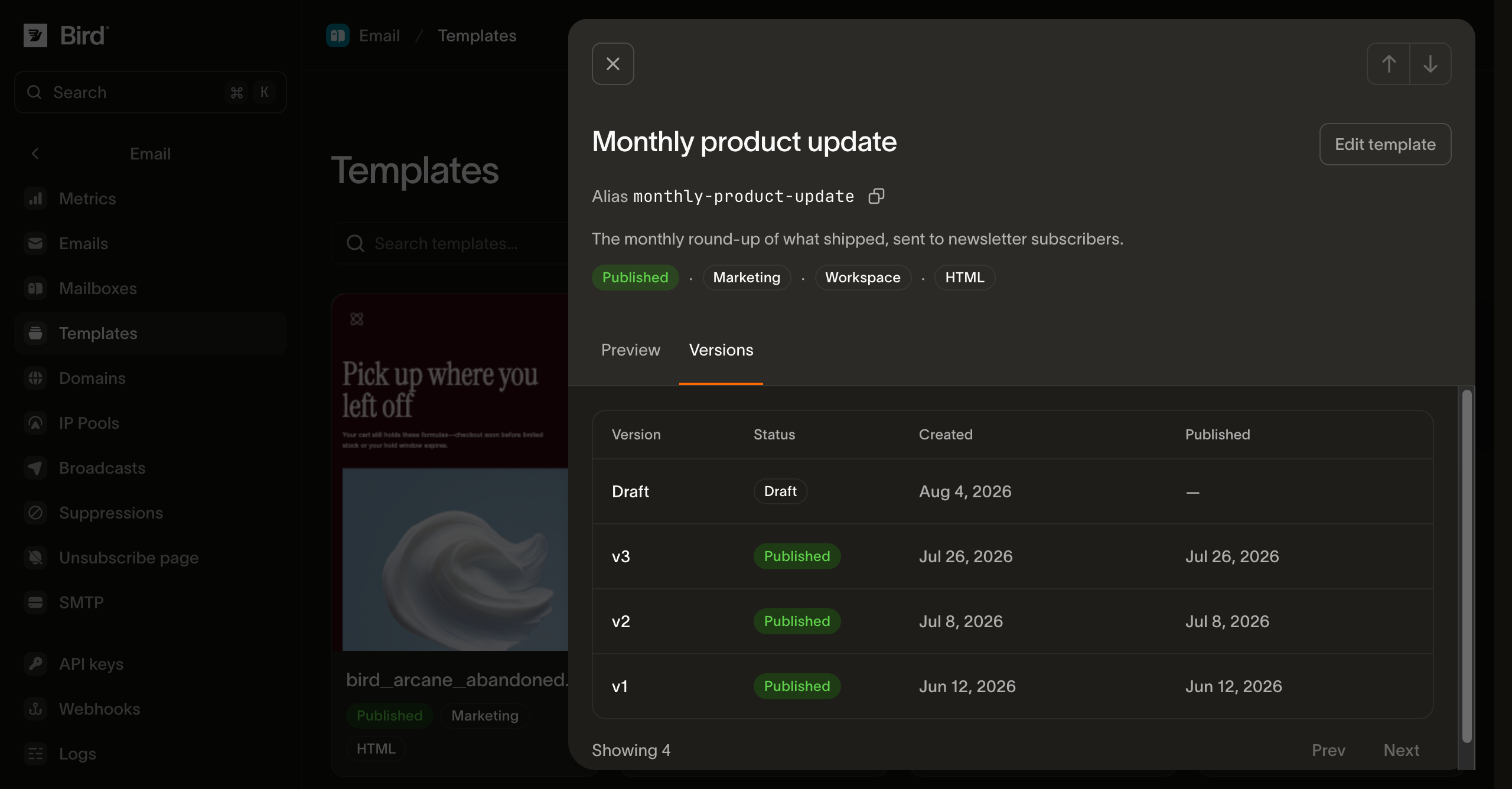
Les versions offrent deux actions supplémentaires. Abandonner les modifications du brouillon pour réinitialiser le brouillon à ce qui est actuellement publié. Ou revenir en arrière pour refaire d'une version publiée antérieure celle utilisée par les envois. Vous ne pouvez revenir qu'à une version publiée, jamais au brouillon lui-même. Le retour en arrière remplace le brouillon par le contenu de cette version : tout ce qui n'a pas été enregistré dans le brouillon est perdu, et les modifications ultérieures partent de la version à laquelle vous êtes revenu. Un retour en arrière ne crée pas de nouvelle version.
Pour choisir une image existante, vous avez besoin d'un accès en lecture à la bibliothèque de médias de l'espace de travail. Pour téléverser, coller ou déposer une nouvelle image, vous avez besoin d'un accès en écriture. Si Insert image est désactivé ou si vous ne pouvez ni parcourir ni téléverser, demandez à un administrateur de l'espace de travail la permission correspondante pour la bibliothèque de médias. La permission de modification des templates seule n'accorde pas l'accès à la bibliothèque de médias.
Dans le tableau de bord, choisissez Visual > Insert image pour rechercher dans votre bibliothèque de médias ou téléverser une image PNG, JPEG, GIF ou WebP statique dans les limites de téléversement de la bibliothèque de médias. Les fichiers WebP statiques sont convertis en PNG ou JPEG. Sélectionnez l'image pour définir son Image description, sa largeur d'affichage, son alignement et son lien. Marquez une image comme Decorative image uniquement quand elle n'apporte aucune information ; une image avec lien a besoin d'une description qui explique sa destination. Chaque langue conserve ses propres descriptions d'image et sa mise en page.
Utilisez Replace image pour changer une image sélectionnée tout en conservant sa description, son lien, sa largeur et son alignement. Vous pouvez aussi coller ou déposer un fichier image dans l'éditeur visuel. Attendez la fin du téléversement, ou annulez-le, avant d'enregistrer ou d'envoyer un test. Vérifiez l'aperçu, puis ouvrez More actions > Test email pour envoyer le contenu actuel à vous-même. Code reste disponible pour modifier le HTML.
Supprimer une image de la bibliothèque de médias ne la retire pas des e-mails déjà envoyés. Remplacer une image utilise une nouvelle URL, les messages antérieurs continuent donc d'afficher l'original.
L'enregistrement est protégé par un numéro de révision. Envoyez le revision que vous avez lu en dernier pour la langue que vous enregistrez. Si quelqu'un d'autre a modifié cette langue entre-temps, l'enregistrement est refusé comme conflit au lieu d'écraser son travail. Omettez revision pour enregistrer sans condition. La publication et le retour en arrière utilisent le revision propre au brouillon de la même manière.
Contenu en plusieurs langues
Un template contient du contenu dans 25 langues au maximum, chacune avec son propre objet et son propre corps, identifiée par un code BCP-47 tel que en ou pt-BR. Une langue est la langue par défaut du template. Publier un template publie toutes les langues qu'il contient en même temps. Vous ne pouvez pas publier une seule langue séparément : elles doivent toutes être terminées au préalable. Chaque langue a besoin d'un objet et d'un corps, et la langue par défaut du template doit faire partie des langues que vous avez remplies. Si l'une de ces conditions manque, rien n'est publié, et l'erreur vous indique ce qui manque dans chaque langue pour que vous puissiez tout corriger en une seule passe. Vous n'êtes pas obligé de terminer toutes les langues dès le départ : publiez celles qui sont prêtes et ajoutez le reste plus tard.
Une langue a besoin d'un corps HTML. Vous pouvez omettre son text : la publication crée alors automatiquement une alternative en texte brut à partir du HTML, vous obtenez donc les deux parties sans rédiger la seconde vous-même.
Chaque langue peut aussi contenir un texte d'aperçu, parfois appelé preheader : la ligne qu'une boîte de réception affiche après l'objet dans sa liste de messages. Il est facultatif, limité à 255 caractères, et accepte les mêmes substitutions {{ variable }} que l'objet. Si vous l'omettez, la boîte de réception reprend la première ligne du corps à la place, ce qui est rarement la ligne que vous choisiriez. La publication refuse un texte d'aperçu sur une langue dont le corps n'a pas de partie HTML, car un client de messagerie ne lit la ligne d'aperçu que dans du balisage HTML masqué, et refuse {{ bird.unsubscribe_url }} à l'intérieur pour la même raison que l'objet ne peut pas en contenir : ni l'un ni l'autre n'est un endroit où un lien peut apparaître.
Deux paramètres couvrent un envoi qui ne nomme pas une langue pour laquelle le template a du contenu, et ils protègent contre des erreurs différentes :
| Paramètre | Ce qu'il contrôle |
|---|---|
on_missing_language | Ce qui se passe quand un envoi demande une langue que le template ne possède pas. fallback, la valeur par défaut, sert la correspondance la plus proche. Il essaie d'abord une forme plus large de la même langue, de sorte qu'un pt stocké peut servir une requête pour pt-BR. Il se rabat ensuite sur la langue par défaut du template. fail rejette l'envoi à la place, pour du contenu où envoyer la mauvaise langue est pire que de ne rien envoyer du tout. |
language_source_required | Si un envoi doit nommer une langue ou non. Ce réglage est désactivé par défaut, de sorte qu'un envoi qui n'en nomme aucune reçoit la langue par défaut. Activez-le, et cet envoi est rejeté à la place. Un broadcast nomme une langue pour toute son audience, donc un template avec ce réglage activé nécessite que cette langue soit choisie avant que le broadcast puisse envoyer. |
Vous pouvez régler ces deux paramètres indépendamment. Seul, fail ne s'applique que lorsqu'un envoi nomme une langue que nous n'avons pas, donc un envoi qui n'en nomme aucune passe quand même. Activez les deux paramètres ensemble lorsque vous voulez que chaque envoi nomme une langue explicitement.
Personnaliser avec des variables
Les envois de modèles individuels, par lot et planifiés peuvent utiliser des valeurs de contact. Chaque adresse To doit correspondre à un contact lorsque le modèle lit bird.contact.*.
Écrivez des substitutions {{ variable }} dans l'objet, le texte d'aperçu et le corps. Nous les détectons automatiquement, combinées à travers toutes les langues, donc vous n'avez jamais à les déclarer séparément. Le préfixe de la substitution distingue les deux types. Un chemin commençant par bird. lit nos données, soit un enregistrement de contact, soit le lien de désinscription. Tout le reste est un paramètre auquel vous donnez une valeur lors de l'envoi.
Le nom d'un paramètre est un mot unique, comme {{ animal }}. Un nom avec des points tente d'accéder à une structure qu'un paramètre ne possède pas, donc sa publication est rejetée : écrivez la valeur comme son propre paramètre, ou lisez les données de contact avec bird.contact.<attribute> à la place.
Pour un envoi unique ou un lot, la valeur d'un paramètre provient de l'objet template.parameters de l'envoi, indexée par son nom. Un seul jeu de valeurs couvre tous les destinataires de cet envoi. bird est le seul nom que vous ne pouvez pas y utiliser : une clé template.parameters nommée bird est rejetée avec une 422.
Utilisez bird.contact.<attribute> pour lire les propriétés de contact du destinataire, y compris les champs intégrés first_name, last_name et email. Les envois individuels et par lot associent chaque adresse To à un contact du même espace de travail. Les destinataires Cc et Bcc reçoivent une copie de l'e-mail personnalisé de chaque destinataire To ; ils n'ont pas besoin de contact correspondant. Un broadcast lit les contacts de son audience et accepte aussi des valeurs de l'appelant dans ses paramètres de modèle.
Hi {{ bird.contact.first_name }},Fournissez les paramètres d'appelant obligatoires utilisés par la langue résolue. Un paramètre obligatoire manquant renvoie 422. Une valeur obligatoire nulle renvoie aussi 422 ; une chaîne vide intentionnelle reste valide. La liste variables de la version couvre ses langues : un paramètre utilisé uniquement par une autre langue n'a donc pas besoin de valeur pour cet envoi.
La publication enregistre les attributs de contact utilisés par chaque langue. L'envoi ne récupère que les attributs utilisés par la langue sélectionnée et les champs de l'envoi. Un envoi sans référence à un contact ne recherche aucun contact.
Un modèle qui lit bird.contact.* exige un contact correspondant dans l'espace de travail pour chaque destinataire To. Si un destinataire To n'a pas de contact, la requête renvoie 422 avec E04099 avant d'accepter un message, y compris pour un lot ou un envoi planifié. Créez ou mettez d'abord à jour le contact, ou utilisez plutôt des paramètres d'appelant. Un filtre default ou une condition Liquid ne supprime pas cette exigence. Les modèles qui utilisent des paramètres d'appelant ou bird.unsubscribe_url sans attributs de contact n'ont pas besoin de contact correspondant.
Par exemple, envoyez Hello {{ bird.contact.first_name }} à Alice et Bob, avec Charlie en Cc :
| Livraison | Salutation | To visible |
|---|---|---|
| Alice | Hello Alice | Alice |
| Charlie, en copie de l'e-mail d'Alice | Hello Alice | Alice |
| Bob | Hello Bob | Bob |
| Charlie, en copie de l'e-mail de Bob | Hello Bob | Bob |
Charlie reçoit deux copies : cette requête produit donc quatre livraisons. Bcc fonctionne de la même manière, l'adresse Bcc restant masquée. Ces e-mails personnalisés distincts s'appliquent lorsque le modèle utilise des attributs de contact ; les envois ordinaires conservent leur adressage habituel. La même règle s'applique à chaque message du lot API.
Le prénom ou le nom d'un contact existant peut être vide. Les noms absents s'affichent comme des valeurs vides et vous choisissez la formule de salutation dans le modèle. Pour une salutation avec le prénom, utilisez Hello {{ bird.contact.first_name | default: "there" }}!. Pour le nom complet, combinez les deux parties, supprimez les espaces aux extrémités, puis choisissez une valeur par défaut :
{% assign full_name = bird.contact.first_name | append: " " | append: bird.contact.last_name | strip %}
Hello {{ full_name | default: "there" }}!
Cela affiche Hello Jane Doe!, Hello Jane! ou Hello Doe! lorsque les noms correspondants sont présents, et Hello there! lorsque les deux sont absents. Aucun nom de remplacement à l'échelle de l'espace de travail n'est nécessaire.
Les propriétés de contact que vous créez conservent leurs valeurs de repli configurées. Une valeur null stockée est considérée comme absente ; une chaîne explicitement vide, false ou zéro reste une valeur. Une propriété absente sans valeur de repli s'affiche vide. Les propriétés inconnues et les valeurs stockées invalides empêchent l'acceptation. Une recherche en échec peut être retentée et ne déclenche pas de substitution par des valeurs de repli.
Un placeholder bird.contact.* doit nommer un attribut intégré ou une propriété personnalisée enregistrée. Les noms de paramètres d'appelant restent distincts de ces chemins de la plateforme. Les envois de modèles individuels et par lot enregistrent les valeurs des destinataires au moment de l'acceptation, y compris pour les envois planifiés, et les réutilisent pour les nouvelles tentatives de livraison et la lecture des messages. Les broadcasts conservent leur propre calendrier de préparation. Les envois individuels et par lot rejettent les données sensibles avant l'acceptation.
Archiver une propriété la retire du sélecteur de propriétés dans l'éditeur. Les nouvelles versions de template qui la lisent ne peuvent pas être publiées, et l'erreur nomme la propriété. Les templates déjà publiés continuent d'envoyer. Désarchivez la propriété pour l'utiliser à nouveau dans de nouvelles versions.
Les placeholders utilisent Liquid, donc les filtres et le contrôle de flux fonctionnent aux côtés de la substitution simple. Un conditionnel {% if %} et une boucle {% for %} sur une valeur de tableau sont tous deux valides. Quelques constructions sont rejetées lors de la publication, et l'erreur nomme exactement ce qu'il faut modifier :
- Les inclusions partielles, avec
{% include %}ou{% render %}. - Les tags
increment,decrementetifchanged. - Les filtres
money,format_date,format_time,json,inspectettype. - Les comparaisons avec
emptyoublank. Utilisez.size == 0à la place. - Les blocs imbriqués bien plus profondément que le balisage d'un e-mail réel ne l'exige.
Les paramètres de modèle des broadcasts acceptent des valeurs scalaires ; les tableaux et les objets ne sont pas pris en charge. Sans paramètres de l’appelant, {% for %} et {% tablerow %} acceptent les plages littérales comme (1..3) et les listes créées dans Liquid avec split. Un broadcast qui utilise des paramètres de l’appelant accepte {% for %} sur une liste créée avec split, mais rejette les plages et {% tablerow %}. Dans les deux cas, une balise de boucle qui lit directement un paramètre de l’appelant ou une propriété du contact est rejetée, y compris une plage dont une borne lit l’une de ces valeurs.
Chaque modèle utilise Liquid, y compris un modèle qui ne contient que des substituants {{ variable }}. Avant la publication, nous validons l'objet, le texte d'aperçu, le HTML et le contenu en texte brut en tant que Liquid. Nous ajoutons aussi le filtre escape à chaque sortie HTML qui ne se termine pas déjà par escape ou escape_once, afin qu'une valeur contenant & ou < ne puisse pas altérer le balisage environnant. La sortie réservée au lien de désinscription reste inchangée pour que l'envoi puisse la remplacer. L'objet et le corps en texte brut sont laissés tels quels. Comme la publication ajoute ces filtres, le HTML que vous lisez depuis une version publiée peut ne pas être identique octet par octet à ce que vous avez soumis.
Placez une URL complète directement dans un href, par exemple <a href="{{ sign_in_url }}">Sign in</a>. N'ajoutez pas url_encode à la valeur entière. Ce filtre encode en pourcentage https://, /, ? et &, ce qui empêche le résultat de fonctionner comme un lien absolu. Nous ajoutons l'échappement HTML tout en préservant la structure de l'URL. Quand un paramètre fournit un seul composant d'URL, encodez ce composant explicitement : <a href="https://example.com/search?q={{ query | url_encode }}">Search</a>.
Prévisualiser avant de publier
Effectuez le rendu d'un modèle avec des valeurs d'exemple et récupérez l'objet ainsi que les corps HTML et texte brut qu'un envoi livrerait. La prévisualisation utilise notre moteur Liquid local et rend le brouillon par défaut, ce qui vous permet de vérifier une modification avant sa mise en production. Elle peut aussi rendre une version publiée à la place. Elle fonctionne pour vos propres modèles et pour nos modèles intégrés, et rien n'est envoyé.
Vous pouvez aussi lui fournir le contenu vous-même au lieu de lui faire lire le brouillon. Passez un objet et des corps : ils sont rendus exactement comme un brouillon le serait, ce qui permet à un éditeur d'afficher une modification au fil de la saisie sans rien enregistrer au préalable.
La personnalisation est remplie pour vous, de sorte que le résultat se lit comme un texte finalisé au lieu de substituants {{ }}. Indiquez un contact et chaque bird.contact.<attribute> est résolu à partir des propriétés propres à ce contact, ce qui vous permet de vérifier votre formulation par rapport à un enregistrement réel avant que quiconque ne le reçoive. Les valeurs proviennent de la même projection qu'un broadcast utilise pour remplir ses substituants, de sorte que la prévisualisation renvoie ce qu'un envoi produirait.
Omettez contact et des valeurs de substitution sont utilisées à la place : Bird et Test pour le prénom et le nom, bird.test@example.com pour l'e-mail, et la valeur de repli enregistrée de chaque autre propriété. Une propriété référencée sans valeur de repli est rendue sous la forme de sa clé entre crochets, comme [loyalty_tier], ce qui vous indique à la fois que la valeur est un substituant et quelle propriété attend encore une valeur de repli.
Un contact est lu tel qu'il se présente à l'instant. La prévisualisation est donc le bon outil pour vérifier un contenu que vous êtes sur le point d'envoyer, mais pas pour savoir ce qu'un envoi antérieur contenait. Pour lire ce qu'un envoi a effectivement livré, ouvrez plutôt ce message dans le journal des e-mails, qui le rend à partir des valeurs transmises par cet envoi.
Ajoutez language pour rendre une langue spécifique, ou omettez-le pour la langue par défaut du modèle. La réponse vous indique quelle langue a été rendue, ce qui compte quand celle que vous avez demandée n'est pas disponible et que le on_missing_language du modèle a servi une correspondance proche.
Si le brouillon contient une personnalisation qui serait rejetée lors de la publication, la prévisualisation renvoie la même erreur, ce qui en fait aussi un moyen de détecter les problèmes en amont.
Dans le constructeur de modèles du tableau de bord, Preview with contact data en bas du rail gauche affiche l'e-mail rendu à côté de ce que vous êtes en train de modifier, dans l'éditeur visuel comme dans l'éditeur de code. Le sélecteur en dessous choisit le contact dont les données remplissent les substituants, et Sample data correspond aux valeurs de substitution décrites ci-dessus.
Envoyer avec un modèle
Définissez le champ template de l'envoi sur un objet qui nomme le modèle, soit par id (emt_...), soit par slug, en utilisant exactement l'un des deux. Placez les valeurs de ses variables dans template.parameters. Ajoutez language pour choisir une langue précise, ou omettez-le pour envoyer dans la langue par défaut du modèle, sauf si le modèle exige que chaque envoi en nomme une. Omettez entièrement subject, html et text, car le modèle les fournit déjà.
{
  "from": "hello@yourdomain.com",
  "to": ["delivered@messagebird.dev"],
  "category": "transactional",
  "template": {
    "slug": "welcome-email",
    "parameters": { "first_name": "Jane" }
  }
}
Un comportement à anticiper : la catégorie du modèle est une valeur par défaut, et le category de l'envoi la remplace. Omettez category, et l'envoi hérite de la catégorie du modèle : un modèle opérationnel est donc envoyé comme transactionnel sans que vous ayez à le répéter à chaque appel. Définissez category, et votre valeur l'emporte. Le reste du contrat côté envoi se trouve dans envoyer avec un modèle.
Créer en dehors du tableau de bord
L'ensemble du cycle de vie est disponible en dehors du tableau de bord : via API, les SDK sous email.templates, le bird CLI, et les outils email_templates_* MCP. Dans les SDK, les opérations de version et de langue se trouvent sous email.templates.versions et email.templates.versions.languages. L'étape de publication s'appelle submit dans ce contexte, et elle transforme le brouillon en prochaine version publiée.
Vous pouvez conserver vos modèles dans votre propre dépôt et les synchroniser depuis une étape de build. Un brouillon et une version publiée renvoient un HTML différent : choisissez la lecture qui correspond aux besoins de votre outil.
- Un brouillon est renvoyé exactement tel que vous l'avez enregistré. Le HTML que vous enregistrez dans une langue de brouillon est restitué octet par octet depuis la lecture de cette langue (
GET /v1/email/templates/{id}/versions/{draft_version_id}/languages/{language}) et depuis la lecture de version, y compris le doctype, les blocs<style>, les commentaires, les espaces, les fins de ligne et le texte non ASCII. Un enregistrement ne renvoie aucun contenu : relisez donc la langue pour confirmer ce qui a été stocké. - Une version publiée est renvoyée prête à l'envoi. La publication réécrit le HTML de trois façons : chaque sortie
{{ }}qui ne se termine pas déjà parescapeouescape_oncereçoit le filtreescape, sauf{{ bird.unsubscribe_url }}, qui reste tel quel ; le texte d'aperçu est intégré dans un bloc masqué juste après la balise ouvrante<body>, ou tout au début si le HTML n'en comporte pas ; et untextvide est rempli avec une alternative en texte brut dérivée du HTML. La lecture de cette version renvoie le contenu réécrit, qui diffère donc de votre fichier source.
Pour exporter la source que vous avez rédigée, lisez le brouillon. La lecture d'un modèle ou le listage des modèles renvoie les métadonnées et l'état par langue, mais pas le HTML.
Les exemples ci-dessous utilisent {{ first_name }}, un paramètre d'appelant fourni dans template.parameters, comme dans "parameters": {"first_name": "Jane"}. Utilisez {{ bird.contact.first_name }} lorsque le modèle doit plutôt lire le contact du destinataire dans l'espace de travail. Adressez les destinataires par e-mail, aussi bien dans les envois individuels que par lot. Le style enregistré dans le modèle publié reste partie intégrante de cette version. Il n'existe pas d'espace de noms bird.brandkit.* à l'exécution.
Créez le modèle avec sa première langue. La réponse contient l'id du modèle et le draft_version_id, utilisés par les opérations de version et de langue. L'exemple définit aussi preview_text, le texte d'aperçu qu'une boîte de réception affiche après l'objet dans sa liste de messages. La publication l'intègre dans le HTML sous forme de bloc masqué, ce qui est l'une des raisons pour lesquelles une version publiée renvoie un HTML différent du brouillon :
const template = await bird.email.templates.create({
  slug: "welcome-email",
  category: "transactional",
  source: "html",
  languages: {
    en: {
      subject: "Welcome, {{ first_name }}",
      preview_text: "Your account is ready",
      html: "<!DOCTYPE html>\n<html>\n<body>\n<p>Hi {{ first_name }}, thanks for signing up.</p>\n</body>\n</html>\n",
    },
  },
});
console.log(template.id, template.draft_version_id);
template = client.email.templates.create(
slug="welcome-email",
category="transactional",
source="html",
languages={
"en": {
"subject": "Welcome, {{ first_name }}",
"preview_text": "Your account is ready",
"html": "<!DOCTYPE html>\n<html>\n<body>\n<p>Hi {{ first_name }}, thanks for signing up.</p>\n</body>\n</html>\n",
},
},
)
print(template.id, template.draft_version_id)template, err := client.Email.Templates.Create(context.Background(), bird.EmailTemplatesCreateParams{
Slug: "welcome-email",
Category: "transactional",
Source: "html",
Languages: map[string]bird.EmailTemplateLanguageContent{
"en": {
Subject: bird.String("Welcome, {{ first_name }}"),
PreviewText: bird.String("Your account is ready"),
Html: bird.String("<!DOCTYPE html>\n<html>\n<body>\n<p>Hi {{ first_name }}, thanks for signing up.</p>\n</body>\n</html>\n"),
},
},
})
if err != nil {
log.Fatal(err)
}
fmt.Println(template.Id, *template.DraftVersionId)$template = $bird->email->templates->create(
slug: 'welcome-email',
category: 'transactional',
source: 'html',
languages: [
'en' => [
'subject' => 'Welcome, {{ first_name }}',
'preview_text' => 'Your account is ready',
'html' => "<!DOCTYPE html>\n<html>\n<body>\n<p>Hi {{ first_name }}, thanks for signing up.</p>\n</body>\n</html>\n",
],
],
);
echo $template->getId(), ' ', $template->getDraftVersionId();bird email templates create --body-file - <<'EOF'
{
"slug": "welcome-email",
"category": "transactional",
"source": "html",
"languages": {
"en": {
"subject": "Welcome, {{ first_name }}",
"preview_text": "Your account is ready",
"html": "<!DOCTYPE html>\n<html>\n<body>\n<p>Hi {{ first_name }}, thanks for signing up.</p>\n</body>\n</html>\n"
}
}
}
EOFcurl -X POST https://us1.platform.bird.com/v1/email/templates \
-H "Authorization: Bearer bk_us1_..." \
-H "Content-Type: application/json" \
-d '{
"slug": "welcome-email",
"category": "transactional",
"source": "html",
"languages": {
"en": {
"subject": "Welcome, {{ first_name }}",
"preview_text": "Your account is ready",
"html": "<!DOCTYPE html>\n<html>\n<body>\n<p>Hi {{ first_name }}, thanks for signing up.</p>\n</body>\n</html>\n"
}
}
}'Pour modifier une langue ultérieurement, enregistrez-la à nouveau avec bird email templates versions languages set ou un PUT vers le même chemin de langue. Le corps est plat : subject, qui est obligatoire, plus preview_text, html et text. Un champ que vous omettez est effacé. Ajoutez le revision que vous avez lu en dernier pour refuser l'enregistrement si quelqu'un d'autre a modifié cette langue entre-temps.
La mise en page de l'éditeur visuel du tableau de bord fait partie des champs effacés de cette manière, car API, les SDK et CLI ne peuvent pas l'envoyer. Enregistrer une langue créée dans l'éditeur visuel conserve son HTML mais supprime la mise en page : le tableau de bord rouvre donc cette langue dans l'éditeur de code.
Les étapes suivantes utilisent TEMPLATE_ID et DRAFT_VERSION_ID pour les id et draft_version_id renvoyés par l'appel de création. Lisez la langue du brouillon pour récupérer le HTML exactement tel qu'il est stocké :
const language = await bird.email.templates.versions.languages.get(
  "TEMPLATE_ID",
  "DRAFT_VERSION_ID",
  "en",
);
console.log(language.content?.html);
language = client.email.templates.versions.languages.get(
"TEMPLATE_ID",
"DRAFT_VERSION_ID",
"en",
)
if language.content is not None:
print(language.content.html)language, err := client.Email.Templates.Versions.Languages.Get(context.Background(),
"TEMPLATE_ID", "DRAFT_VERSION_ID", "en")
if err != nil {
log.Fatal(err)
}
if language.Content != nil && language.Content.Html != nil {
fmt.Println(*language.Content.Html)
}$language = $bird->email->templates->versions->languages->get(
'TEMPLATE_ID',
'DRAFT_VERSION_ID',
'en',
);
echo $language->getContent()?->getHtml();bird email templates versions languages get "$TEMPLATE_ID" "$DRAFT_VERSION_ID" en \
| jq -j .content.html > welcome-email.htmlcurl "https://us1.platform.bird.com/v1/email/templates/$TEMPLATE_ID/versions/$DRAFT_VERSION_ID/languages/en" \
-H "Authorization: Bearer bk_us1_..." \
| jq -j .content.html > welcome-email.htmljq -j écrit la chaîne sans ajouter de saut de ligne final, de sorte que le fichier contient exactement les mêmes octets que ceux stockés par API.
Soumettez le brouillon avec validate_only d'abord. Cette opération exécute les mêmes vérifications qu'une vraie soumission sur chaque langue et signale les problèmes trouvés dans une seule réponse, sans rien publier. Soumettez ensuite sans validate_only pour publier la version suivante, que les envois utiliseront :
const templateId = "TEMPLATE_ID";
const draftVersionId = "DRAFT_VERSION_ID";
const check = await bird.email.templates.versions.submit(templateId, draftVersionId, {
  validate_only: true,
});
for (const problem of check.errors) {
  console.log(problem.language, problem.field, problem.message);
}
if (check.valid) {
  const result = await bird.email.templates.versions.submit(templateId, draftVersionId);
  console.log(result.version?.version_number);
}
template_id = "TEMPLATE_ID"
draft_version_id = "DRAFT_VERSION_ID"
check = client.email.templates.versions.submit(template_id, draft_version_id, validate_only=True)
for problem in check.errors:
print(problem.language, problem.field, problem.message)
if check.valid:
result = client.email.templates.versions.submit(template_id, draft_version_id)
if result.version is not None:
print(result.version.version_number)ctx := context.Background()
templateID := "TEMPLATE_ID"
draftVersionID := "DRAFT_VERSION_ID"
check, err := client.Email.Templates.Versions.Submit(ctx, templateID, draftVersionID,
bird.EmailTemplatesVersionsSubmitParams{ValidateOnly: bird.Bool(true)})
if err != nil {
log.Fatal(err)
}
if check.Errors != nil {
for _, problem := range *check.Errors {
fmt.Println(*problem.Message)
}
}
if check.Valid != nil && *check.Valid {
result, err := client.Email.Templates.Versions.Submit(ctx, templateID, draftVersionID,
bird.EmailTemplatesVersionsSubmitParams{})
if err != nil {
log.Fatal(err)
}
fmt.Println(*result.Version.VersionNumber)
}$templateId = 'TEMPLATE_ID';
$draftVersionId = 'DRAFT_VERSION_ID';
$check = $bird->email->templates->versions->submit(
$templateId,
$draftVersionId,
(new EmailTemplateSubmit())->setValidateOnly(true),
);
foreach ($check->getErrors() ?? [] as $problem) {
echo $problem->getLanguage(), ' ', $problem->getField(), ' ', $problem->getMessage(), "\n";
}
if ($check->getValid() === true) {
$result = $bird->email->templates->versions->submit($templateId, $draftVersionId, new EmailTemplateSubmit());
echo $result->getVersion()?->getVersionNumber();
}bird email templates versions submit "$TEMPLATE_ID" "$DRAFT_VERSION_ID" --validate-only
bird email templates versions submit "$TEMPLATE_ID" "$DRAFT_VERSION_ID"curl -X POST "https://us1.platform.bird.com/v1/email/templates/$TEMPLATE_ID/versions/$DRAFT_VERSION_ID/submit" \
-H "Authorization: Bearer bk_us1_..." \
-H "Content-Type: application/json" \
-d '{"validate_only": true}'
curl -X POST "https://us1.platform.bird.com/v1/email/templates/$TEMPLATE_ID/versions/$DRAFT_VERSION_ID/submit" \
-H "Authorization: Bearer bk_us1_..." \
-H "Content-Type: application/json" \
-d '{}'Le corps de la soumission prend validate_only et expected_revision. Passez le revision du modèle comme expected_revision pour refuser la publication si le brouillon a changé depuis votre dernière lecture.
Listez les modèles de votre espace de travail pour trouver le slug qu'un envoi désigne :
for await (const tpl of bird.email.templates.list({ scope: "workspace" })) {
  console.log(tpl.slug, tpl.name);
}
for template in client.email.templates.list(scope="workspace"):
print(template.slug, template.name)for tpl, err := range client.Email.Templates.List(context.Background(), bird.EmailTemplatesListParams{Scope: "workspace"}) {
if err != nil {
log.Fatal(err)
}
fmt.Println(*tpl.Slug, tpl.Name)
}foreach ($bird->email->templates->list(['scope' => 'workspace']) as $template) {
echo $template->getSlug(), ' ', $template->getName(), "\n";
}bird email templates list --scope workspacecurl "https://us1.platform.bird.com/v1/email/templates?scope=workspace" \
-H "Authorization: Bearer bk_us1_..."Envoyez le modèle publié par slug, avec une valeur dans template.parameters pour chaque paramètre qu'il utilise, ici first_name :
const msg = await bird.email.send({
  from: { email: "onboarding@messagebird.dev", name: "Bird" },
  to: ["delivered@messagebird.dev"],
  category: "transactional",
  template: {
    slug: "welcome-email",
    parameters: { first_name: "Jane" },
  },
});
console.log(msg.id, msg.status);
msg = client.email.send(
from_={"email": "onboarding@messagebird.dev", "name": "Bird"},
to=["delivered@messagebird.dev"],
category="transactional",
template="welcome-email",
parameters={"first_name": "Jane"},
)
print(msg.id, msg.status)msg, err := client.Email.Send(context.Background(), bird.EmailSendParams{
From: "onboarding@messagebird.dev",
To: []string{"delivered@messagebird.dev"},
Category: "transactional",
Template: "welcome-email",
Parameters: map[string]any{"first_name": "Jane"},
})
if err != nil {
log.Fatal(err)
}
fmt.Println(msg.Id, *msg.Status)$message = $bird->email->send(
from: 'Bird <onboarding@messagebird.dev>',
to: ['delivered@messagebird.dev'],
category: 'transactional',
template: (new EmailMessageSendRequestTemplate())
->setSlug('welcome-email')
->setParameters(['first_name' => 'Jane']),
);
echo $message->getId(), ' ', $message->getStatus();bird email send \
--category transactional \
--from hello@yourdomain.com \
--parameters '{"first_name":"Jane"}' \
--template welcome-email \
--to delivered@messagebird.devcurl -X POST https://us1.platform.bird.com/v1/email/messages \
-H "Authorization: Bearer bk_us1_..." \
-H "Content-Type: application/json" \
-d '{
"from": "hello@yourdomain.com",
"to": ["delivered@messagebird.dev"],
"category": "transactional",
"template": {
"slug": "welcome-email",
"parameters": { "first_name": "Jane" }
}
}'Étapes suivantes
- Envoyer un e-mail : le payload d'envoi complet, et comment les envois avec modèle s'y intègrent
- Catégories : choisir entre
marketingettransactionalpour chaque envoi bird email templates: gérer les modèles depuis le terminal- Référence API : schémas complets de requête et de réponse pour les dix-huit opérations de modèle
- SDK : les méthodes typées
email.templatesen TypeScript, Python, PHP et Go - Serveur MCP : permettre à un agent de créer et publier des modèles
- Comment créer un template d'email : une vidéo qui en crée un dans le tableau de bord, puis en fait créer un autre par un agent
Ressources associées
Poursuivez avec la documentation, les guides et les exemples sur ce sujet.