Previsualiza tu primera secuencia de voz
Advertencia: Las secuencias de voz están en versión preliminar. Los pasos, los datos de entrada y el formato de definición de secuencias pueden cambiar de formas que rompan las secuencias existentes y las solicitudes de API.
Usa la plantilla Opening hours and directions para seguir a una persona que llama a través de un menú de teclado numérico. Este recorrido simula la llamada sin marcar un número ni reproducir audio.
Necesitas acceso a Sequences, acceso de lectura de Voice management para explorar plantillas y acceso de escritura para crear un borrador.
Abre la plantilla
- Abre Sequence templates.
- Busca Opening hours and directions y ábrela.
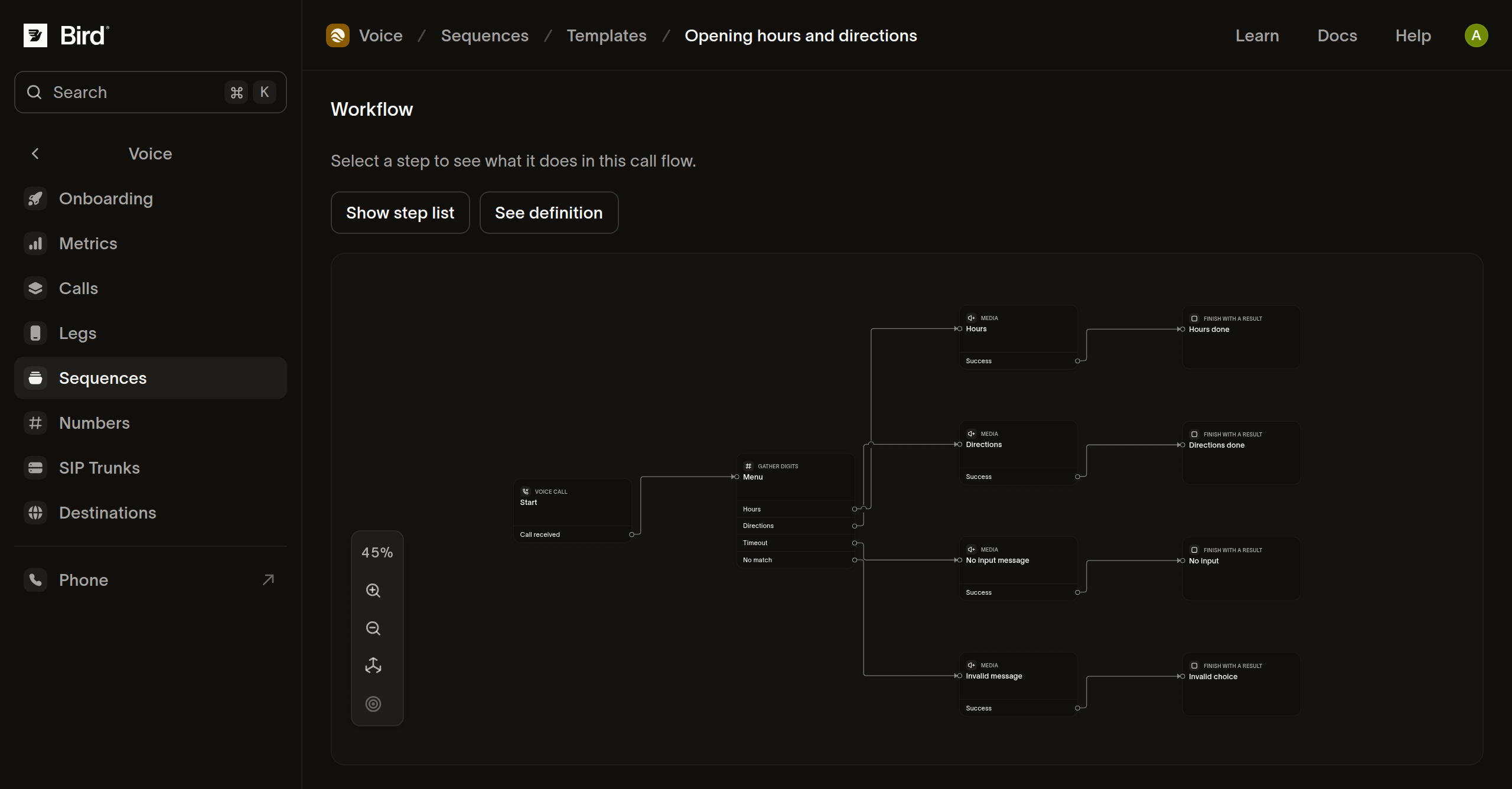
- Revisa el flujo de trabajo, los requisitos previos y los Example scenarios.
- Encuentra la tarjeta del escenario Hours y lee su Expected path para una persona que elige
1.
La ruta comienza en la entrada de llamada, toma la salida de horario del menú, reproduce el mensaje de horario de atención y termina con un resultado. El escenario proporciona resultados hipotéticos de teclado numérico y multimedia.
Compara las otras rutas
- Lee la tarjeta Directions y compara su ruta esperada con la de Hours.
- Lee Silence para ver la respuesta por tiempo de espera agotado.
- Lee Unmatched key para ver cómo termina una opción no compatible.
La plantilla asigna a la entrada silenciosa y a la no reconocida resultados explícitos de fallo. Eso describe el resultado configurado; no significa que la previsualización haya realizado una llamada telefónica fallida.
Crea tu borrador
- Selecciona Use template y asigna un nombre a tu secuencia.
- Reemplaza el mensaje del menú, el horario de atención y las indicaciones con tu propio texto. Mantén las opciones habladas coherentes con las rutas del teclado numérico.
- Selecciona Create draft. El editor abre tu copia independiente.
- Abre Preview, elige la entrada de llamada y deja Entry data (JSON) como
{}para esta plantilla. - Usa Add a sample outcome para elegir la coincidencia de horario del menú y un resultado exitoso para el paso Media de horario de atención. Las muestras de escenarios de plantilla no se copian en el borrador.
- Selecciona Preview workflow.
Inspecciona la ruta seleccionada y el discurso preparado. Guardar un borrador conserva tus ediciones; no publica la secuencia ni llama a nadie. Si la previsualización se detiene, sigue la guía de previsualización para reparar o agregar un resultado de muestra.
Próximos pasos
Recursos relacionados
Continúa con la documentación, guías y ejemplos de este tema.