Reclama tu primer buzón de agente
Esta guía completa una conversación bidireccional: reclama una bandeja de entrada en inbox.ai, recibe un mensaje en un hilo, léelo y responde. No necesitas verificar un dominio ni ejecutar un servidor de correo.
1. Crea una clave de API
En el panel, ve a Platform tools > API keys y crea una clave. En el grupo Email, activa los ámbitos mailbox y mailbox_management. Las claves tienen el formato bk_us1_... o bk_eu1_...; la región del prefijo determina el host de API.
export BIRD_API_KEY="bk_us1_..."Usa name para el nombre de remitente que ven los destinatarios. Define display_name si quieres que tu equipo vea una etiqueta de buzón distinta; si no, toma el valor de name.
2. Reclama un buzón
Crea un buzón en el dominio compartido inbox.ai. Si omites la parte local, Bird genera una dirección disponible. La política de recepción open acepta el correo salvo que una regla de recepción lo bloquee.
const mailbox = await bird.email.mailboxes.create({ name: "Support" });
console.log(mailbox.address); // "abc123@inbox.ai"
mailbox = client.email.mailboxes.create(name="Acme Support")
print(mailbox.id)mailbox, err := client.Email.Mailboxes.Create(context.Background(), bird.EmailMailboxesCreateParams{
Name: bird.Ptr("Support"),
})
if err != nil {
log.Fatal(err)
}
fmt.Println(mailbox.Id, *mailbox.Address)$mailbox = $bird->email->mailboxes->create(
(new MailboxCreate())
->setName('Acme Support'),
);
echo $mailbox->getId(), ' ', $mailbox->getAddress();bird email mailboxes create --name 'My Agent' --receive-policy opencurl -X POST "https://us1.platform.bird.com/v1/email/mailboxes" \
-H "Authorization: Bearer $BIRD_API_KEY" \
-H "Content-Type: application/json" \
-d '{
"name": "My Agent",
"receive_policy": "open"
}'La respuesta incluye el id del buzón y la address reclamada para ti. Envía un correo a esa dirección desde cualquier cliente de correo para que el siguiente paso tenga algo que leer.
3. Lee el hilo
El correo entrante se convierte en un hilo del buzón. Lista los hilos y luego lee los mensajes del primero.
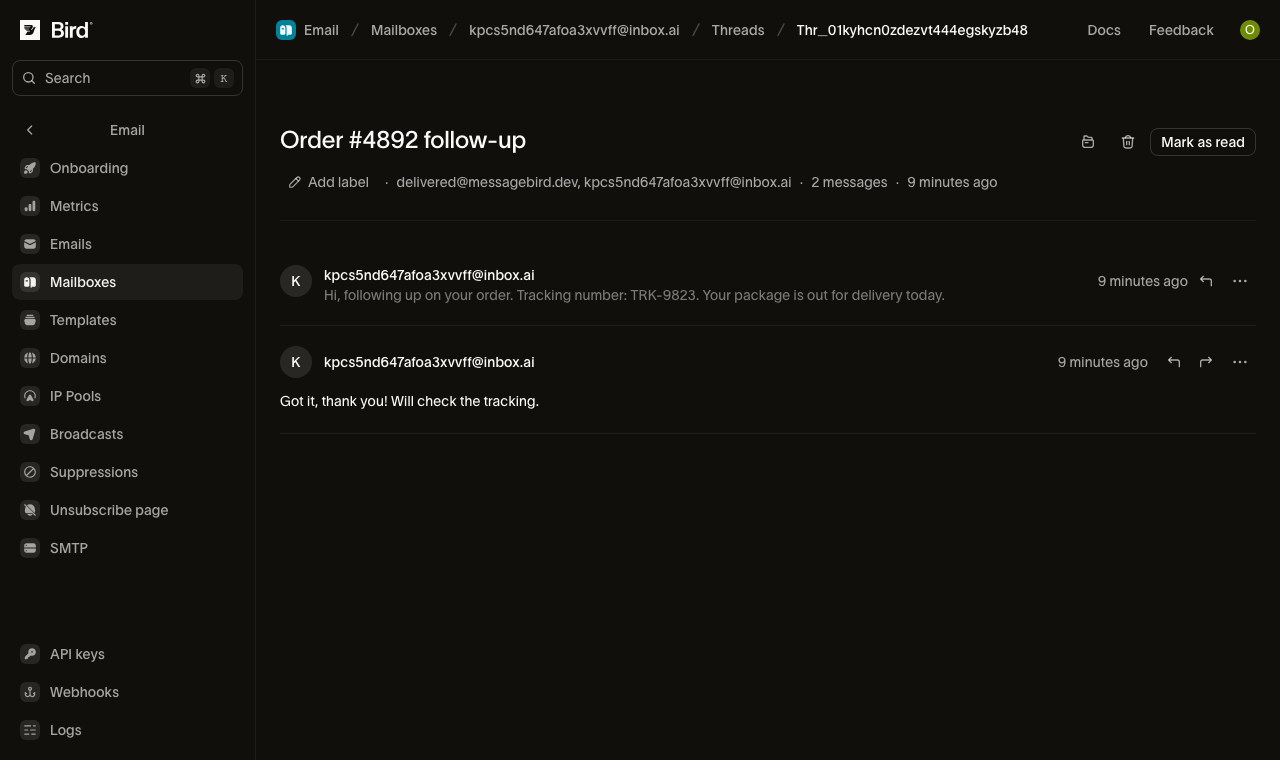
for await (const thread of bird.email.threads.list({ mailbox_id: "mbx_01abc" })) {
  console.log(thread.id, thread.subject);
}
for thread in client.email.threads.list(mailbox_id="mbx_01krdgeqcxet5s7t44vh8rt9mg"):
print(thread.id, thread.subject)for thread, err := range client.Email.Threads.List(context.Background(), bird.EmailThreadsListParams{}) {
if err != nil {
log.Fatal(err)
}
fmt.Println(thread.Id)
}foreach ($bird->email->threads->list(['mailbox_id' => 'mbx_01krdgeqcxet5s7t44vh8rt9mg']) as $thread) {
echo $thread->getId(), ' ', $thread->getSubject(), "\n";
}bird email threads listcurl -X GET "https://{region}.platform.bird.com/v1/email/threads" \
-H "Authorization: Bearer $TOKEN" \
--url-query "labels=urgent" \
--url-query "participant=billing@acme.com" \
--url-query "subject=quarterly invoice" \
--url-query "limit=25"Después, lee los mensajes de ese hilo:
for await (const msg of bird.email.threads.messages.list("thr_01abc")) {
  console.log(msg.id, msg.direction);
}
for message in client.email.threads.messages.list("thr_01krdgeqcxet5s7t44vh8rt9mg"):
print(message.id, message.subject)for msg, err := range client.Email.Threads.Messages.List(context.Background(), "thr_123", bird.EmailThreadsMessagesListParams{}) {
if err != nil {
log.Fatal(err)
}
fmt.Println(msg.Id, msg.Direction)
}foreach ($bird->email->threads->messages->list('thr_01krdgeqcxet5s7t44vh8rt9mg') as $message) {
echo $message->getId(), ' ', $message->getDirection(), "\n";
}bird email threads messages list <thread-id>curl -X GET "https://{region}.platform.bird.com/v1/email/threads/{thread_id}/messages" \
-H "Authorization: Bearer $TOKEN" \
--url-query "label=unread" \
--url-query "limit=25"Cada mensaje indica su dirección (inbound) y su id (un mensaje recibido lleva el prefijo rem_). Añade include=extracted_text para incluir el cuerpo sin citas: el contenido nuevo, sin el historial citado que, de lo contrario, el agente tendría que eliminar por su cuenta.
Para no tener que consultar periódicamente, suscríbete al webhook email_mailbox.message_received. Se activa cuando un mensaje entrante llega a la bandeja de entrada. Consulta la referencia de eventos.
4. Responder
Responde al mensaje recibido con el ID de rem_ del paso 3. La respuesta permanece en el mismo hilo y se envía desde la dirección de tu buzón:
const reply = await bird.email.threads.messages.reply("thr_01abc", "rem_01xyz", {
  text: "Thanks for reaching out!",
});
console.log(reply.id);
reply = client.email.threads.messages.reply(
"thr_01krdgeqcxet5s7t44vh8rt9mg", "rem_01krdgeqcxet5s7t44vh8rt9mg",
text="Thanks for reaching out!",
)
print(reply.id)reply, err := client.Email.Threads.Messages.Reply(context.Background(), "thr_123", "rem_456", bird.EmailThreadsMessagesReplyParams{
Text: bird.Ptr("Thanks for reaching out!"),
})
if err != nil {
log.Fatal(err)
}
fmt.Println(reply.Id)$reply = $bird->email->threads->messages->reply(
'thr_01krdgeqcxet5s7t44vh8rt9mg',
'rem_01krdgeqcxet5s7t44vh8rt9mg',
(new EmailThreadMessageReplyRequest())
->setText('Thanks, looking into it now.')
->setReplyAll(true),
);
echo $reply->getId();bird email threads messages reply <thread-id> <message-id> \
--text 'Thanks, confirming we received your request.'curl -X POST "https://{region}.platform.bird.com/v1/email/threads/{thread_id}/messages/{message_id}/reply" \
-H "Authorization: Bearer $TOKEN" \
-H "Content-Type: application/json" \
-d '{
"text": "Thanks, confirming we received your request."
}'Ya puedes reservar un buzón, recibir, leer y responder. Para iniciar una conversación en lugar de responder a una, redacta un mensaje nuevo en el buzón (POST /v1/email/mailboxes/{id}/messages), lo que abre un hilo nuevo.
Siguientes pasos
- Buzones de agente: cómo funcionan los hilos, las reglas de recepción, el envío y la retención.
- Servidor MCP: ejecuta el mismo ciclo desde un agente de IA a través del servidor MCP.
- CLI:
bird email mailboxesybird email threadspara la terminal. - Guías de inicio rápido de SDK: recorridos de SDK en Go, Python y TypeScript.
Recursos relacionados
Continúa con la documentación, guías y ejemplos de este tema.