Moyens de paiement et portefeuille
Bird enregistre les renouvellements d'abonnement, les dépassements et les frais d'utilisation sur le portefeuille de votre organisation. Une carte enregistrée peut financer les rechargements manuels, les rechargements automatiques et les insuffisances de solde lors du renouvellement.
Ouvrez Billing and payments > Overview pour consulter le solde disponible, la prochaine échéance, le rechargement automatique, l'alerte de solde bas, les moyens de paiement et l'adresse de facturation. Les propriétaires de l'organisation et les administrateurs de facturation gèrent ces paramètres.
Le portefeuille
Le solde disponible est le montant que l'organisation peut dépenser. Les frais d'utilisation modifient ce solde au fur et à mesure de leur règlement, et un message avec des frais facturés à la livraison est réglé deux fois : une fois quand Bird le traite, une fois quand il est livré. Next charge affiche la date et le montant du prochain renouvellement et vous avertit lorsque le solde disponible est insuffisant.
Deux états méritent votre attention :
- Solde bas. Un bandeau que vous pouvez fermer apparaît lorsque vous êtes en dessous de votre seuil d'alerte, et vos contacts de facturation reçoivent un e-mail. Rechargez avant la date de renouvellement et rien d'autre ne se passe.
- Solde prépayé épuisé. Les frais à l'utilisation sont suspendus lorsque le portefeuille ne peut pas les couvrir. Un solde prépayé négatif bloque l'envoi jusqu'à ce que vous ajoutiez suffisamment de fonds. Les frais facturés à la livraison se comportent différemment : lorsque le solde est insuffisant, les frais sont ignorés plutôt que le message retenu, de sorte qu'un message déjà en cours d'acheminement arrive quand même. Pendant une période de relance de renouvellement, le quota d'e-mails inclus reste disponible sauf si le portefeuille est déjà négatif.
Rechargement
Dans Billing and payments > Overview, sélectionnez Add funds pour ouvrir le flux de rechargement. Saisissez au moins 15 unités dans la devise du portefeuille et payez par carte. Avant le premier paiement, fournissez une adresse de facturation et un statut TVA. Ajoutez un numéro de TVA le cas échéant.
Un rechargement effectué affiche immédiatement le nouveau solde, apparaît comme un crédit sur la page Spend et génère son propre reçu de paiement (distinct de votre facture mensuelle, qui ne couvre que les frais).
Paiement par virement bancaire
Une facture pro forma vous permet d'ajouter des fonds au portefeuille par virement bancaire plutôt que par carte :
- Dans Billing and payments > Overview, sélectionnez Add funds.
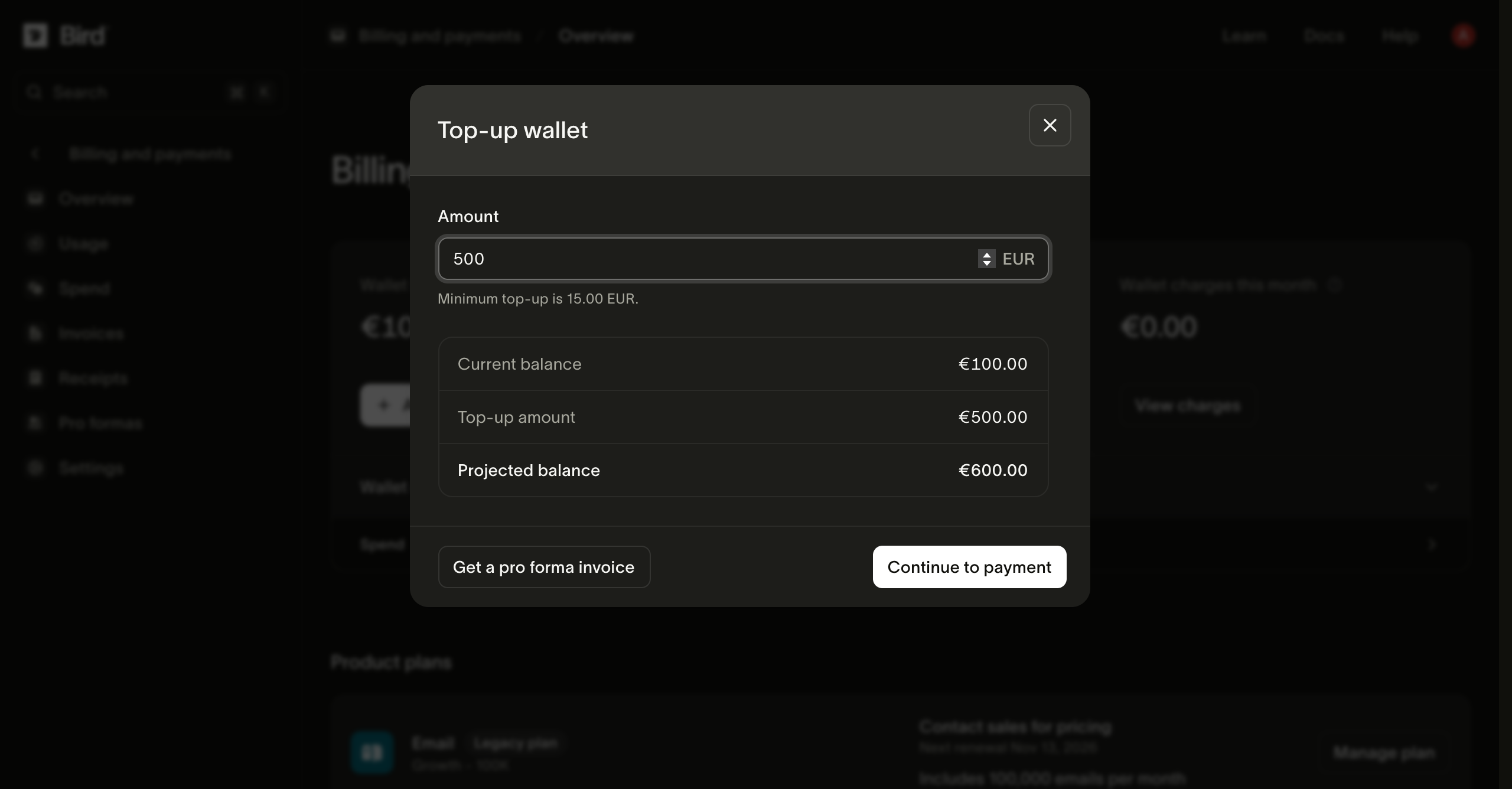
- Saisissez le montant et sélectionnez Get a pro forma invoice.
- Lorsque la boîte de dialogue affiche Pro forma ready, sélectionnez Download PDF.
- Effectuez le virement depuis votre banque vers le compte indiqué sur le PDF, en utilisant la référence de paiement comme référence du virement.
Le PDF comporte les coordonnées bancaires de Bird pour la devise du portefeuille, le montant et un numéro de document tel que PRO-2600001. La référence de paiement est un code court distinct, tel que R9NGKC, affiché dans la boîte de dialogue et sur le PDF. Bird associe votre virement à la facture pro forma grâce à la référence de paiement : un virement sans cette référence prend donc plus de temps à identifier.
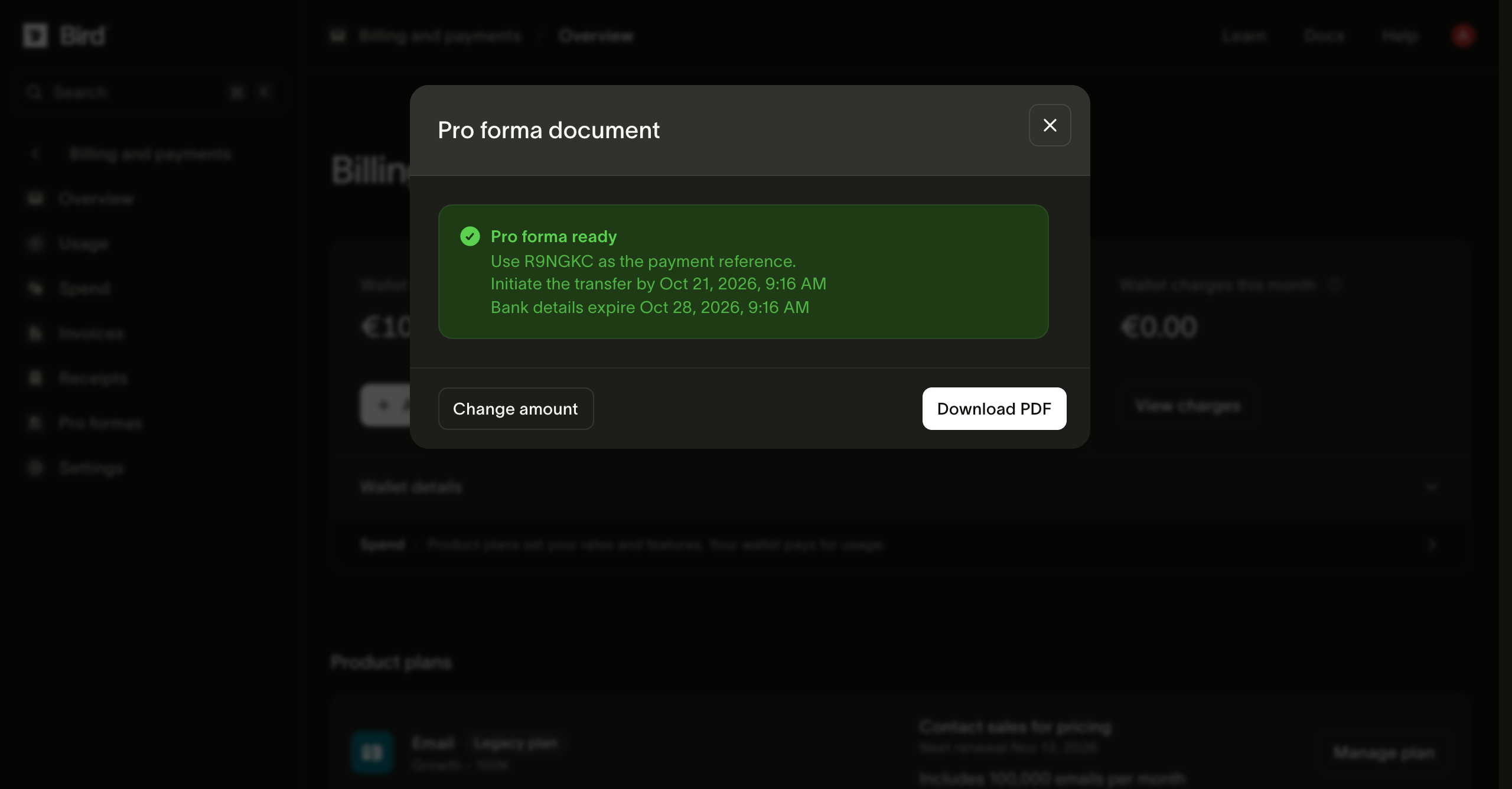
La boîte de dialogue et le PDF indiquent également deux dates. Lancez le virement dans les 7 jours. Les coordonnées bancaires expirent au bout de 14 jours : pour un paiement ultérieur, créez une nouvelle facture pro forma.
Deux points à anticiper :
- Un virement bancaire n'est pas immédiat. Bird crédite le portefeuille une fois le virement reçu et rapproché. Lancez la procédure avant d'avoir besoin du solde.
- Une facture pro forma est une demande de paiement. Elle ne comporte pas de ventilation de TVA et ne remplace pas votre facture fiscale mensuelle. Une fois le virement crédité, vous recevez un reçu de paiement, comme pour tout autre rechargement.
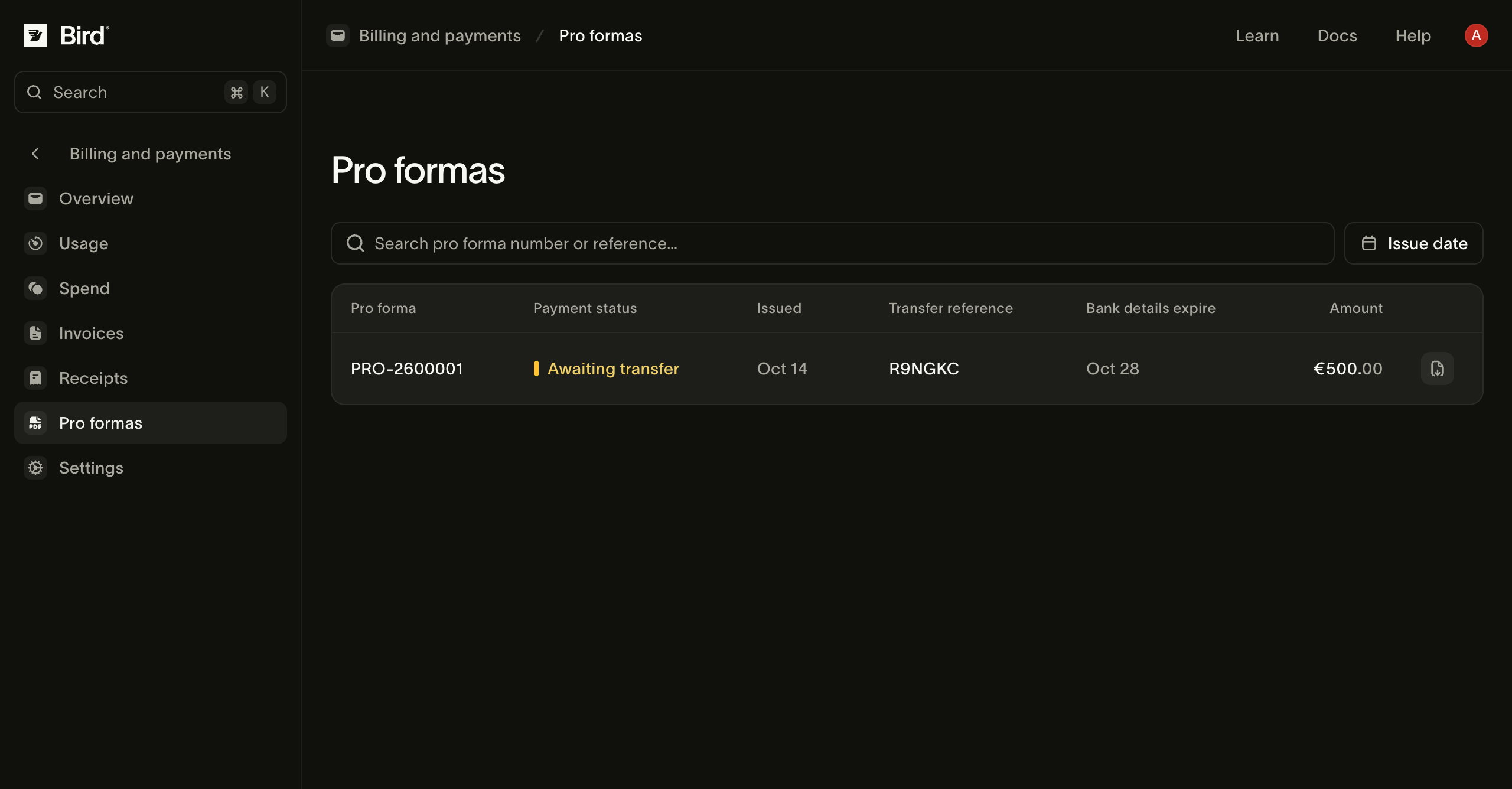
Le montant utilise la devise du portefeuille et le même minimum de 15 unités qu'un rechargement par carte. Les documents antérieurs restent disponibles dans Billing and payments > Pro formas. Chaque ligne indique le statut du paiement, la référence du virement et la date d'expiration des coordonnées bancaires, et comporte un bouton pour télécharger à nouveau le PDF. Une facture pro forma affiche Awaiting transfer jusqu'à ce que Bird reçoive et rapproche votre paiement, puis Paid.
Rechargement automatique
Pour une utilisation continue, configurez Auto top-up depuis la barre latérale du portefeuille. Définissez un seuil de solde et un montant de rechargement. Lorsque le solde passe en dessous du seuil, Bird tente de débiter la carte par défaut.
Les rechargements automatiques apparaissent sur la page Spend. Une alerte de solde bas envoie un e-mail aux contacts de facturation lorsque le solde franchit son seuil. Vous pouvez activer les deux fonctionnalités ; l'alerte peut vous prévenir si un rechargement automatique échoue.
Moyens de paiement
La ligne Payment method liste les cartes enregistrées. La carte par défaut garantit le rechargement automatique et couvre les insuffisances de solde lors du renouvellement. Consultez Changements d'abonnement et renouvellements pour la séquence de paiement.
- L'ajout d'une carte la vérifie sans la débiter. Certaines banques affichent une autorisation temporaire qui s'annule automatiquement.
- Make default change la carte utilisée pour les futurs débits ; les transactions passées ne sont pas affectées.
- Une carte dont le dernier débit a été refusé est signalée dans la liste. Remplacez-la rapidement : une carte par défaut périmée associée à un portefeuille vide est la seule combinaison qui mène au processus d'échec de renouvellement.
- Vous ne pouvez pas supprimer la carte par défaut tant que d'autres cartes existent ; définissez d'abord une autre carte comme carte par défaut.
Informations de facturation
L'adresse de facturation et le numéro de TVA apparaissent sur les factures. Dans Billing and payments > Overview, utilisez Billing address pour les mettre à jour ou définir une adresse de facturation distincte. Billing and payments > Settings stocke le contact de facturation et liste les abonnements et les modifications planifiées de l'organisation.
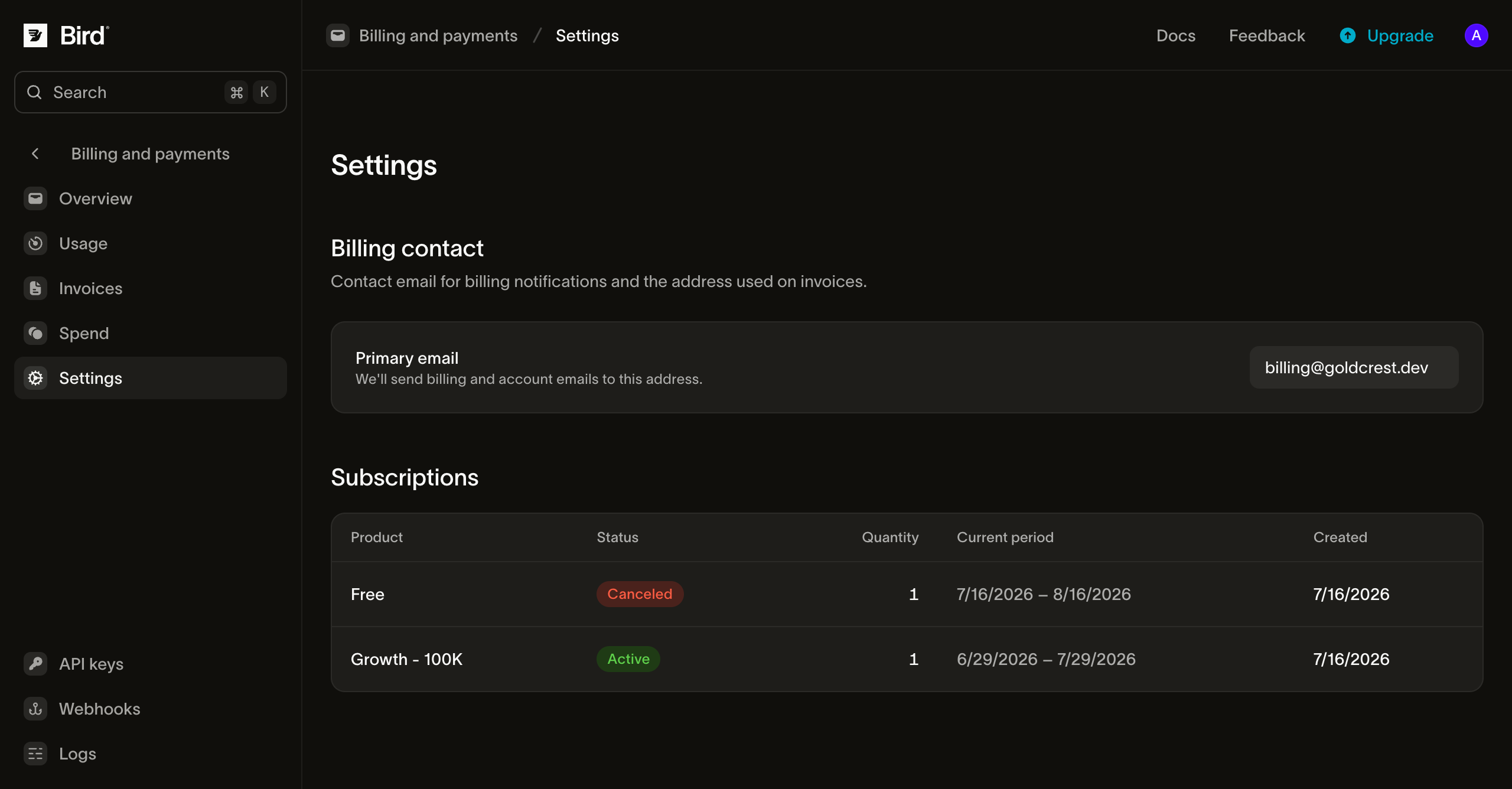
Utilisez un alias d'équipe surveillé pour le contact de facturation afin que les notifications de paiement et de solde ne dépendent pas d'une seule personne.
Étapes suivantes
- Changements d'abonnement et renouvellements : comment les renouvellements utilisent le portefeuille et la carte, et le calendrier en cas d'échec de paiement.
- Utilisation, dépenses et factures : le registre et la facture mensuelle.
- Le fonctionnement des rechargements et du registre du portefeuille derrière ces pages est décrit dans Facturation et utilisation.
Ressources associées
Poursuivez avec la documentation, les guides et les exemples sur ce sujet.