Plans et tarifs
Votre plan, votre portefeuille et vos factures appartiennent à votre organisation. Utilisez cette page pour comparer les plans e-mail, comprendre le dépassement et distinguer les frais d'utilisation des abonnements complémentaires.
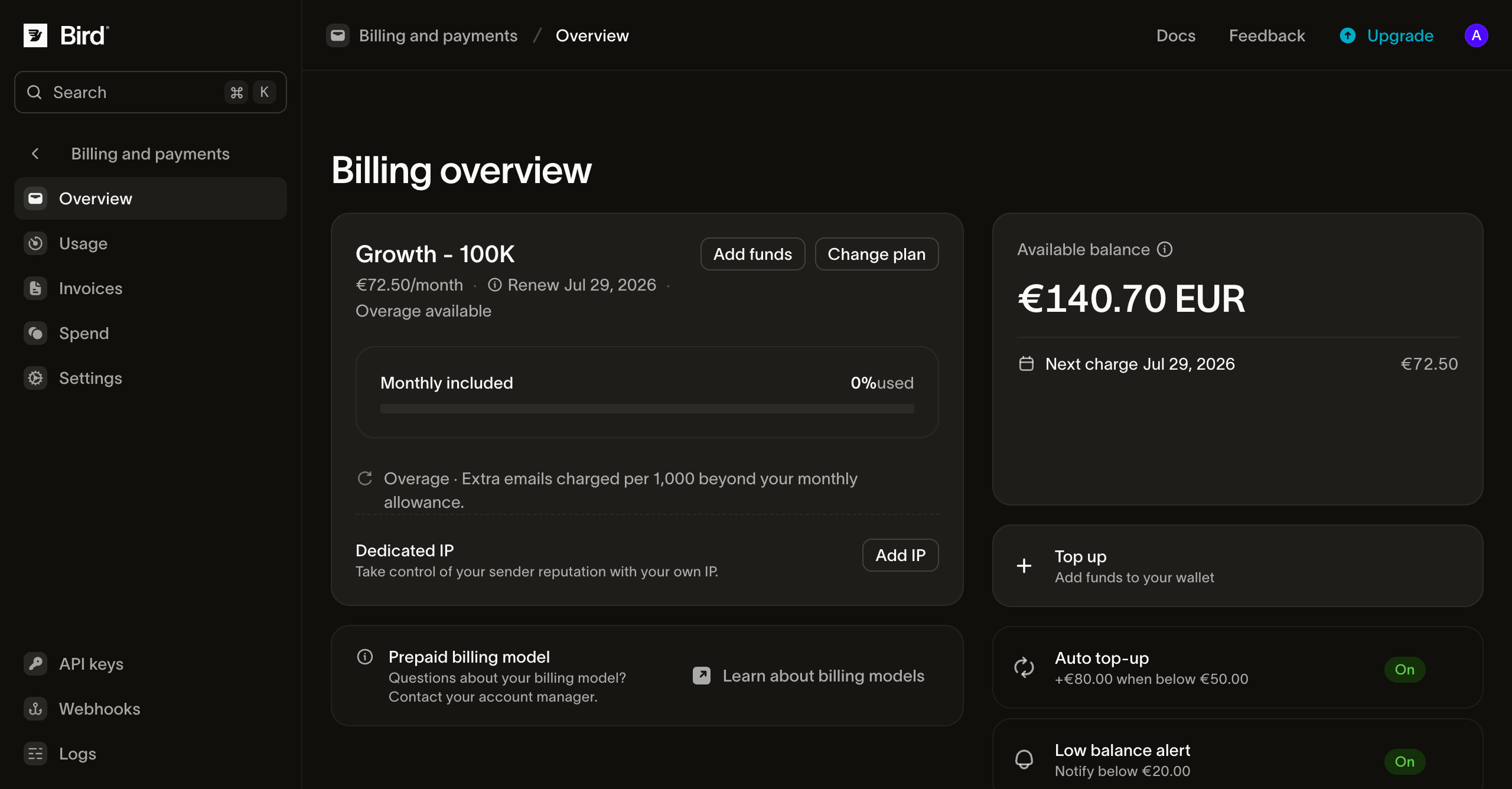
Ouvrez Facturation et paiements > Vue d'ensemble pour voir le plan en cours, la date de renouvellement et la consommation de votre quota. Les propriétaires d'organisation et les administrateurs de facturation gèrent l'accès à la facturation.
Contenu d'un plan
Chaque plan comporte trois éléments :
- Un montant récurrent. Un montant fixe facturé à chaque période de facturation, couvrant le plan et tout ce qu'il inclut.
- Un volume d'e-mails inclus. Chaque plan comprend un quota mensuel d'e-mails couvert par le montant du plan.
- Des capacités liées au niveau. Les niveaux définissent les limites de vitesse d'envoi, de domaines d'envoi et d'IP dédiées.
Les plans d'un même niveau ont des volumes inclus différents. Les prix, quotas et limites en vigueur figurent sur la page des tarifs et dans le sélecteur de plan du tableau de bord.
Les niveaux de plan
- Free : pour découvrir Bird et envoyer de faibles volumes. 1 000 e-mails par mois, plafonnés à 50 par jour (le compteur journalier se réinitialise à minuit UTC), un seul domaine d'envoi, et aucune carte bancaire requise pour commencer. Il n'y a pas de dépassement sur le plan Free. Bird refuse les nouveaux envois au plafond journalier jusqu'à minuit UTC et au plafond mensuel jusqu'au début de votre prochaine période.
- Startup : pour démarrer. Un vrai volume mensuel, de la place pour plusieurs domaines d'envoi, et du dépassement en cas de pic. Les IP dédiées ne sont pas disponibles à ce niveau.
- Growth : pour les équipes qui envoient à grande échelle. Les quotas les plus élevés, des plafonds de vitesse d'envoi nettement supérieurs, bien plus de domaines d'envoi que Startup, et des IP dédiées en option payante.
- Enterprise : pour les volumes ou les conditions commerciales au-delà des plans Growth publiés. Contactez l'équipe commerciale pour discuter de vos besoins.
Utilisez la page des tarifs en vigueur et le sélecteur de plan du tableau de bord comme référence pour les prix, le volume inclus et les limites de plan.
Dépassement : envoyer au-delà de votre quota
Lorsque votre plan payant dispose d'un tarif de dépassement et que le dépassement est activé, les envois supplémentaires sont mesurés par tranche de 1 000 e-mails. Le dépassement s'accumule pendant la période de facturation et est prélevé sur votre portefeuille à la fin de la période. Si le dépassement est désactivé ou si le plan ne prévoit pas de tarif de dépassement, Bird refuse les nouveaux envois une fois le volume inclus atteint, jusqu'à la prochaine période de facturation ou jusqu'à ce qu'un changement de plan relève la limite.
Le dépassement est plafonné. Le plafond par défaut autorise une utilisation totale sur la période allant jusqu'à cinq fois le volume inclus dans votre plan. Bird refuse les envois au-delà de ce plafond jusqu'à la réinitialisation de la période ou jusqu'à ce que vous passiez à un plan supérieur. Consultez Changements de plan et renouvellements.
Point important : si un paiement de renouvellement a échoué et que votre plan est en retard de paiement, le dépassement est suspendu : vous conservez votre quota inclus, mais les envois au-delà sont refusés jusqu'au règlement du solde. Les détails se trouvent dans Changements de plan et renouvellements.
À la consommation : SMS et WhatsApp
Les produits de messagerie en dehors du quota d'e-mails sont facturés depuis le portefeuille au fil de vos envois :
- SMS est tarifé par segment selon le pays de destination et, dans certains pays, par opérateur. Bird déduit ses propres frais du portefeuille lors du traitement du message ; lorsqu'une surcharge opérateur s'applique, elle est déduite à la livraison du message.
- WhatsApp est tarifé par message selon la catégorie de modèle et le pays de destination, facturé de la même manière : les frais de Bird lors du traitement, la part de Meta à la livraison.
- Verification (codes de vérification à usage unique) n'a pas de frais distincts : vous payez le coût normal du canal pour chaque message envoyé.
Ces produits nécessitent un solde ou un crédit suffisant dans le portefeuille pour couvrir le prélèvement. Les organisations en prépayé doivent recharger lorsque le solde est épuisé. Les tarifs par pays en vigueur apparaissent dans les pages produit et tarifs ; l'utilisation de l'organisation apparaît sur la page Utilisation.
Abonnements complémentaires : numéros et IP dédiées
Les numéros de téléphone dédiés et les IP dédiées sont des abonnements mensuels avec des frais récurrents. Ils apparaissent avec le plan dans le tableau des abonnements sur la page Settings et comme lignes distinctes sur la facture. Les IP dédiées sont disponibles à partir du niveau Growth.
Certaines commandes de numéros et inscriptions d'expéditeur alphanumérique payantes comportent également des frais de mise en service ponctuels. Vérifiez le produit, le pays et les montants indiqués avant d'estimer un total ; l'abonnement mensuel ou le tarif par message ne permet pas de savoir si la mise en service est gratuite.
Changer de plan
Depuis la carte du plan sur la page Vue d'ensemble, sélectionnez Upgrade ou Change plan. Les montées en gamme prennent effet une fois le paiement réglé. Les passages à un plan inférieur et les résiliations prennent effet à la fin de la période en cours. Consultez Changements de plan et renouvellements pour les détails de paiement.
Étapes suivantes
- Changements de plan et renouvellements : montées en gamme, résiliation, et ce qui se passe en cas d'échec de paiement.
- Utilisation, dépenses et factures : suivez votre consommation et consultez la facture.
- Moyens de paiement et portefeuille : comment le portefeuille et les cartes financent les prélèvements.
- Les développeurs peuvent consulter le volet technique dans Facturation et utilisation.