Kirim SMS pertama Anda
Kirim pesan teks ke ponsel Anda sendiri dengan Bird SMS, lalu baca kembali pesan tersebut untuk melihat apakah berhasil terkirim. Panduan cepat ini menggunakan template bawaan yang menyediakan teks, kategori, dan pengirim bersama yang dipilih Bird untuk tujuan pengiriman. Anda tidak memerlukan sender ID atau registrasi pengirim untuk ini.
Sebelum memulai, pastikan dompet organisasi Anda memiliki saldo. Pengiriman SMS mengambil dana dari dompet, dan Bird menolak pengiriman yang tidak dapat ditanggung saldonya dengan 402 WalletInsufficientBalance. Metode pembayaran dan dompet menjelaskan cara mengisi ulang.
1. Buat kunci API
Di dashboard, buka Platform tools > Kunci API dan buat kunci dengan cakupan sms:write, yang mencakup pengiriman dan pembacaan pesan. Kunci dicakupkan ke suatu region dan berbentuk seperti bk_us1_... atau bk_eu1_.... Region pada prefiks menunjukkan host API mana yang harus dipanggil: https://us1.platform.bird.com atau https://eu1.platform.bird.com.
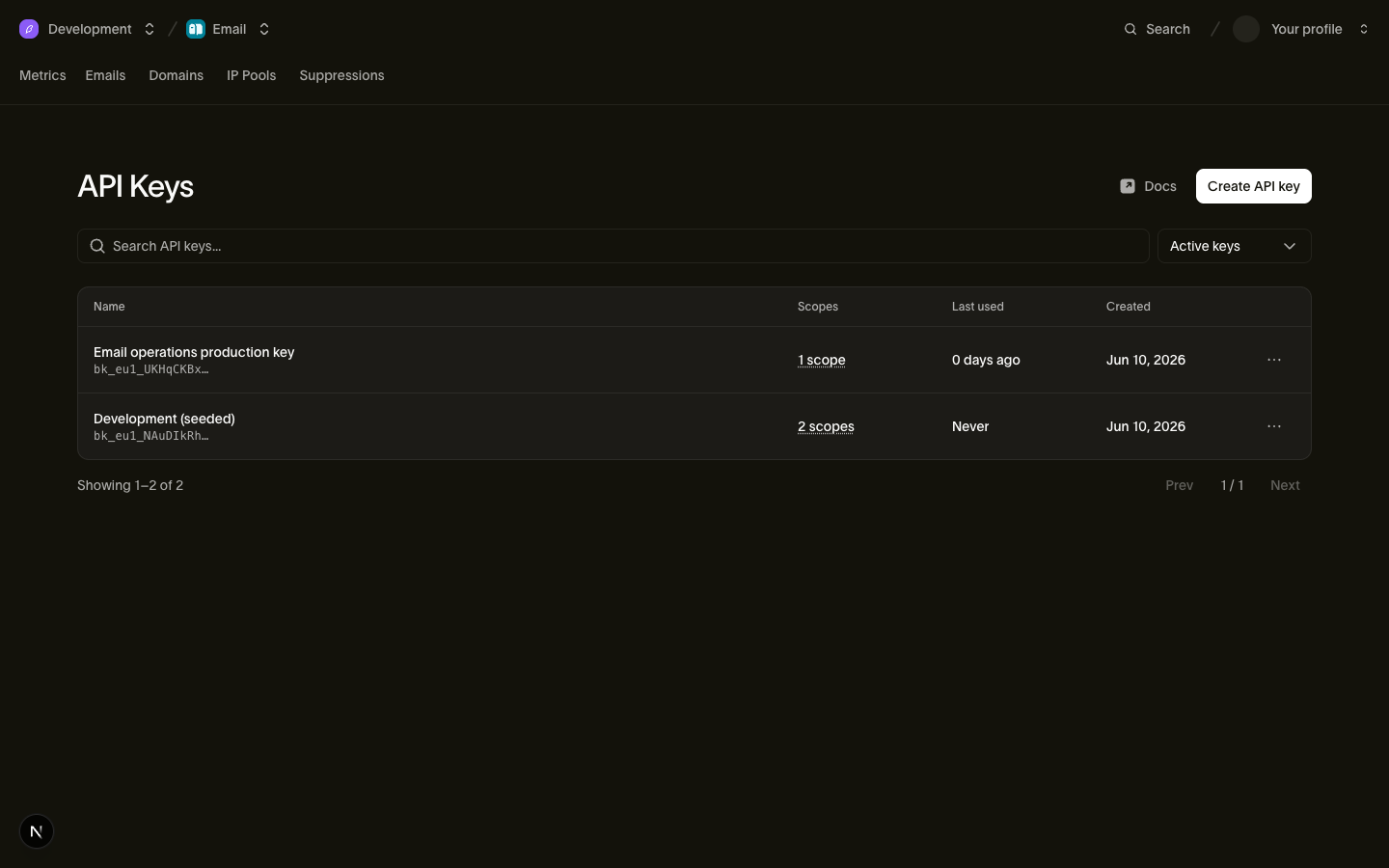
Kunci lengkap ditampilkan sekali saja, pada saat pembuatan. Salin ke tempat yang aman, lalu ekspor untuk contoh cURL:
export BIRD_API_KEY="bk_us1_..."2. Aktifkan negara tujuan
Bird mengirim SMS hanya ke negara yang diaktifkan untuk workspace Anda. Pengiriman ke negara lain gagal dengan 422 SMSDestinationNotEnabled. Aktifkan negara nomor telepon Anda di SMS > Destinations. Jika sudah ditampilkan sebagai aktif, lanjutkan ke langkah 3.
Dari terminal, Bird CLI melakukan perubahan yang sama. Masukkan kode ISO dua huruf negara tersebut, misalnya US untuk Amerika Serikat. Jika login CLI Anda tidak memiliki akses ke pengaturan SMS, perintah tersebut mencetak perintah bird auth login untuk menambahkannya:
bird sms destinations update --destination US=trueAgen yang terhubung ke server MCP menggunakan tool sms_destinations_update. API publik tidak memiliki operasi untuk destinasi. Perubahan bisa memerlukan waktu hingga satu menit untuk berlaku pada pengiriman.
3. Kirim pesan
Kirim template bawaan bird_otp_verification ke ponsel Anda. Template ini ditampilkan sebagai "493021 is your verification code. Do not share it." dengan nilai code yang Anda masukkan. Instal Bird SDK untuk bahasa Anda dengan mengikuti quickstart SDK.
Di tab SDK, ganti contoh kunci API, dan ganti +14155550100 dengan nomor ponsel Anda dalam format E.164. Tab CLI menggunakan login Anda, dan tab cURL menggunakan BIRD_API_KEY.
import { BirdClient } from "@messagebird/sdk";

const bird = new BirdClient({ apiKey: "bk_XXXXXXXXXXXXXXXXXXXXXXXX" });

const msg = await bird.sms.send({
  to: "+14155550100",
  template: { slug: "bird_otp_verification", parameters: { code: "493021" } },
});

console.log(msg.id, msg.status);
from bird import APIError, Bird
with Bird(api_key="bk_XXXXXXXXXXXXXXXXXXXXXXXX") as client:
try:
message = client.sms.send(
to="+14155550100",
template="bird_otp_verification",
parameters={"code": "493021"},
)
print(message.id, message.status)
except APIError as err:
print("send failed:", err)package main
import (
"context"
"fmt"
"log"
bird "github.com/messagebird/bird-sdk-go"
"github.com/messagebird/bird-sdk-go/option"
)
func main() {
client, err := bird.NewClient(option.WithAPIKey("bk_XXXXXXXXXXXXXXXXXXXXXXXX"))
if err != nil {
log.Fatal(err)
}
msg, err := client.Sms.Send(context.Background(), bird.SmsSendParams{
To: "+14155550100",
Template: "bird_otp_verification",
Parameters: map[string]any{"code": "493021"},
})
if err != nil {
log.Fatal(err)
}
fmt.Println(msg.Id, *msg.Status)
}<?php
declare(strict_types=1);
require __DIR__ . '/../vendor/autoload.php';
use MessageBird\Bird;
$bird = new Bird('bk_XXXXXXXXXXXXXXXXXXXXXXXX');
$message = $bird->sms->send(
to: '+14155550100',
template: 'bird_otp_verification',
parameters: ['code' => '493021'],
);
echo $message->getId(), ' ', $message->getStatus(), "\n";bird sms send \
--parameters '{"code":"493021"}' \
--template bird_otp_verification \
--to +14155550100curl -X POST https://us1.platform.bird.com/v1/sms/messages \
-H "Authorization: Bearer $BIRD_API_KEY" \
-H "Content-Type: application/json" \
-d '{
"to": "+14155550100",
"template": {
"slug": "bird_otp_verification",
"parameters": { "code": "493021" }
}
}'Jika kunci Anda diawali dengan bk_eu1_, panggil https://eu1.platform.bird.com sebagai gantinya.
API merespons dengan 202 Accepted beserta pesan. id-nya diawali dengan sms_, dan status-nya adalah accepted: Bird sudah menerima pesan dan mengirimkannya secara asinkron. Simpan id untuk langkah berikutnya. Pesan tiba dari pengirim bersama yang dipilih Bird untuk negara Anda.
4. Periksa status pengiriman
Ambil pesan berdasarkan ID-nya. Pembacaan tepat setelah pengiriman dapat mengembalikan 404 sampai pesan terlihat di endpoint baca, yang terjadi sesaat setelah 202. Baca lagi beberapa saat kemudian. Ganti SMS_MESSAGE_ID dengan id dari langkah 3, dan ganti contoh kunci API di tab SDK dengan milik Anda. SDK Go tidak memiliki method bertipe untuk membaca pesan SMS, jadi tab Go memanggil path API melalui method request client.Get milik SDK.
import { BirdClient } from "@messagebird/sdk";

const bird = new BirdClient({ apiKey: "bk_XXXXXXXXXXXXXXXXXXXXXXXX" });

const msg = await bird.sms.get("SMS_MESSAGE_ID");

console.log(msg.id, msg.status);
from bird import APIError, Bird
with Bird(api_key="bk_XXXXXXXXXXXXXXXXXXXXXXXX") as client:
try:
message = client.sms.get("SMS_MESSAGE_ID")
print(message.id, message.status)
except APIError as err:
print("read failed:", err)package main
import (
"context"
"fmt"
"log"
bird "github.com/messagebird/bird-sdk-go"
"github.com/messagebird/bird-sdk-go/option"
)
func main() {
client, err := bird.NewClient(option.WithAPIKey("bk_XXXXXXXXXXXXXXXXXXXXXXXX"))
if err != nil {
log.Fatal(err)
}
var msg bird.SMSMessage
if err := client.Get(context.Background(), "/v1/sms/messages/SMS_MESSAGE_ID", &msg); err != nil {
log.Fatal(err)
}
fmt.Println(msg.Id, *msg.Status)
}<?php
declare(strict_types=1);
require __DIR__ . '/../vendor/autoload.php';
use MessageBird\Bird;
$bird = new Bird('bk_XXXXXXXXXXXXXXXXXXXXXXXX');
$message = $bird->sms->get('SMS_MESSAGE_ID');
echo $message->getId(), ' ', $message->getStatus(), "\n";bird sms get SMS_MESSAGE_IDcurl https://us1.platform.bird.com/v1/sms/messages/SMS_MESSAGE_ID \
-H "Authorization: Bearer $BIRD_API_KEY"Field status menunjukkan posisi pesan saat ini:
accepted: Bird menyimpan pesan dan belum menyerahkannya ke operator.sent: operator menerima pesan, dansent_atmencatat waktu Bird menyerahkannya.delivered: operator telah mengonfirmasi pengiriman, dandelivered_atmencatat waktunya.undelivered,failed,rejected, atauexpired: pesan tidak sampai ke ponsel.last_errormemberikan alasannya, dan Kesalahan pengiriman menjelaskan masing-masing.
Lakukan polling sampai status berpindah dari accepted dan sent, atau subscribe ke event SMS untuk menerima setiap perubahan melalui webhook. Setiap pesan juga muncul di halaman Messages beserta timeline event-nya.
Memperbaiki pengiriman yang gagal
422SMSDestinationNotEnabled: negara penerima belum diaktifkan untuk workspace Anda. Aktifkan seperti di langkah 2, tunggu hingga satu menit, lalu kirim ulang.402WalletInsufficientBalance: saldo wallet tidak cukup untuk pesan ini. Isi ulang wallet, lalu kirim ulang.403InsufficientScope: kunci API tidak memiliki scopesms. Edit scope kunci tersebut atau buat kunci baru dengansms:write.
Langkah selanjutnya
- Mengirim SMS: kirim teks Anda sendiri dengan sender dan kategori, secara batch, dan dengan percobaan ulang yang aman.
- Sender ID SMS: pilih sender untuk setiap negara dan daftarkan jika negara tersebut mewajibkannya.
- Template SMS: katalog template bawaan beserta variabelnya.
- Event SMS: jenis event dan pengiriman webhook untuk setiap perubahan status.
- Referensi SMS API: skema permintaan dan respons lengkap.
Sumber daya terkait
Lanjutkan dengan dokumentasi, panduan, dan contoh untuk topik ini.