WhatsApp keyword rules
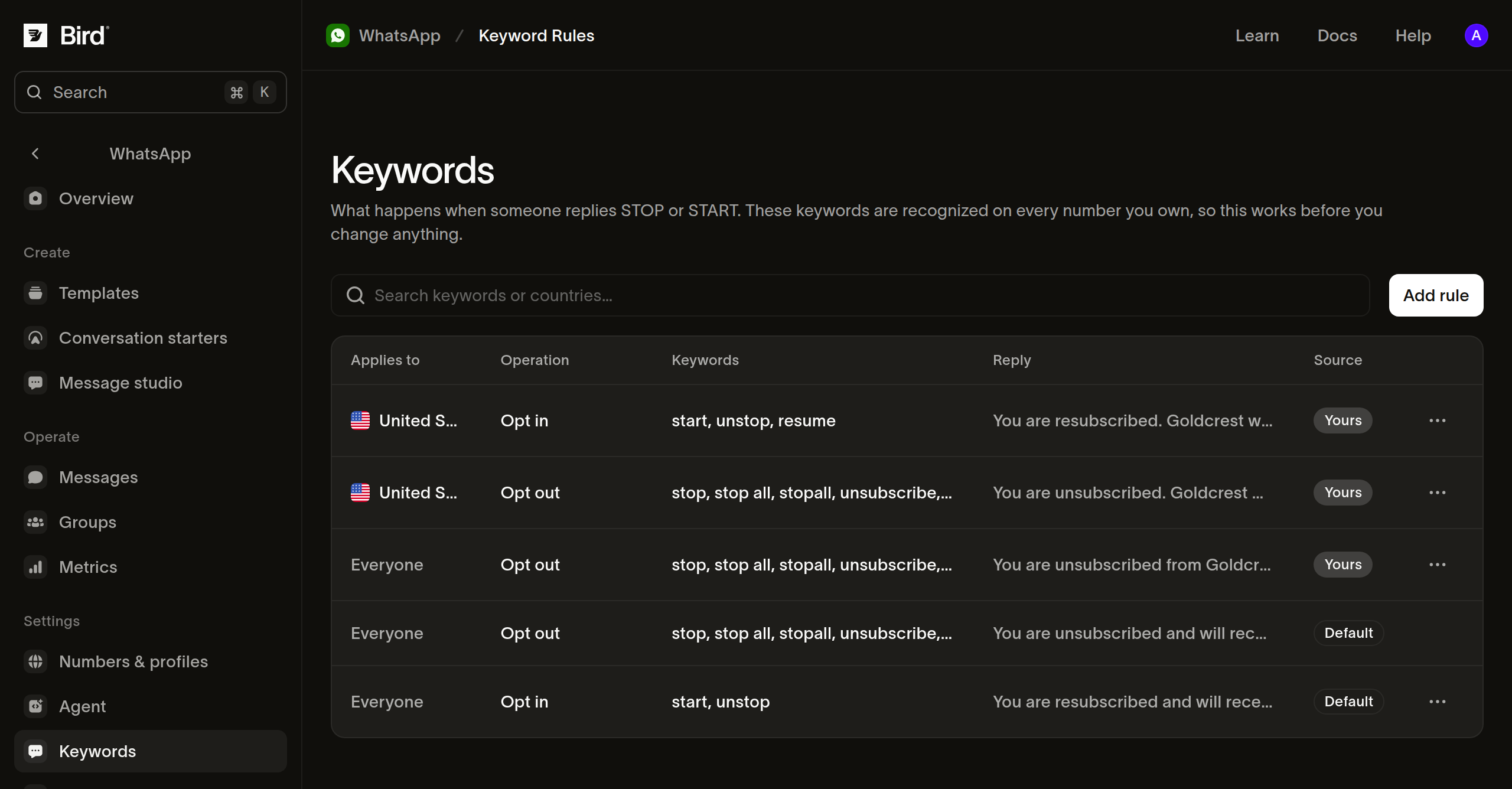
Bird ships the keyword catalog, so a recipient who replies STOP to one of your inbound-capable numbers is opted out with no setup on your part. START reverses it. A rule of your own overrides Bird's default for the scope it covers.
This page covers what Bird recognizes, how an inbound message is matched, and how to change the wording or add keywords. The Keywords page is the dashboard equivalent.
What Bird recognizes by default
Nine words record an opt-out:
stop, stop all, stopall, unsubscribe, cancel, end, quit, revoke, optout
Two reverse it: start and unstop.
Matching is on the whole message rather than a substring. Because cancel and end are keywords, that distinction matters: "cancel my 3pm delivery" is an ordinary message rather than a withdrawal of consent. Letter case, accents, repeated spaces, and trailing punctuation are ignored, so Stop! and STOP both match. Punctuation before or inside the word is not ignored, so #stop does not match.
Where keywords are not matched
A keyword inside a group message is skipped, so a participant cannot opt out by replying there. Honor a group member's stated opt-out in your own sending logic.
When the preference is recorded
Classification runs alongside the whatsapp.received event rather than ahead of it. An integration watching that event can therefore see a STOP arrive before the preference it records exists. If your handler reacts to the inbound message by sending something, re-read the recipient's records rather than assuming the event order.
Seeing what applies
GET /v1/whatsapp/keyword-rules describes how replies to your numbers are handled. Unfiltered, it returns Bird's catalog alongside any rules you have created. Narrow it with country, waba, operation, or scope:
scope=systemreturns Bird's catalog, including the default that a rule of yours overrides.scope=workspacereturns your own rules.
const rules = await bird.whatsapp.keywordRules.list({ operation: "opt_out" });
for (const rule of rules.data ?? []) {
  console.log(rule.scope, rule.effective_keywords);
}
rules = client.whatsapp.keyword_rules.list(operation="opt_out")
for rule in rules.data or []:
print(rule.scope, rule.effective_keywords)rules, err := client.Whatsapp.KeywordRules.List(context.Background(), bird.WhatsappKeywordRulesListParams{
Operation: "opt_out", // omit for both operations, Bird's rules and your own
})
if err != nil {
log.Fatal(err)
}
for _, rule := range rules.Data {
fmt.Println(rule.Scope, rule.EffectiveKeywords)
}$rules = $bird->whatsapp->keywordRules->list(['operation' => 'opt_out']);
foreach ($rules->getData() ?? [] as $rule) {
echo $rule->getScope(), ' ', implode(',', $rule->getEffectiveKeywords() ?? []), PHP_EOL;
}bird whatsapp keyword-rules listcurl "https://us1.platform.bird.com/v1/whatsapp/keyword-rules?operation=opt_out" \
-H "Authorization: Bearer $BIRD_API_KEY"Rules come back most specific first, which is the order an inbound message is matched against them. Each carries effective_keywords: Bird's set for that operation and country, plus anything you added.
For a rule of your own with no country, effective_keywords shows Bird's worldwide set, because the rule has no country and the sender's is unknown until a message arrives. That rule matches against Bird's set for the sender's country, which can be a larger set. Set a country on your rule to see exactly what those senders match.
country is the sender's country, worked out from their own phone number rather than the number they messaged. It is the country signal WhatsApp sends. A sender identified by a business-scoped user ID carries no country, so a message from one skips the country-scoped rules and matches a worldwide rule instead.
Changing the reply
Bird's default replies are correct but generic. To answer in your own name, create a rule:
const rule = await bird.whatsapp.keywordRules.create({
  operation: "opt_out",
  country: "US", // the SENDER's country, from their own number
  reply: "You're off the list. ACME Courier won't message you again.",
});
// effective_keywords is Bird's set plus any of your own.
console.log(rule.id, rule.effective_keywords);
rule = client.whatsapp.keyword_rules.create(
operation="opt_out",
country="US", # the SENDER's country, from their own number
reply="You're off the list. ACME Courier won't message you again.",
)
# effective_keywords is Bird's set plus any of your own.
print(rule.id, rule.effective_keywords)rule, err := client.Whatsapp.KeywordRules.Create(context.Background(), bird.WhatsappKeywordRulesCreateParams{
Operation: "opt_out",
Country: bird.String("US"), // the SENDER's country, from their own number
Reply: bird.String("You're off the list. ACME Courier won't message you again."),
})
if err != nil {
log.Fatal(err)
}
// EffectiveKeywords is Bird's set plus any of your own.
fmt.Println(rule.Id, rule.EffectiveKeywords)$rule = $bird->whatsapp->keywordRules->create(
(new WhatsAppKeywordRuleCreate())
->setOperation('opt_out')
->setCountry('US')
->setReply("You're off the list. ACME Courier won't message you again."),
);
// getEffectiveKeywords() is Bird's set plus any of your own.
echo $rule->getId(), ' ', implode(',', $rule->getEffectiveKeywords() ?? []);bird whatsapp keyword-rules create \
--country US \
--keywords 'no more texts' \
--keywords 'remove me' \
--operation opt_out \
--reply "You're off the list. ACME Courier won't message you again." \
--waba 102290129340398curl -X POST https://us1.platform.bird.com/v1/whatsapp/keyword-rules \
-H "Authorization: Bearer $BIRD_API_KEY" \
-H "Content-Type: application/json" \
-d '{"operation":"opt_out","country":"US","reply":"You'"'"'re off the list. ACME Courier won'"'"'t message you again."}'Your rule replaces Bird's reply for that scope and keeps Bird's keywords. Your keywords are additions rather than a replacement, so a keyword Bird ships later starts matching with no change from you.
To send nothing while still recording the opt-out, omit reply when you create the rule. To silence an existing rule, set reply to null in a JSON body on the update below; a CLI flag cannot carry null.
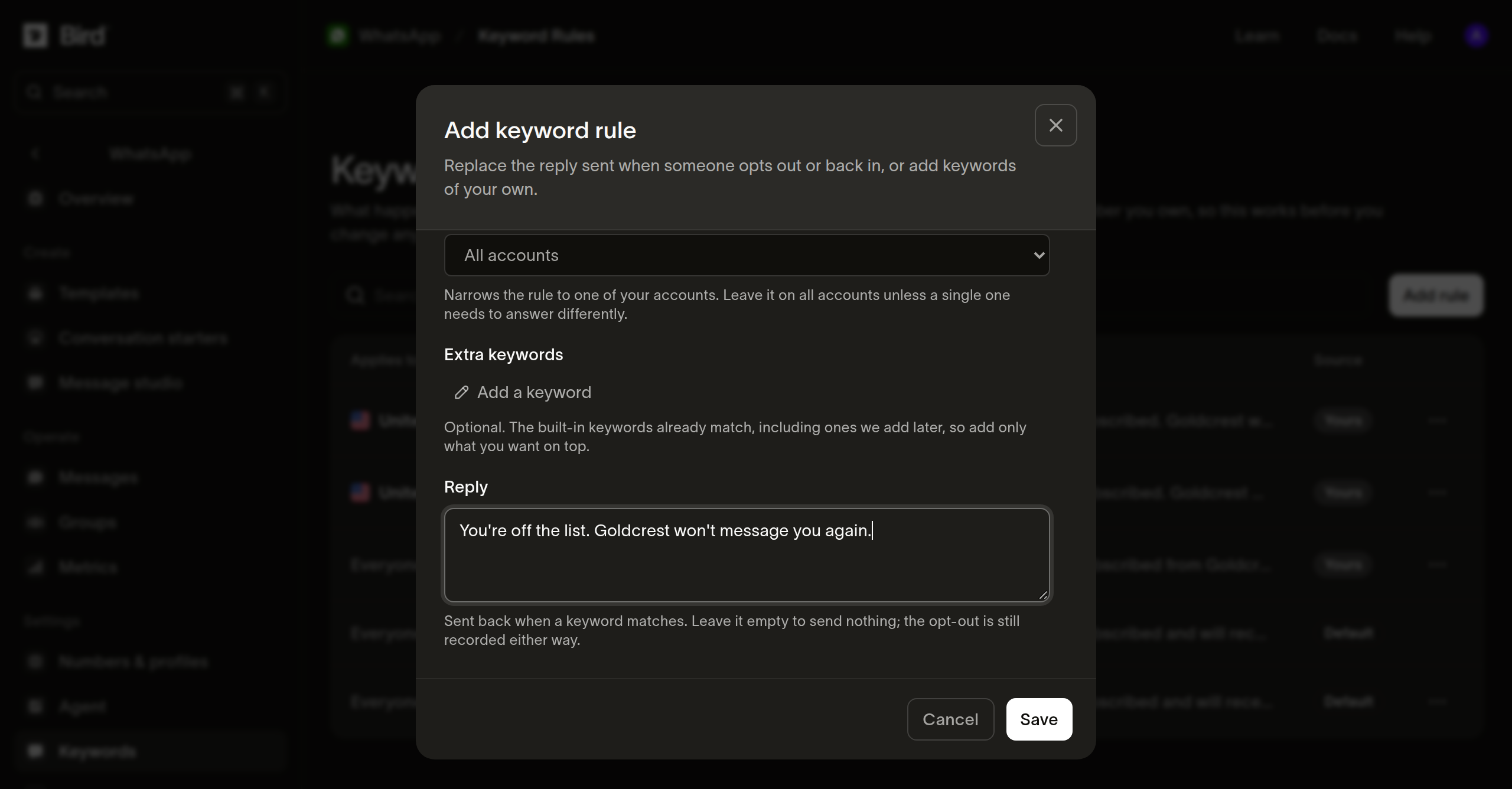
Adding your own keywords
// Omitting keywords leaves the set alone; an empty array clears your additions
// back to Bird's. reply: null switches the auto-reply off and still records
// the opt-out.
const rule = await bird.whatsapp.keywordRules.update("wkr_01m2kj8x4te9p0rr7e5w2n1abc", {
  keywords: ["no more texts", "remove me"],
});
console.log(rule.effective_keywords);
# Omitting keywords leaves the set alone; an empty list clears your additions
# back to Bird's.
rule = client.whatsapp.keyword_rules.update(
"wkr_01m2kj8x4te9p0rr7e5w2n1abc", keywords=["no more texts", "remove me"]
)
print(rule.effective_keywords)// Omitting keywords leaves the set alone; an empty slice clears your
// additions back to Bird's.
rule, err := client.Whatsapp.KeywordRules.Update(context.Background(),
"wkr_01m2kj8x4te9p0rr7e5w2n1abc", bird.WhatsappKeywordRulesUpdateParams{
Keywords: []string{"no more texts", "remove me"},
})
if err != nil {
log.Fatal(err)
}
fmt.Println(rule.EffectiveKeywords)// Omitting keywords leaves the set alone; an empty array clears your additions
// back to Bird's.
$rule = $bird->whatsapp->keywordRules->update(
'wkr_01m2kj8x4te9p0rr7e5w2n1abc',
(new WhatsAppKeywordRuleUpdate())->setKeywords(['no more texts', 'remove me']),
);
echo implode(',', $rule->getEffectiveKeywords() ?? []);bird whatsapp keyword-rules update <id> \
--keywords 'no more texts' \
--reply "You're off the list. ACME Courier won't message you again."curl -X PATCH https://us1.platform.bird.com/v1/whatsapp/keyword-rules/wkr_01m2kj8x4te9p0rr7e5w2n1abc \
-H "Authorization: Bearer $BIRD_API_KEY" \
-H "Content-Type: application/json" \
-d '{"keywords":["no more texts"]}'Omitting keywords leaves your additions alone. Sending an empty array clears them back to Bird's set.
Rule scope and duplicates
A rule narrows to one WhatsApp Business Account with waba, to one sender country with country, to both, or to neither. You hold one rule per combination of operation, country, and account. A second write for the same combination returns a duplicate error.
Bird rejects a rule that binds stop to opt_in, whether the word came from Bird's catalog or from another of your rules, so an opt-out word cannot be made to grant consent.
Deleting a rule
Deleting your rule hands that scope to the next rule in the match order, which is not always one of yours. The order runs:
- Your rule for an account and country.
- Your rule for the account.
- Your rule for the country.
- Bird's rule for the sender's country.
- Your worldwide rule.
- Bird's worldwide rule.
Deleting your rule for a country therefore hands the scope to Bird's rule for that country before your own worldwide rule:
// The next rule in the ladder answers the scope, which is another rule of yours if you hold a less specific one; STOP never stops working.
await bird.whatsapp.keywordRules.delete("wkr_01m2kj8x4te9p0rr7e5w2n1abc");
# The next rule in the ladder answers the scope, which is another rule of yours if you hold a less specific one; STOP never stops working.
client.whatsapp.keyword_rules.delete("wkr_01m2kj8x4te9p0rr7e5w2n1abc")if err := client.Whatsapp.KeywordRules.Delete(context.Background(),
"wkr_01m2kj8x4te9p0rr7e5w2n1abc"); err != nil {
log.Fatal(err)
}// The next rule in the ladder answers the scope, which is another rule of yours if you hold a less specific one; STOP never stops working.
$bird->whatsapp->keywordRules->delete('wkr_01m2kj8x4te9p0rr7e5w2n1abc');bird whatsapp keyword-rules delete <id> --yescurl -X DELETE https://us1.platform.bird.com/v1/whatsapp/keyword-rules/wkr_01m2kj8x4te9p0rr7e5w2n1abc \
-H "Authorization: Bearer $BIRD_API_KEY"Deleting a rule does not stop STOP working. It returns the wording and the keyword set to whichever rule comes next in that order.
Next steps
- Preferences: the records a keyword creates, and which of them you can reverse.
- Suppressions: the addresses your workspace blocks directly.
Related resources
Continue with the documentation, guides and examples for this topic.