WhatsApp suppressions
A suppression is an address your workspace will not message, recorded with a scope. Bird blocks a send to a suppressed address before it reaches WhatsApp.
Open the Suppressions page to work with the list, or use the API below. Recipient-stated records live on the Preferences tab of the same page and follow different rules.
Suppressing a business account
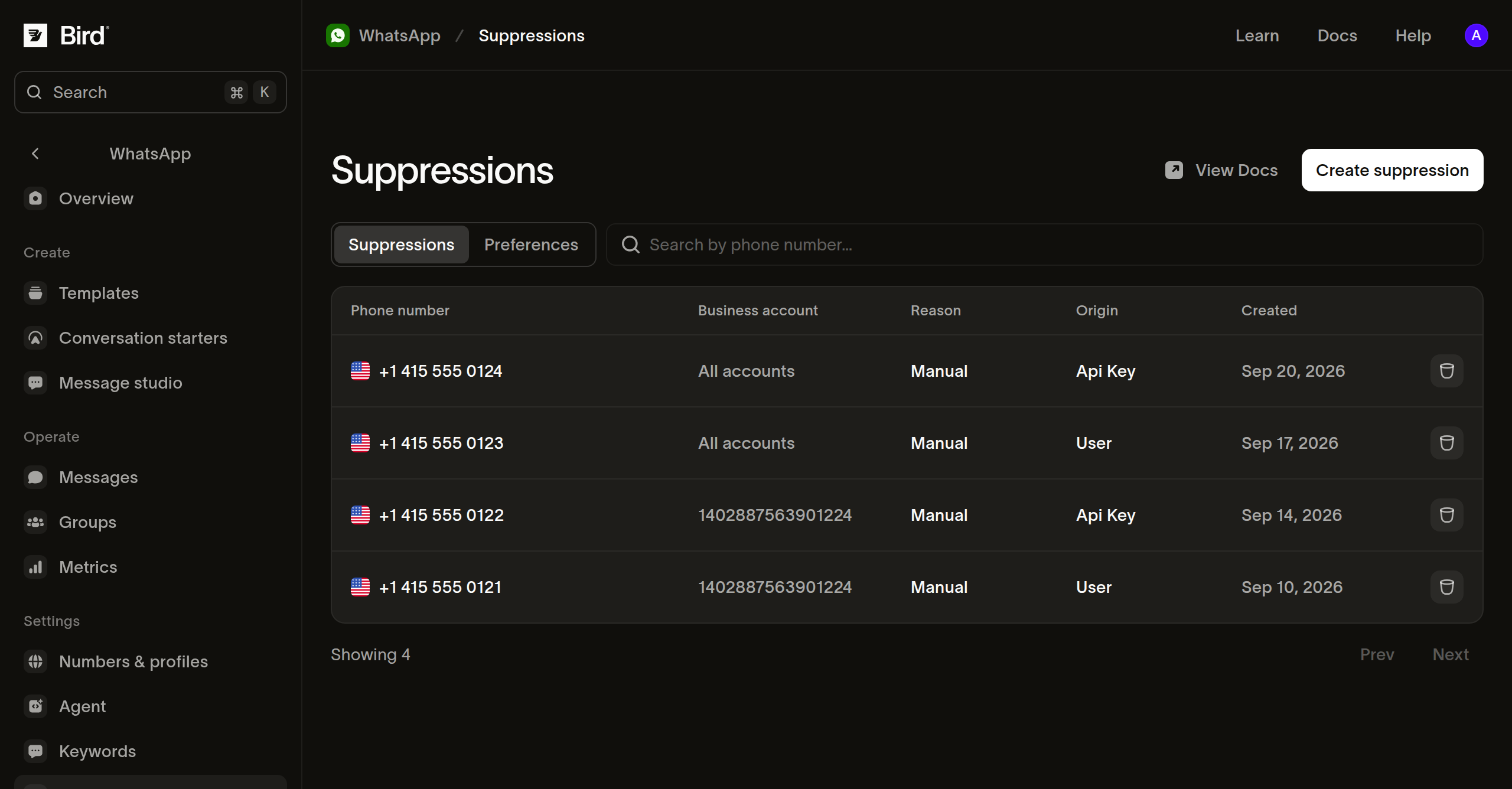
From the Suppressions tab, create a suppression for a phone number and pick the business account it applies to. Bird blocks messages from that account, and your other accounts can still message the number. The list's Business account column names the account a suppression is scoped to, or reads All accounts for one that covers your whole workspace.
POST /v1/whatsapp/suppressions records the same thing from code. waba is the account to scope it to; omit it to block the address for your whole workspace, including accounts you connect later:
// Omit waba to block the address for the whole workspace, whichever account
// sends. With it, your other accounts keep reaching them, and the same
// address for two accounts is two records.
const suppression = await bird.whatsapp.suppressions.add({
  address: "+15550001234",
  waba: "102290129340398",
});
console.log(suppression.id, suppression.applies_to);
# Omit waba to block the address for the whole workspace, whichever account
# sends. With it, your other accounts keep reaching them, and the same
# address for two accounts is two records.
suppression = client.whatsapp.suppressions.add(
address="+15550001234",
waba="102290129340398",
)
print(suppression.id, suppression.applies_to)suppression, err := client.Whatsapp.Suppressions.Add(context.Background(), bird.WhatsappSuppressionsAddParams{
Address: "+15550001234",
// Omit Waba to block the address for the whole workspace, whichever account
// sends. With it, your other accounts keep reaching them, and the same
// address for two accounts is two records.
Waba: &waba,
})
if err != nil {
log.Fatal(err)
}
fmt.Println(suppression.Id, suppression.AppliesTo)// Omit setWaba to block the address for the whole workspace, whichever account
// sends. With it, your other accounts keep reaching them, and the same address
// for two accounts is two records.
$suppression = $bird->whatsapp->suppressions->add(
(new WhatsAppSuppressionCreate())
->setAddress('+15550001234')
->setWaba('102290129340398'),
);
echo $suppression->getId(), ' ', $suppression->getAppliesTo();bird whatsapp suppressions add --address +5511977670804curl -X POST https://us1.platform.bird.com/v1/whatsapp/suppressions \
-H "Authorization: Bearer $BIRD_API_KEY" \
-H "Content-Type: application/json" \
-d '{"address":"+15550001234","waba":"102290129340398"}'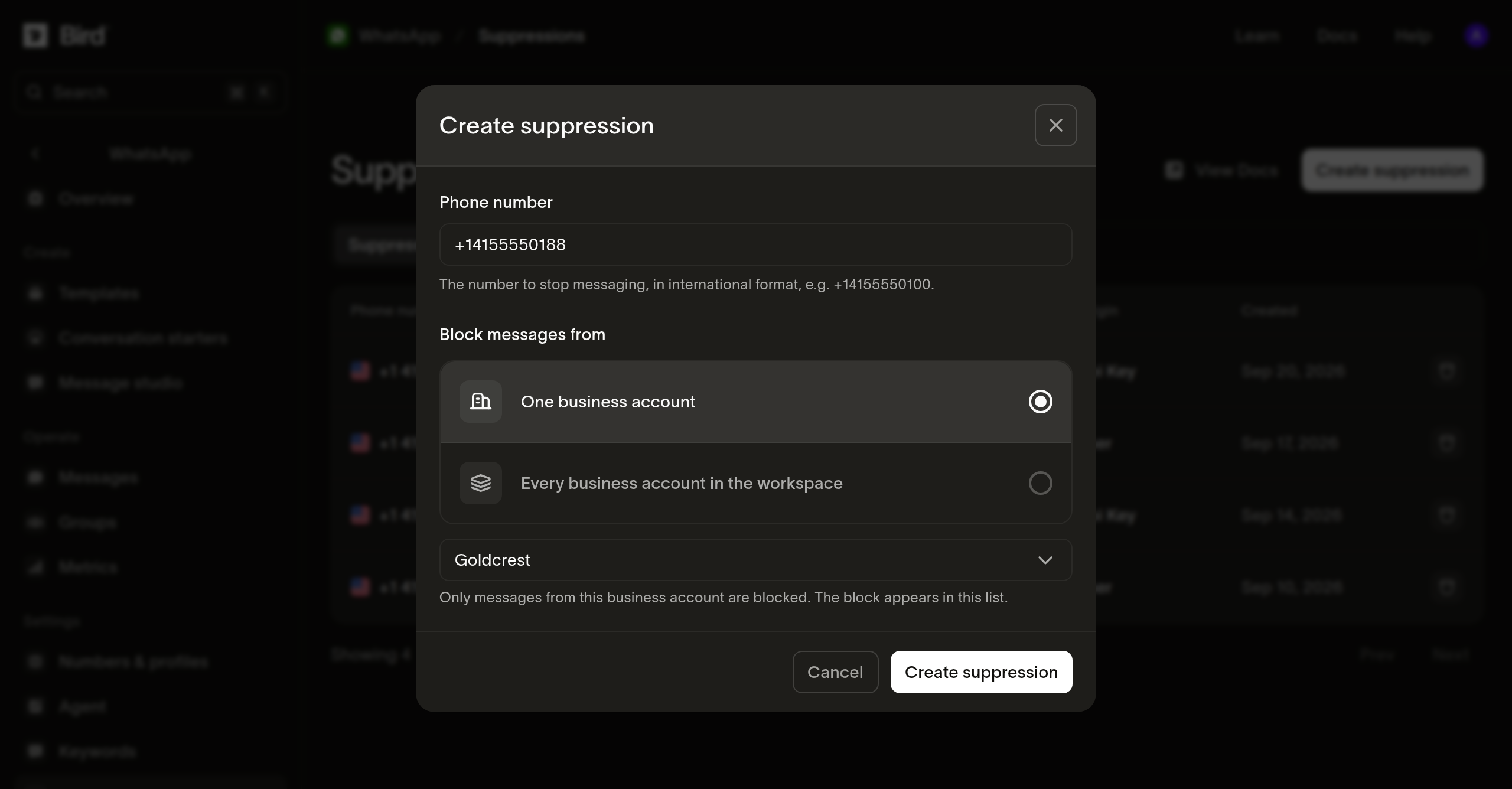
One scope, one record
A suppression carries one scope, so the same address blocked for two accounts is two records rather than one. To cover the whole workspace, make one call with no waba.
Adding an address that is already suppressed for that scope returns 200 with the existing record rather than creating a second one. A new record returns 201.
A suppression is keyed on the address you record. A recipient reached by phone number and the same recipient reached by a business-scoped user ID are two keys, so suppressing one does not suppress the other. Record both if you address the same person either way.
Reading your suppression list
GET /v1/whatsapp/suppressions returns the suppressions in force, most recent first, as a cursor page. address filters by prefix and ignores case: a partial value matches every address under it, and a complete value matches that address alone. reason narrows to a category, such as manual for the ones you added:
// address is a prefix, so a partial value matches every address under it.
const suppressions = await bird.whatsapp.suppressions.list({ address: "+1555" });
for (const suppression of suppressions.data ?? []) {
  console.log(suppression.address, suppression.waba ?? "every account");
}
# address is a prefix, so a partial value matches every address under it.
suppressions = client.whatsapp.suppressions.list(address="+1555")
for suppression in suppressions.data or []:
print(suppression.address, suppression.waba or "every account")for suppression, err := range client.Whatsapp.Suppressions.List(context.Background(), bird.WhatsappSuppressionsListParams{
Address: "+1555", // a prefix, so a partial value matches every address under it
}) {
if err != nil {
log.Fatal(err)
}
fmt.Println(suppression.Address, suppression.Reason)
}// address is a prefix, so a partial value matches every address under it.
foreach ($bird->whatsapp->suppressions->list(['address' => '+1555']) as $suppression) {
echo $suppression->getAddress(), ' ', $suppression->getWaba() ?? 'every account', PHP_EOL;
}bird whatsapp suppressions listcurl "https://us1.platform.bird.com/v1/whatsapp/suppressions?address=%2B1555" \
-H "Authorization: Bearer $BIRD_API_KEY"The list carries what is in force, and records that have ended are left out. A missing address does not prove the workspace never suppressed it; the record may have ended. Read it by ID to confirm.
Reading one record
GET /v1/whatsapp/suppressions/{suppression_id} resolves a record that has ended as well as one in force, reporting when it ended and what ended it:
// Resolves a record that has already ended, which the list leaves out.
const suppression = await bird.whatsapp.suppressions.get("was_01krdgeqcxet5s7t44vh8rt9mg");
console.log(suppression.reason, suppression.ended_at ?? "still in force");
# Resolves a record that has already ended, which the list leaves out.
suppression = client.whatsapp.suppressions.get("was_01krdgeqcxet5s7t44vh8rt9mg")
print(suppression.reason, suppression.ended_at or "still in force")suppression, err := client.Whatsapp.Suppressions.Get(context.Background(), "was_01krdgeqcxet5s7t44vh8rt9mg")
if err != nil {
log.Fatal(err)
}
fmt.Println(suppression.Reason, suppression.EndedAt)// Resolves a record that has already ended, which the list leaves out.
$suppression = $bird->whatsapp->suppressions->get('was_01krdgeqcxet5s7t44vh8rt9mg');
echo $suppression->getReason(), ' ', $suppression->getEndedAt()?->format(DATE_ATOM) ?? 'still in force';bird whatsapp suppressions get <suppression-id>curl https://us1.platform.bird.com/v1/whatsapp/suppressions/was_01krdgeqcxet5s7t44vh8rt9mg \
-H "Authorization: Bearer $BIRD_API_KEY"Ending a suppression
The Delete action on a suppression row ends the suppression rather than removing it. The block stops. The record stays readable and shows when it ended and who ended it. DELETE /v1/whatsapp/suppressions/{suppression_id} does the same and returns 204:
// Only a manual suppression can be ended; a recipient's own opt-out is
// theirs to reverse. The record is kept and still reads back by id.
await bird.whatsapp.suppressions.remove("was_01krdgeqcxet5s7t44vh8rt9mg");
# Only a manual suppression can be ended; a recipient's own opt-out is
# theirs to reverse. The record is kept and still reads back by id.
client.whatsapp.suppressions.remove("was_01krdgeqcxet5s7t44vh8rt9mg")if err := client.Whatsapp.Suppressions.Remove(context.Background(), "was_01krdgeqcxet5s7t44vh8rt9mg"); err != nil {
log.Fatal(err)
}// Only a manual suppression can be ended; a recipient's own opt-out is theirs
// to reverse. The record is kept and still reads back by id.
$bird->whatsapp->suppressions->remove('was_01krdgeqcxet5s7t44vh8rt9mg');bird whatsapp suppressions remove <suppression-id> --yescurl -X DELETE https://us1.platform.bird.com/v1/whatsapp/suppressions/was_01krdgeqcxet5s7t44vh8rt9mg \
-H "Authorization: Bearer $BIRD_API_KEY"A suppression you added yourself carries reason manual and can be ended. A recipient's own opt-out is theirs to reverse, and the attempt returns 422. Calling this again on a suppression that has already ended succeeds and changes nothing, and an ID the workspace does not hold returns 404.
Ending a suppression takes its ID, so look it up with the list first.
Watching for new suppressions
whatsapp_suppression.created fires when a suppression is recorded, so your own system can see new blocks without polling. Its payload carries:
suppression_id, the record's identifier.address, the suppressed number in E.164 format.waba, the account the block is limited to, or null when it covers the whole workspace.reasonandworkspace_id.
No event fires when a suppression ends, so re-read the list before trusting a copy you hold. See WhatsApp suppression webhooks for the full payload.
Next steps
- Preferences: the records recipients state, and which of them you can reverse.
- Message status webhooks: the
whatsapp.rejectedpayload a blocked send produces. - Sending WhatsApp messages: the send API and its asynchronous delivery model.
Related resources
Continue with the documentation, guides and examples for this topic.