KI-Onboarding
Verwenden Sie die bird CLI und die Skills von Bird, wenn Ihr Coding-Agent Shell-Befehle ausführen kann. Verwenden Sie den gehosteten MCP-Server, wenn Ihr Client stattdessen Tools aufruft. Beide Oberflächen können die Docs durchsuchen, und Agenten ohne Tools können das veröffentlichte Markdown-Corpus lesen. Beginnen Sie mit der CLI, es sei denn, Ihr Client erfordert MCP.
1. Agenten einrichten (CLI + Skills)
Fügen Sie den Setup-Prompt in Ihren Coding-Agenten ein. Er installiert die bird CLI, meldet Sie mit bird auth login an, installiert die Skills von Bird, und sendet eine Test-E-Mail zur Bestätigung des Setups. Die Buttons Claude Code, Codex und Cursor auf den Produktseiten von Bird kopieren einen auf den jeweiligen Client zugeschnittenen Prompt. Coding-Agenten einrichten führt durch denselben Ablauf.
2. MCP-Server verbinden (wenn es passt)
Wenn Ihr Client Tools aufruft, statt eine Shell auszuführen, verweisen Sie ihn auf den gehosteten MCP-Server von Bird. Sie benötigen nur die URL und eine Browser-Anmeldung:
https://mcp.bird.comDer Endpunkt verwendet OAuth, daher authentifizieren Sie sich einmal pro Client. Ihr Browser öffnet einen Bird-Zustimmungsbildschirm, auf dem Sie sich anmelden, einen Workspace und Berechtigungen auswählen und den Zugriff genehmigen. Sie benötigen keinen API-Key und kein Secret in der Client-Konfiguration. Folgen Sie den Verbindungsschritten für Ihren Client. Der MCP-Server-Guide behandelt außerdem die Tool-Oberfläche, delegiertes OAuth und die lokale bird mcp-Option.
3. Ihrem Agenten die Docs bereitstellen
Wenn Ihr Agent die Bird-Tools aus Schritt 1 oder 2 hat, kann er diese Docs bereits lesen: docs_search findet Seiten per Abfrage und docs_read gibt eine als Markdown zurück. Aus einer Shell heraus sind das bird docs search "ip warmup" und bird docs read <slug>. Bevorzugen Sie dies gegenüber dem Laden des Corpus, weil der Agent nur die aktuelle Seite abruft, die er benötigt.
Für Agenten, die keine Tools aufrufen können, wird die gesamte Website als Markdown veröffentlicht:
/llms.txt: der Index, eine flache, linkreiche Zusammenfassung jeder Seite, ein Ausgangspunkt, von dem aus der Agent Links folgen kann./llms-full.txt: das vollständige Corpus, alle Doc-Seiten als Markdown zusammengefügt, für Agenten, die alles im Kontext haben möchten.
Beide Dateien werden bei jedem Site-Deploy neu generiert. Sie können auch die KI-Tools in der Seitenleiste einer Docs-Seite verwenden: Copy as Markdown kopiert die jeweilige Seite und Open llms-full.txt öffnet das Corpus. Die E-Mail-Onboarding-Seite des Dashboards bietet dieselben Copy for AI-Shortcuts.
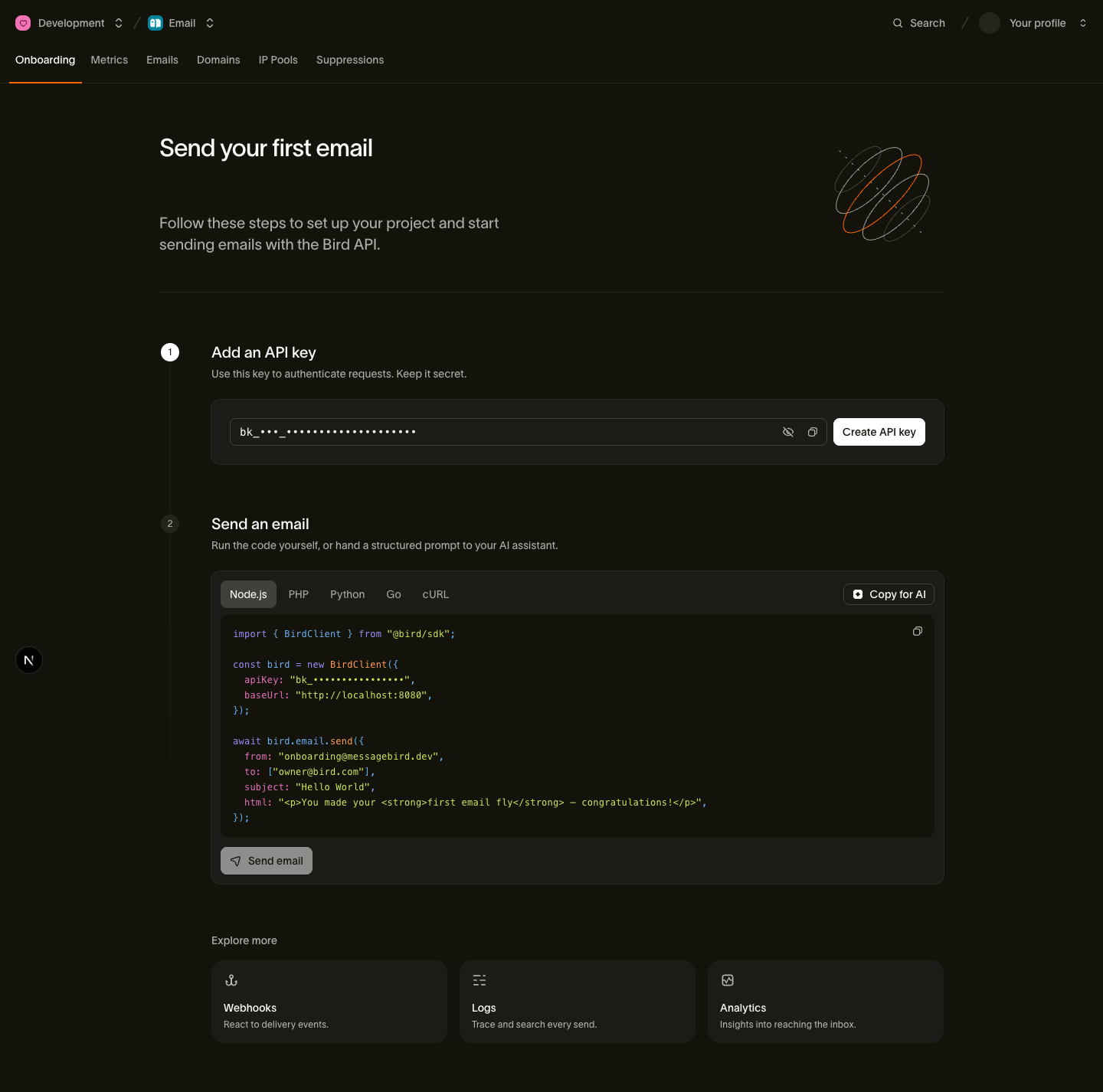
Formate, Größen und Abruf-Tipps werden im llms.txt-Guide behandelt.
4. Ausprobieren
Sobald Ihr Agent eingerichtet ist, geben Sie ihm eine echte Aufgabe von Anfang bis Ende:
Find my email with whoami, then send me a test email from onboarding@messagebird.dev and tell me when it's delivered.
Der Agent liest Ihre Adresse mit whoami, sendet über die gemeinsame Onboarding-Domain von Bird und fragt den Status ab, bis die Nachricht Ihren Posteingang erreicht. Die Onboarding-Domain kann ohne Domain-Verifizierung an verifizierte Mitglieder Ihres Workspace senden. Für einen deterministischen Test ohne echten Posteingang senden Sie stattdessen an delivered@messagebird.dev; siehe die Test-Sandbox.
Nächste Schritte
- Self-serve signup: für einen Agenten, der ein eigenes Bird-Konto statt Ihres benötigt. Erstellen Sie Konto, Organisation und Workspace über das Terminal, ohne Browser.
- CLI for agents: der Agenten-Vertrag der
birdCLI. JSON-Ausgabe, semantische Exit-Codes, OAuth-Login. - Agent skills: das bird-ai-Marketplace-Plugin und was jeder Client erhält.
- MCP server: der gehostete Endpunkt, die vollständige Tool-Oberfläche, das delegierte OAuth-Modell und die Local-stdio-Option.
- llms.txt & Markdown docs: wie das maschinenlesbare Corpus erstellt wird und wie Sie daraus abrufen.
- Erste E-Mail senden: denselben E-Mail-Ablauf ohne Agenten durchführen.
- Ihren Coding-Agenten einrichten: ein Video, das einen Agenten verbindet und eine Test-E-Mail darüber sendet
Verwandte Ressourcen
Weiter mit der Dokumentation, Anleitungen und Beispielen zu diesem Thema.