Erste Agent-Mailbox einrichten
Diese Anleitung schließt eine bidirektionale Konversation ab: Fordern Sie eine Inbox auf inbox.ai an, empfangen Sie eine Nachricht in einem Thread, lesen Sie sie und antworten Sie. Sie müssen weder eine Domain verifizieren noch einen Mailserver betreiben.
1. API-Key erstellen
Gehen Sie im Dashboard zu Platform tools > API keys und erstellen Sie einen Key. Aktivieren Sie in der Gruppe Email die Scopes mailbox und mailbox_management. Keys sehen aus wie bk_us1_... oder bk_eu1_...; die Region im Präfix bestimmt den API-Host.
export BIRD_API_KEY="bk_us1_..."2. Mailbox anfordern
Erstellen Sie eine Mailbox auf der gemeinsamen inbox.ai-Domain. Lassen Sie den Local Part weg, und Bird generiert eine verfügbare Adresse. Die Empfangsrichtlinie open nimmt E-Mails an, sofern keine Empfangsregel sie blockiert.
const mailbox = await bird.email.mailboxes.create({ display_name: "Support" });
console.log(mailbox.address); // "abc123@inbox.ai"
mailbox = client.email.mailboxes.create(display_name="Acme Support")
print(mailbox.id)mailbox, err := client.Email.Mailboxes.Create(context.Background(), bird.EmailMailboxesCreateParams{
DisplayName: bird.Ptr("Support"),
})
if err != nil {
log.Fatal(err)
}
fmt.Println(mailbox.Id, *mailbox.Address)$mailbox = $bird->email->mailboxes->create(
(new MailboxCreate())
->setDisplayName('Acme Support'),
);
echo $mailbox->getId(), ' ', $mailbox->getAddress();bird email mailboxes create \
--display-name 'My Agent' \
--receive-policy opencurl -X POST "https://us1.platform.bird.com/v1/email/mailboxes" \
-H "Authorization: Bearer $BIRD_API_KEY" \
-H "Content-Type: application/json" \
-d '{
"display_name": "My Agent",
"receive_policy": "open"
}'Die Antwort enthält die Mailbox-id und die für Sie beanspruchte address. Senden Sie von einem beliebigen E-Mail-Client eine Nachricht an diese Adresse, damit der nächste Schritt etwas zum Lesen hat.
3. Thread lesen
Eingehende E-Mails werden zu einem Thread in der Mailbox. Listen Sie die Threads auf und lesen Sie dann die Nachrichten im ersten Thread.
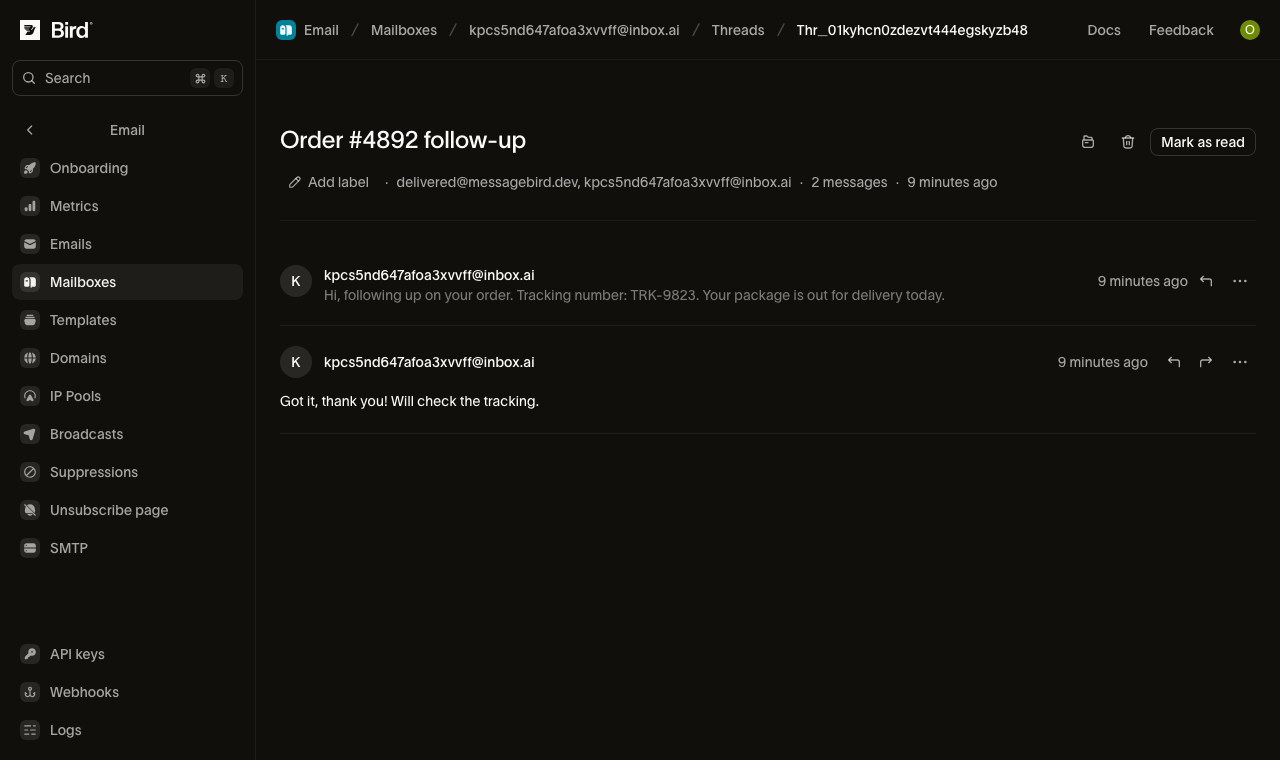
for await (const thread of bird.email.threads.list({ mailbox_id: "mbx_01abc" })) {
  console.log(thread.id, thread.subject);
}
for thread in client.email.threads.list(mailbox_id="mbx_01krdgeqcxet5s7t44vh8rt9mg"):
print(thread.id, thread.subject)for thread, err := range client.Email.Threads.List(context.Background(), bird.EmailThreadsListParams{}) {
if err != nil {
log.Fatal(err)
}
fmt.Println(thread.Id)
}foreach ($bird->email->threads->list(['mailbox_id' => 'mbx_01krdgeqcxet5s7t44vh8rt9mg']) as $thread) {
echo $thread->getId(), ' ', $thread->getSubject(), "\n";
}bird email threads listcurl -X GET "https://{region}.platform.bird.com/v1/email/threads" \
-H "Authorization: Bearer $TOKEN" \
--url-query "label=urgent" \
--url-query "participant=billing@acme.com" \
--url-query "subject=quarterly invoice" \
--url-query "limit=25"Lesen Sie dann die Nachrichten dieses Threads:
for await (const msg of bird.email.threads.messages.list("thr_01abc")) {
  console.log(msg.id, msg.direction);
}
for message in client.email.threads.messages.list("thr_01krdgeqcxet5s7t44vh8rt9mg"):
print(message.id, message.subject)for msg, err := range client.Email.Threads.Messages.List(context.Background(), "thr_123", bird.EmailThreadsMessagesListParams{}) {
if err != nil {
log.Fatal(err)
}
fmt.Println(msg.Id, msg.Direction)
}foreach ($bird->email->threads->messages->list('thr_01krdgeqcxet5s7t44vh8rt9mg') as $message) {
echo $message->getId(), ' ', $message->getDirection(), "\n";
}bird email threads messages list <thread-id>curl -X GET "https://{region}.platform.bird.com/v1/email/threads/{thread_id}/messages" \
-H "Authorization: Bearer $TOKEN" \
--url-query "label=unread" \
--url-query "limit=25"Jede Nachricht enthält ihre Richtung (inbound) und ihre id (einer empfangenen Nachricht ist rem_ vorangestellt). Fügen Sie include=extracted_text hinzu, um den von Zitaten bereinigten Body inline einzubetten: den neuen Inhalt ohne die zitierte Historie, die ein Agent sonst selbst entfernen müsste.
Um Polling zu vermeiden, abonnieren Sie den email_mailbox.message_received-Webhook. Er wird ausgelöst, wenn eine eingehende Nachricht die Inbox erreicht. Siehe die Events-Referenz.
4. Antworten
Antworten Sie auf die empfangene Nachricht. Verwenden Sie deren rem_-ID aus Schritt 3. Die Antwort bleibt im selben Thread und wird von der Adresse Ihrer Mailbox gesendet:
const reply = await bird.email.threads.messages.reply("thr_01abc", "rem_01xyz", {
  text: "Thanks for reaching out!",
});
console.log(reply.id);
reply = client.email.threads.messages.reply(
"thr_01krdgeqcxet5s7t44vh8rt9mg", "rem_01krdgeqcxet5s7t44vh8rt9mg",
text="Thanks for reaching out!",
)
print(reply.id)reply, err := client.Email.Threads.Messages.Reply(context.Background(), "thr_123", "rem_456", bird.EmailThreadsMessagesReplyParams{
Text: bird.Ptr("Thanks for reaching out!"),
})
if err != nil {
log.Fatal(err)
}
fmt.Println(reply.Id)$reply = $bird->email->threads->messages->reply(
'thr_01krdgeqcxet5s7t44vh8rt9mg',
'rem_01krdgeqcxet5s7t44vh8rt9mg',
(new EmailThreadMessageReplyRequest())
->setText('Thanks, looking into it now.')
->setReplyAll(true),
);
echo $reply->getId();bird email threads messages reply <thread-id> <message-id> \
--text 'Thanks, confirming we received your request.'curl -X POST "https://{region}.platform.bird.com/v1/email/threads/{thread_id}/messages/{message_id}/reply" \
-H "Authorization: Bearer $TOKEN" \
-H "Content-Type: application/json" \
-d '{
"text": "Thanks, confirming we received your request."
}'Sie können jetzt eine Mailbox anfordern, Nachrichten empfangen, lesen und beantworten. Um eine Konversation zu starten, statt auf eine zu antworten, verfassen Sie eine neue Nachricht in der Mailbox (POST /v1/email/mailboxes/{id}/messages). Dadurch wird ein neuer Thread eröffnet.
Nächste Schritte
- Agent-Mailboxen: wie Threads, Empfangsregeln, Versand und Aufbewahrung funktionieren.
- MCP-Server: denselben Ablauf über den MCP-Server von einem KI-Agenten aus ausführen.
- CLI:
bird email mailboxesundbird email threadsfür das Terminal. - SDK-Schnellstarts: Schritt-für-Schritt-Anleitungen für Go, Python und TypeScript mit SDK.
Verwandte Ressourcen
Weiter mit der Dokumentation, Anleitungen und Beispielen zu diesem Thema.