Envoyer votre premier e-mail
Créez une clé API, envoyez via le domaine d'intégration partagé de Bird, et vérifiez le résultat. Vous n'avez pas besoin de vérifier un domaine d'envoi ni de publier des enregistrements DNS pour ce guide. Vérifiez votre propre domaine avant d'envoyer à des clients.
1. Créer une clé API
Dans le tableau de bord, accédez à Developers > Clés API et créez une clé. Les clés sont liées à une région et ressemblent à bk_us1_... ou bk_eu1_... ; la région dans le préfixe indique quel hôte API appeler : https://us1.platform.bird.com ou https://eu1.platform.bird.com.
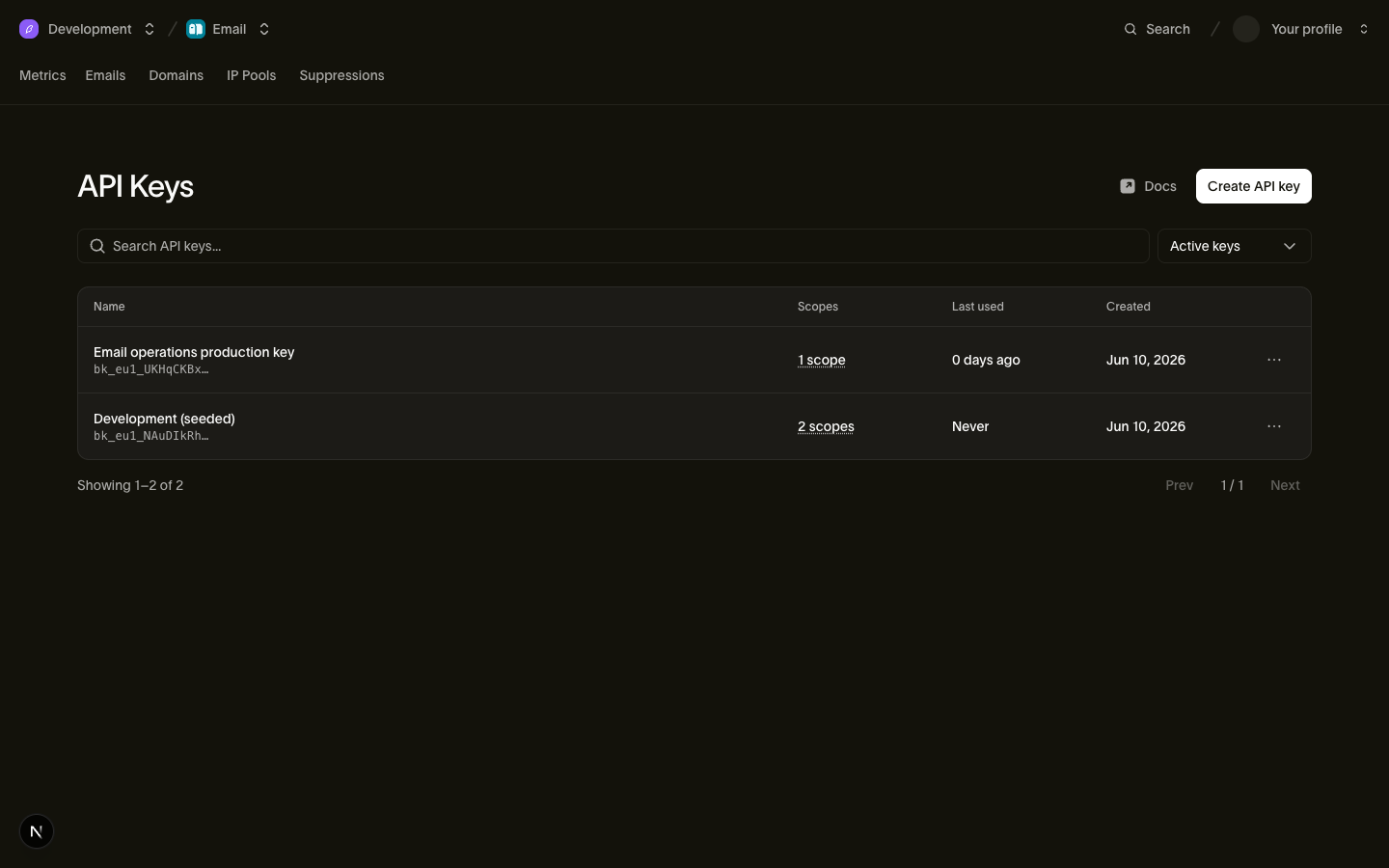
La clé complète est affichée une seule fois, au moment de la création. Copiez-la dans un endroit sûr, puis exportez-la pour que les extraits de code de l'étape 2 puissent la lire :
export BIRD_API_KEY="bk_us1_..."2. Envoyer un e-mail
Envoyez depuis onboarding@messagebird.dev, le domaine d'intégration partagé de Bird, disponible dans votre espace de travail sans configuration. Adressez-le à delivered@messagebird.dev, un destinataire sandbox qui livre toujours, de sorte que le résultat est déterministe sans boîte de réception réelle.
L'appel cURL désigne l'hôte US. Si votre clé commence par bk_eu1_, appelez https://eu1.platform.bird.com à la place. Le SDK lit la région depuis votre clé et sélectionne l'hôte. L'onglet TypeScript nécessite npm install @messagebird/sdk.
import { BirdClient } from "@messagebird/sdk";

const bird = new BirdClient({ apiKey: process.env.BIRD_API_KEY! });

const msg = await bird.email.send({
  from: { email: "onboarding@messagebird.dev", name: "Bird" },
  to: ["delivered@messagebird.dev"],
  subject: "Hello from Bird",
  html: "<p>My first Bird email.</p>",
});

console.log(msg.id, msg.status);
from bird import APIError, Bird
with Bird() as client:
try:
message = client.email.send(
from_={"email": "onboarding@messagebird.dev", "name": "Bird"},
to=["delivered@messagebird.dev"],
subject="Hello from Bird",
html="<p>My first Bird email.</p>",
)
print(message.id, message.status)
except APIError as err:
print("send failed:", err)package main
import (
"encoding/json"
"errors"
"log"
"net/http"
"os"
bird "github.com/messagebird/bird-sdk-go"
"github.com/messagebird/bird-sdk-go/option"
)
func main() {
client, err := bird.NewClient(option.WithAPIKey(os.Getenv("BIRD_API_KEY")))
if err != nil {
log.Fatal(err)
}
http.HandleFunc("POST /send", func(w http.ResponseWriter, r *http.Request) {
msg, err := client.Email.Send(r.Context(), bird.EmailSendParams{
From: "onboarding@messagebird.dev",
To: []string{"delivered@messagebird.dev"},
Subject: "Hello from Bird",
HTML: "<p>My first Bird email.</p>",
})
if err != nil {
var apiErr *bird.APIError
if errors.As(err, &apiErr) {
http.Error(w, apiErr.Error(), apiErr.StatusCode)
return
}
http.Error(w, err.Error(), http.StatusInternalServerError)
return
}
w.Header().Set("Content-Type", "application/json")
w.WriteHeader(http.StatusAccepted)
_ = json.NewEncoder(w).Encode(msg)
})
log.Fatal(http.ListenAndServe(":3000", nil))
}<?php
// Send your first email. Set BIRD_API_KEY in your environment, then run:
// php examples/quickstart-email.php
declare(strict_types=1);
require __DIR__ . '/../vendor/autoload.php';
use MessageBird\Bird;
$bird = new Bird(getenv('BIRD_API_KEY') ?: '');
$message = $bird->email->send(
from: 'Bird <onboarding@messagebird.dev>',
to: ['delivered@messagebird.dev'],
subject: 'Hello from Bird',
html: '<p>My first Bird email.</p>',
);
echo $message->getId(), ' ', $message->getStatus(), "\n";bird email send \
--from 'Bird <onboarding@messagebird.dev>' \
--html '<p>My first Bird email.</p>' \
--subject 'Hello from Bird' \
--to delivered@messagebird.devcurl -X POST "https://us1.platform.bird.com/v1/email/messages" \
-H "Authorization: Bearer $BIRD_API_KEY" \
-H "Content-Type: application/json" \
-d '{
"from": { "email": "onboarding@messagebird.dev", "name": "Bird" },
"to": ["delivered@messagebird.dev"],
"subject": "Hello from Bird",
"html": "<p>My first Bird email.</p>"
}'Pour les étapes complètes d'installation et d'exécution dans chaque langage ou framework, utilisez les quickstarts SDK.
3. Voir le résultat
Le API répond avec 202 : Bird a accepté l'envoi pour un traitement asynchrone. Vérifiez le statut de livraison séparément. Les champs *_count suivent les destinataires à travers les états de livraison. Dans la réponse initiale, un destinataire est accepté et aucun n'est livré.
{
  "id": "em_01ky7ma8y2es1s2akzk53tmjn0",
  "status": "accepted",
  "category": "marketing",
  "from": { "email": "onboarding@messagebird.dev" },
  "to": [{ "email": "delivered@messagebird.dev" }],
  "subject": "Hello from Bird",
  "accepted_count": 1,
  "processed_count": 0,
  "delivered_count": 0,
  "deferred_count": 0,
  "bounced_count": 0,
  "complained_count": 0,
  "rejected_count": 0,
  "open_count": 0,
  "click_count": 0,
  "track_opens": true,
  "track_clicks": true,
  "created_at": "2026-07-23T13:58:20.866Z"
}
Récupérez le message par son ID em_ pour voir son état actuel. Un message passe de accepted à processed puis à delivered. Interrogez jusqu'à ce que le message sandbox atteigne delivered :
const msg = await bird.email.get("em_abc123");
msg.status; // "accepted" | "processed" | "delivered" | "bounced" | …
msg.delivered_count;
msg.bounced_count;
message = client.email.get("em_abc123")
print(message.id, message.status, message.delivered_count)package main
import (
"context"
"fmt"
"log"
"os"
bird "github.com/messagebird/bird-sdk-go"
"github.com/messagebird/bird-sdk-go/option"
)
func main() {
client, err := bird.NewClient(option.WithAPIKey(os.Getenv("BIRD_API_KEY")))
if err != nil {
log.Fatal(err)
}
msg, err := client.Email.Get(context.Background(), "em_abc123")
if err != nil {
log.Fatal(err)
}
fmt.Println(*msg.Status, *msg.DeliveredCount)
}$message = $bird->email->get('em_01krdgeqcxet5s7t44vh8rt9mg');
echo $message->getStatus();bird email get <message-id>curl -X GET "https://{region}.platform.bird.com/v1/email/messages/{message_id}" \
-H "Authorization: Bearer $TOKEN"Dans l'onglet cURL, remplacez {region} et {message_id}, et utilisez $BIRD_API_KEY à la place de $TOKEN.
La lecture affiche désormais status: "delivered", delivered_count: 1 et un horodatage delivered_at. Consultez le guide des événements pour savoir ce que delivered établit pour un destinataire réel.
Comme vous avez envoyé à delivered@messagebird.dev, le résultat est garanti : le message passe par le pipeline de livraison réel de Bird, y compris les formats d'événements et de webhooks de production, mais ne touche jamais une vraie boîte de réception. Pour tester un rebond, envoyez à bounce@messagebird.dev. Le guide du sandbox de test liste chaque adresse sandbox et son résultat simulé.
À propos du domaine d'intégration
L'expéditeur partagé onboarding@messagebird.dev est disponible pour l'intégration et a les limites suivantes :
- En dehors des adresses sandbox
@messagebird.dev, il ne livre qu'aux membres vérifiés de votre espace de travail ; tout autre destinataire est rejeté avec une422. - Les envois sont limités à 50 destinataires par organisation par jour UTC, en comptant chaque adresse
to,ccetbcc, destinataires sandbox inclus. Au-delà de ce plafond, le API renvoie une429.
Quand vous êtes prêt à envoyer des e-mails à de vrais clients, vérifiez votre propre domaine d'envoi et placez votre propre adresse dans from ; tout le reste de la requête reste identique.
Étapes suivantes
- Quickstarts par SDK : le même flux dans votre langage et framework.
- Domaines d'envoi : vérifiez votre propre domaine pour l'envoi en production.
- Sandbox de test : chaque adresse sandbox et les événements qu'elle déclenche.
- Référence API e-mail : le schéma complet de requête et de réponse.
- Premiers pas avec l'email : une vidéo de l'intégration via le tableau de bord, qui va plus loin que cette page et ajoute un domaine d'envoi avec ses enregistrements DNS
Ressources associées
Poursuivez avec la documentation, les guides et les exemples sur ce sujet.