Sender reputation monitoring
Your sender reputation is the track record mailbox providers keep on your domain and IPs, and it decides whether your mail reaches the inbox at all. You can't read providers' internal scores directly, but the metrics that drive them are visible in your own sending data — and watching them is how you catch a problem while it's still small.
The metrics that matter
- Bounce rate — the share of mail that couldn't be delivered. Hard bounces (the address doesn't exist) are the damaging kind: they signal stale or bad data, and providers read a high hard-bounce rate as the mark of a purchased or scraped list.
- Complaint (spam) rate — the share of delivered mail that recipients marked as junk. This is the most damaging signal there is: each complaint is a person telling their provider your mail was unwanted.
- Unsubscribe rate — people opting out. Unsubscribes don't hurt your reputation by themselves — they're the healthy alternative to complaints — but a sudden spike tells you something about a send missed the mark, and the people who didn't bother to unsubscribe may complain instead next time.
Where to see them
The Metrics page in the Bird dashboard shows your delivery, open, bounce, and complaint rates over time, with breakdowns by sending domain and more.
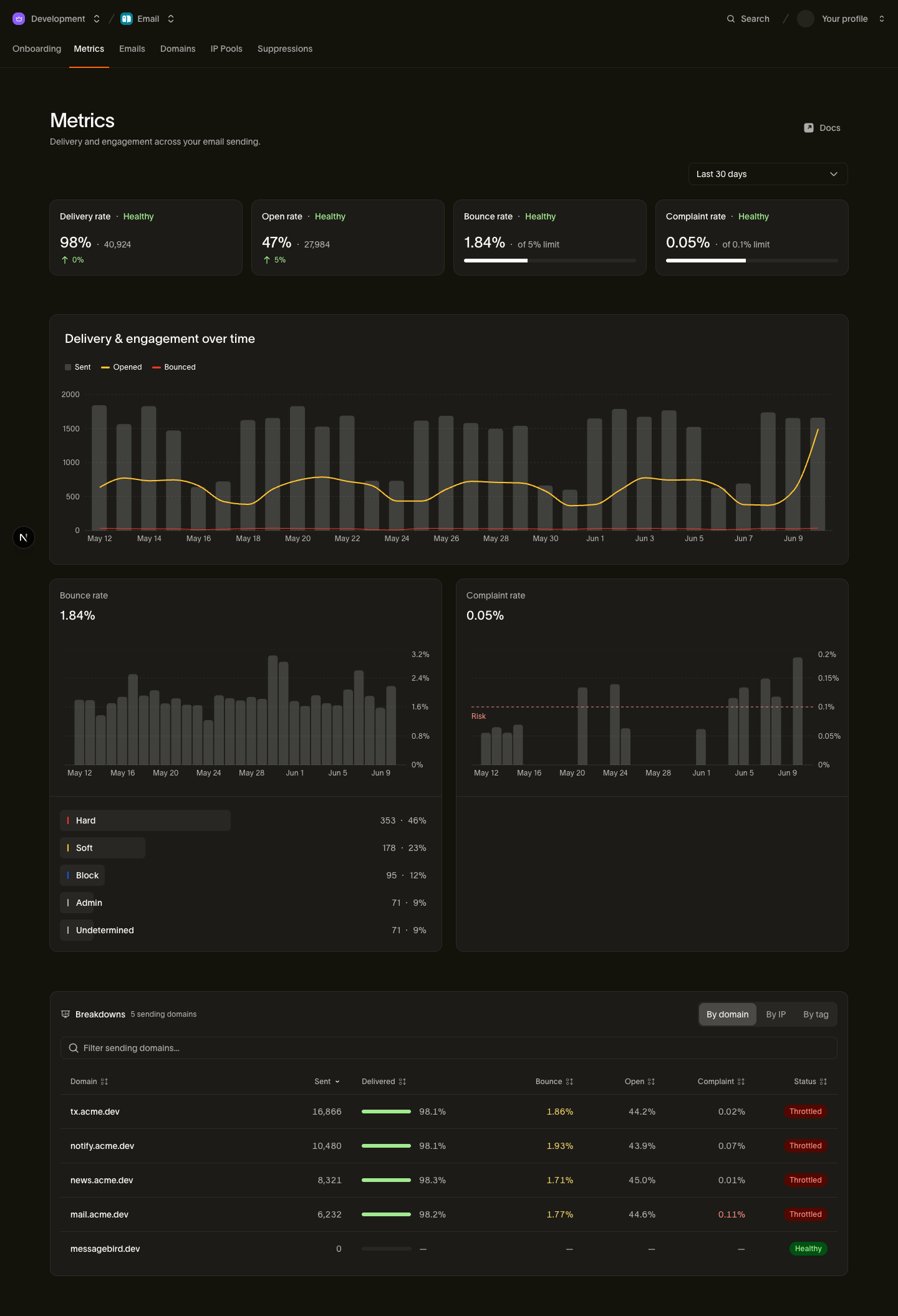
Make checking it a habit around your sending cadence — after every large campaign, and at least weekly for a steady transactional stream. The same numbers are available programmatically; see the tracking and metrics guide for the developer view.
What good looks like
- Complaint rate: well under 0.3%, ideally below 0.1%. Large providers treat 0.3% as the line where bulk senders get filtered aggressively — that's roughly one complaint per 300 delivered messages, so there is very little margin. A healthy program lives closer to one in a thousand.
- Bounce rate: low single digits. A couple of percent is normal; sustained rates above that — especially hard bounces — mean your list needs attention.
- Watch the trend, not just the level. A complaint rate that doubles week over week is a warning even while the absolute number still looks fine.
What happens when rates stay high
Sustained high bounce or complaint rates don't just hurt your standing with mailbox providers — they can trigger Bird's own protections. Sending that consistently generates bad signals may be automatically throttled (slowed down) or paused entirely until the underlying problem is fixed. This protects both your domain's long-term reputation and the shared infrastructure your mail rides on. If that has happened to you, the throttled or paused article explains what it means and how to recover.
How to react when a metric climbs
- Find the source. Use the Metrics page breakdowns to isolate the problem: one campaign, one sending domain, one audience segment? A spike usually has a single cause.
- Stop or shrink the offending send. Don't keep mailing the segment that's bouncing or complaining while you investigate.
- Fix the list. Bird has already suppressed the addresses that bounced or complained; your job is the rest of the segment they came from — see list hygiene for the routine.
- Rebuild gradually. Reputation recovers the way it's built: steady volume to engaged recipients. If the damage was significant, treat the recovery like a warmup — start with your best audience and widen slowly, as described in warming best practices.
Related pages
- Why is my sending throttled or paused? — what Bird's automatic protections mean and how to recover
- Warming best practices — ramping volume safely
- List hygiene — keeping bounces and complaints down at the source
- Tracking & metrics — the developer guide to the stats behind the Metrics page