Sending domains
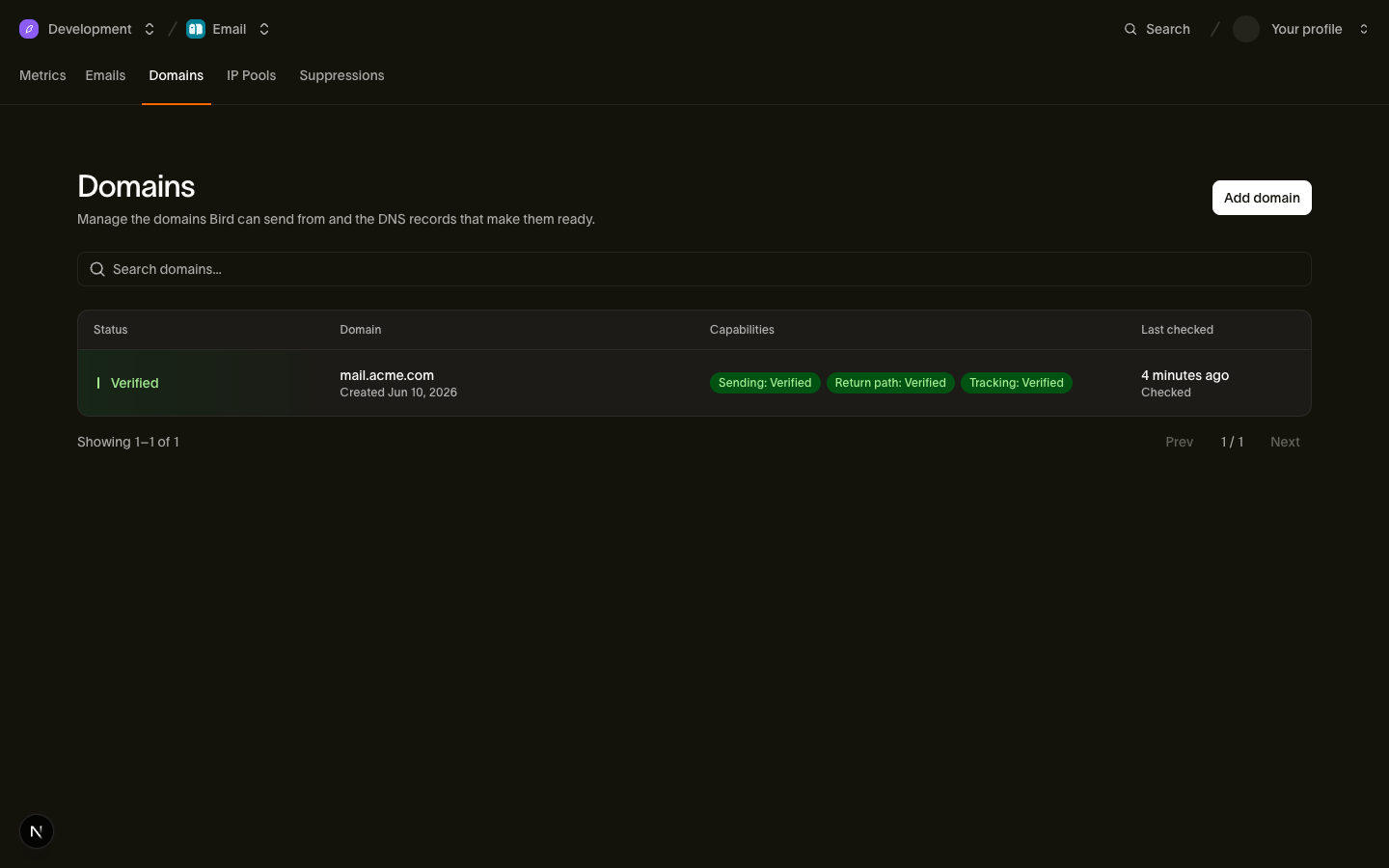
Before Bird will deliver email from your domain, you have to prove you own it and publish the DNS records that let mailbox providers authenticate your mail. A sending domain is the workspace-scoped resource (dom_...) that tracks that setup: which records to publish, what has verified, and whether the domain is ready to send.
Sharing a domain across workspaces
The same domain can be used by more than one workspace — even across different organizations — without anyone stepping on anyone else. Each organization proves ownership with its own DKIM key, and each workspace keeps its own return-path, tracking hostname, and tracking settings. In practice:
- Two workspaces in the same org can register the same domain; the second reuses the org's existing DKIM proof, so there's nothing new to publish to authenticate.
- Another organization on the same domain can never see your verification state or change your configuration.
- Each region (us1, eu1) is independent: the same domain in two regions is two separate registrations with their own DNS records. Register it in each region you send from.
Register a domain
Create the domain with POST /v1/email/domains. The call is workspace-scoped and takes the sending domain plus optional name parts for the return-path and tracking hostnames — you pass only the label (send, links), and Bird composes the full hostname under your sending domain. Omitted values default to send and links.
Use a dedicated subdomain (mail.acme.com) rather than your registered domain, so your sending reputation stays separate from everything else on the domain.
Przykład kodu
curl -s https://eu1.platform.bird.com/v1/email/domains \
  -H "Authorization: Bearer $BIRD_API_KEY" \
  -H "Content-Type: application/json" \
  -d '{
    "domain": "mail.acme.com",
    "return_path": { "name": "send" },
    "tracking": { "name": "links" }
  }'
The response is the full domain resource: status: pending, the DKIM selector assigned to your org, and a dns_records array listing exactly what to publish. Replace eu1 with us1 if your workspace is in the US region (API keys are region-prefixed: bk_eu1_..., bk_us1_...).
Publish the DNS records
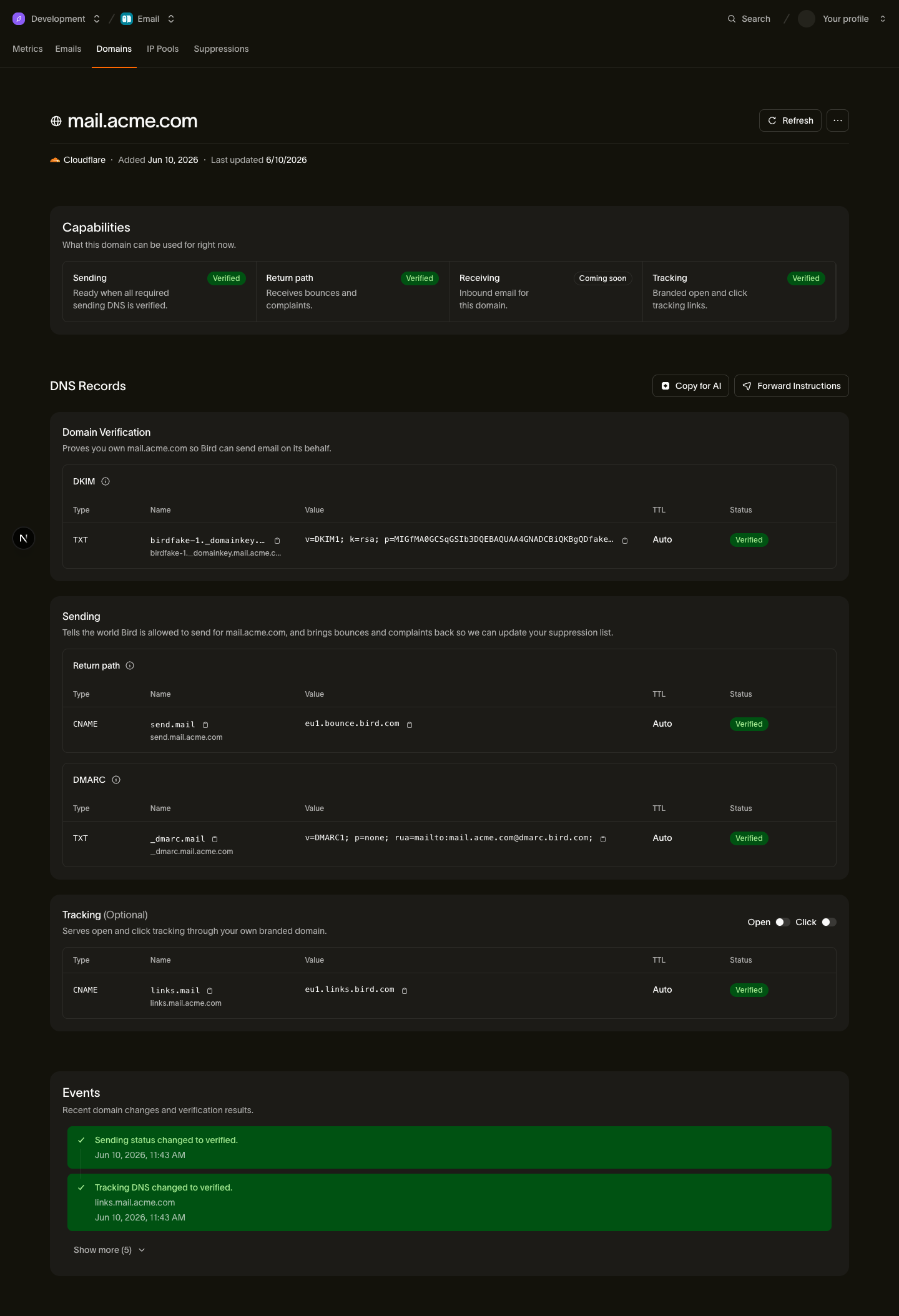
The dns_records array gives you copy-pasteable name, host, and value for each record. What you publish:
| Record | Type | Required for sending | What it does |
|---|---|---|---|
| DKIM | TXT | Yes | Proves ownership and signs your mail with your org's key |
| Return-path CNAME | CNAME | Yes | Routes bounces back to Bird and covers SPF — the SPF lookup follows the CNAME, so no SPF record on your domain apex is needed |
| DMARC | TXT | Yes | Any valid v=DMARC1 policy covering the sending domain — on the domain itself or on its registered (organizational) domain. A minimal p=none policy is enough. |
| Tracking CNAME | CNAME | No | Enables branded open/click tracking hostnames; tracked links are served over HTTPS once it verifies |
For what each record actually does and how to choose values, see DKIM, SPF, and DMARC. For step-by-step click-paths in your DNS provider's dashboard, see the per-provider knowledge-base walkthroughs — for example Cloudflare, Route 53, or the generic registrar guide.
The dashboard detects which provider hosts your domain's nameservers (the vendor field on the API resource — Cloudflare, Route 53, GoDaddy, Namecheap, and others) and deep-links you straight to that provider's DNS-management page.
Verification lifecycle
A new domain starts as pending. You never have to poll: Bird checks your records automatically, starting within seconds of registration and backing off over the first hours, then folding into a daily re-check that covers every active domain. Publishing your records and waiting is enough — most domains verify within minutes of DNS propagation. If you want an immediate check (for example right after editing DNS), call POST /v1/email/domains/{domain_id}/verify. Calling it again within about a minute is a no-op rather than an error, so there's no value in hammering it — give DNS a moment to propagate between checks.
The domain's top-level status reflects ownership, proven by the DKIM record:
- pending — the DKIM record has not been published yet.
- verified — the DKIM record is in place; ownership is confirmed.
- failed — a DKIM record exists but does not match the expected value, or a previously verified record was removed. Correct the record to recover.
- temporary_failure — DNS resolution failed transiently; verification is retried automatically.
- rejected — the domain was refused for policy reasons; contact support.
Readiness to send is reported separately under capabilities. The send gate is capabilities.sending, which verifies only when DKIM, the return-path CNAME, and a DMARC policy are all in place — SPF at the domain apex is not required. Tracking readiness (capabilities.tracking) is independent of the send gate: it controls whether branded open/click tracking can be used, never whether the domain may send.
Verification is continuous, not one-time. The daily re-check keeps verified domains honest: if your DNS later breaks, Bird notices. To avoid flapping on transient DNS blips, a verified domain is only downgraded after two consecutive failed re-checks — a single bad day never knocks a domain offline, and any successful re-check resets the counter. Downgrades take effect on the next send, and a downgraded domain re-verifies automatically once the records are fixed.
Managing domains
Regions. Domain state is regional. If you send from both us1 and eu1, register the domain in each region — each registration gets its own DKIM selector and verifies independently.
Changing return-path or tracking hostnames. These are per-workspace choices on your assignment. A hostname that has already verified is never replaced by an unverified one: changes are staged, verified alongside your active configuration, and promoted only once the new records check out.
Open/click tracking. The settings toggles are also per workspace and require a verified tracking domain — they are enforced per send, so one workspace's tracking choices never affect another workspace sending from the same domain.
Deletion. DELETE /v1/email/domains/{domain_id} removes only your workspace's assignment. The underlying registration is reference-counted: shared infrastructure (the domain registration, your org's DKIM key, shared return-path or tracking hostnames) is cleaned up only when the last reference to it is gone, so deleting your assignment can never break another workspace or organization still using the domain.
Next steps
- DKIM, SPF, and DMARC — what each record does and how to pick values.
- Per-provider DNS walkthroughs — setup click-paths for Cloudflare, Route 53, GoDaddy, and more.
- Domains API reference — full request/response schemas for every endpoint.