DKIM, SPF & DMARC
Email authentication is how receiving mail servers decide whether a message really came from your domain. Each DNS record you publish for a sending domain proves one specific thing: DKIM proves the message was signed by you, the return-path proves bounces flow back through an address aligned with your domain, and DMARC tells receivers what to do when those checks fail. This page describes each record Bird asks you to publish, what it proves, and how verification works. If you have not added a sending domain yet, start with Sending domains.
The DNS records
Your domain's detail page in the dashboard shows the full set of records to publish, with copyable host and value fields. The same set is returned by the API.
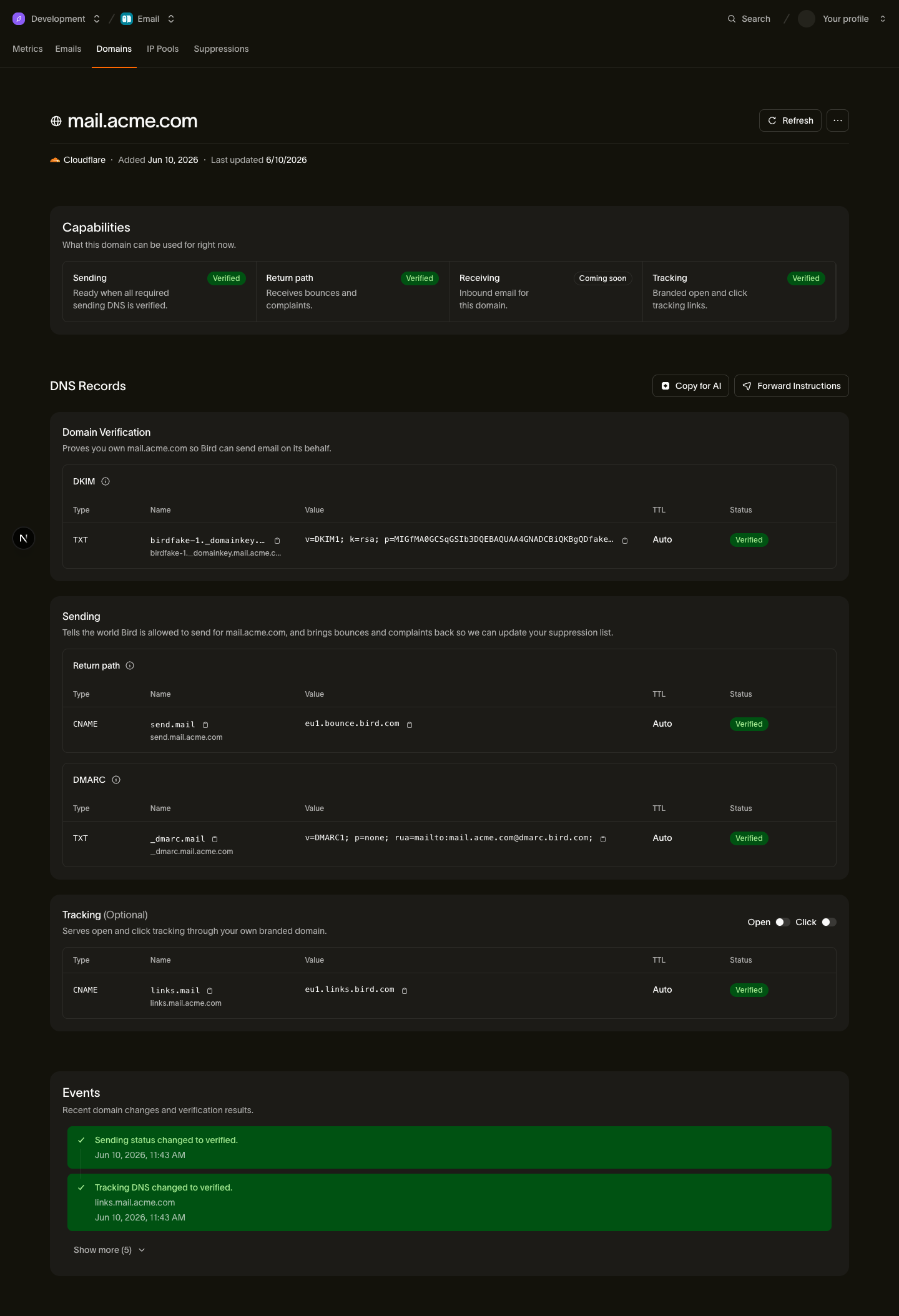
Three records gate sending: DKIM, the return-path CNAME, and DMARC. The tracking CNAME is optional and only gates branded open/click tracking, not sending itself.
DKIM (TXT)
DKIM is your ownership and signing proof. Bird generates a signing key for your organization and signs every message you send with it; the public half is published as a TXT record under a selector that is unique to your organization. Receivers fetch the public key from that selector and check the signature, which proves the message was sent by someone with control of your domain's DNS — and because each organization on Bird gets its own selector and key, your DKIM proof is yours alone, even if another Bird customer sends from the same physical domain.
| Type | Host | Value |
|---|---|---|
| TXT | <selector>._domainkey.example.com | v=DKIM1; k=rsa; p=<public-key> |
The selector and public key are generated for you — copy the exact host and value from the dashboard or the API rather than constructing them by hand. Long keys may be shown split into multiple quoted strings; that is standard DNS formatting and most providers accept the value as shown.
Return-path (CNAME)
The return-path record sets your envelope-from (bounce) domain. Bounces and delivery feedback for your messages are addressed to this hostname, and pointing it at Bird lets us process them for you. It is also what gives you SPF alignment: receivers evaluate SPF against the envelope-from domain, and because this hostname resolves to Bird's bounce infrastructure, SPF passes and aligns with your domain without any record at your apex (see Where's SPF? below).
| Type | Host | Value |
|---|---|---|
| CNAME | send.example.com | <region>.bounce.bird.com |
The host defaults to send. under your sending domain but is your choice per workspace — each workspace using a shared domain can pick its own return-path hostname (or share one). The value depends on the region your workspace sends from; copy it from the dashboard.
DMARC (TXT)
DMARC publishes your policy: it tells receivers what to do with mail that fails DKIM or SPF alignment (p=none to just monitor, p=quarantine or p=reject to enforce), and where to send aggregate reports (rua). Bird requires a DMARC record to exist before the domain can send, and verifies it by resolving your DNS directly — a record at the domain itself or an inherited record at a parent domain both count.
| Type | Host | Value |
|---|---|---|
| TXT | _dmarc.example.com | v=DMARC1; p=none; rua=mailto:example.com@dmarc.bird.com; |
The value above is Bird's recommendation: p=none is a safe starting policy, and the rua address routes aggregate reports to Bird. You can use your own policy and reporting address — the gate only requires that a valid DMARC record exists. If you already have a DMARC record (or one at a parent domain), you do not need to change it.
Tracking (CNAME, optional)
The tracking record gives you a branded hostname for open and click tracking. When click tracking is enabled, links in your messages are rewritten to this hostname instead of a generic Bird domain, which looks better to recipients and keeps link reputation tied to your brand. It is per workspace, like the return-path.
| Type | Host | Value |
|---|---|---|
| CNAME | links.example.com | <region>.links.bird.com |
This record is not part of the send gate — a domain with verified DKIM, return-path, and DMARC can send even if the tracking record is missing. It only gates whether branded open/click tracking is available.
Where's SPF?
You do not need to publish an SPF record at your domain's apex (example.com) for Bird, and the dashboard will not ask you to. This surprises people coming from providers that require an include: in your apex SPF record, so it is worth being explicit about why: SPF is evaluated against the envelope-from domain, not the visible From address. Your envelope-from is the return-path hostname (send.example.com), and the verified return-path CNAME points it at Bird's bounce infrastructure — which carries the SPF authorization. SPF passes, and it aligns with your domain because the return-path is a subdomain of it. Adding include: entries at your apex would do nothing for your Bird mail, and apex SPF records have a hard limit of 10 DNS lookups that is easy to exhaust, so not consuming any of it is a feature. If you have an existing apex SPF record for other senders, leave it alone — it neither helps nor hurts your Bird setup.
How verification works
Bird verifies your records by checking DNS — there is no callback from your DNS provider, so verification is detection, not notification:
- Right after you add a domain, Bird polls frequently — checks start within seconds and back off gradually over the first 72 hours. DNS records usually propagate in seconds to minutes, so most domains verify shortly after you publish the records. You can also trigger an immediate re-check from the dashboard or via the API.
- After that, a daily sweep re-checks every domain — pending domains that you fixed late, verified domains, and failed ones alike. If you publish the records on day four, the sweep picks them up automatically; you never need to re-add the domain.
- A record marked invalid means Bird resolved your DNS and found a wrong value — fix the record, then re-verify from the dashboard or wait for the sweep. A domain that simply stays pending means the records were not found yet, which is the normal state before you publish them.
- Downgrades are deliberate. If a verified domain's records disappear, Bird does not knock it offline on a single failed check — a transient DNS blip will not interrupt your sending. Only consecutive failed daily checks downgrade the domain, at which point sending is gated again until the records are restored.
The domain's status and per-record state are available at any time from the domain detail endpoint, and verification can be triggered on demand — see the Domains API reference.
Next steps
- Add and manage domains end to end: Sending domains
- Step-by-step instructions for your DNS provider, for example Cloudflare — guides for other registrars are in the same knowledge-base section
- Verify endpoints and record payloads: Domains API reference