Domain verification delays
You added the DNS records, but your domain still shows as unverified. In almost every case nothing is wrong — DNS changes simply take time to spread, and Bird keeps checking automatically until they do. This page explains why the wait happens and gives you a short checklist for the cases where a record really does need fixing.
DNS changes take time to propagate
When you add or edit a DNS record, your DNS provider doesn't push the change out to the whole internet instantly. Resolvers around the world cache DNS answers for a period set by the record's TTL (time to live), and they keep serving the old answer — including "this record doesn't exist" — until that cache expires. Depending on your provider and TTL settings, this can take anywhere from a few minutes to 24–48 hours.
So a domain that shows as unverified right after you've added the records usually isn't misconfigured — Bird just hasn't been able to see the new records yet.
Bird keeps checking — your domain isn't stuck
You never need to sit and refresh. Bird re-checks your domain's records automatically: checks start within seconds of registration and run frequently at first, then space out gradually over roughly the first 72 hours. After that, every active domain is still re-checked daily. The moment your records resolve, the next check picks them up and the domain verifies — there is no state where a domain is permanently stuck waiting for you to do something.
If you've just fixed a record and don't want to wait for the next automatic check, you can trigger one yourself: open the domain's page in the dashboard and use the re-check action. Manual re-checks are rate-limited to a handful per hour, which is plenty for normal use.
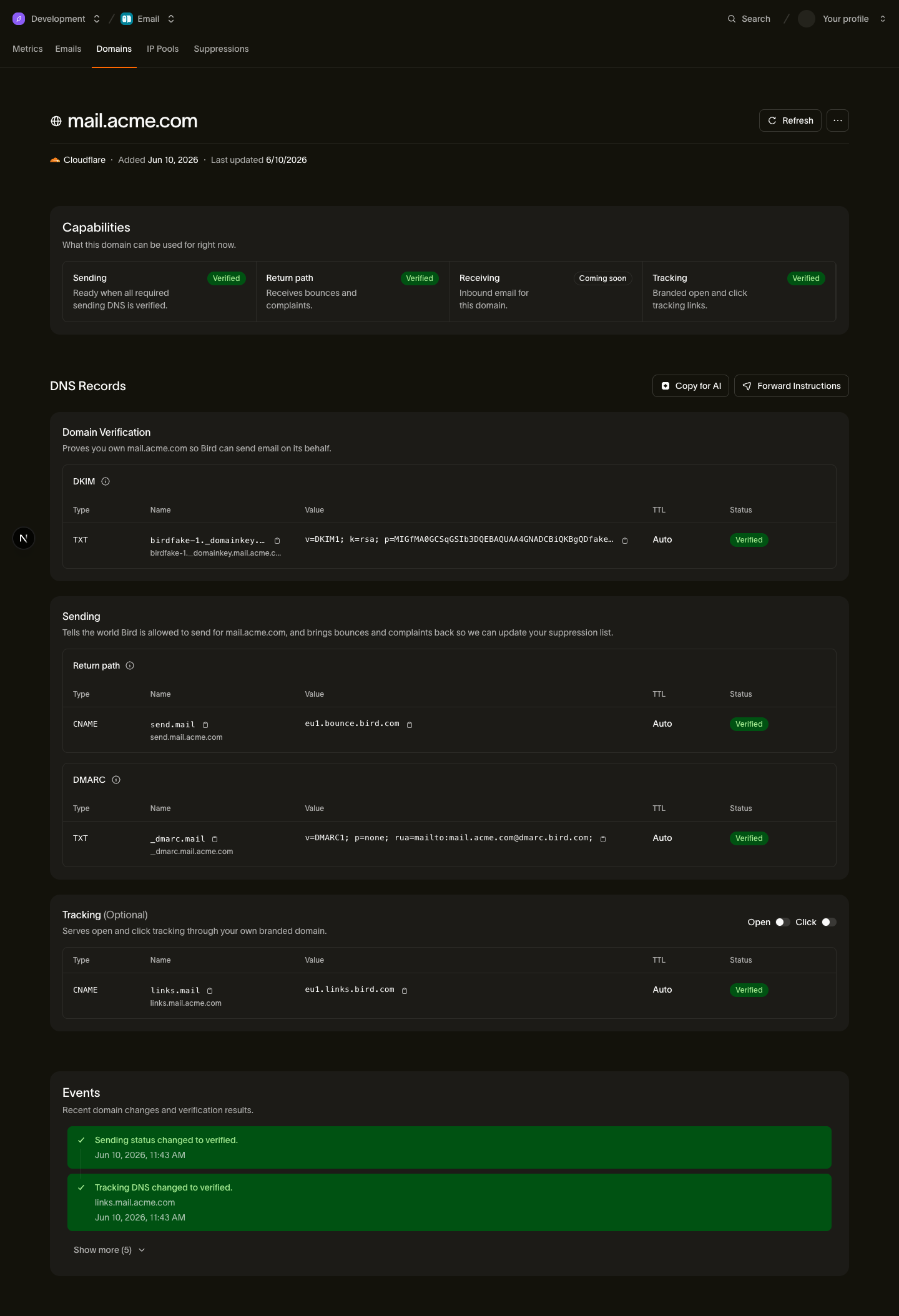
The domain page shows each record's individual status, so you can see exactly which record is still outstanding rather than guessing.
Checklist: when it's taking longer than expected
If a record still hasn't verified after a day or so, walk through these four checks — they cover the vast majority of real problems:
1. Check for a duplicated domain in the host name
This is the classic copy-paste mistake. Many DNS providers automatically append your domain to whatever you type in the host field. If Bird asks you to create a record for send.example.com and you paste the full name into a provider that appends the domain, you end up with send.example.com.example.com — which will never verify. If your provider appends the domain, enter only the part before it (here, just send). You can confirm what actually got published by looking up the record with any public DNS lookup tool.
2. Lower the TTL
If your records have a high TTL (some providers default to 24 hours or more), old cached answers stick around that much longer. Lowering the TTL to something short — 5 minutes is common — makes future changes propagate much faster. It won't speed up a change you've already made (the old TTL governs that), but it helps with every correction after.
3. Make sure you're editing the authoritative name servers
DNS records only count if they're published on the name servers that are actually authoritative for your domain. If your domain was recently moved between providers, or DNS is managed somewhere other than your registrar, you may be adding records in a control panel that the internet isn't reading from. Check which name servers your domain points to (a WHOIS lookup or your registrar's dashboard will show them) and make sure that's where you added the records.
4. Confirm all required records exist
Verifying ownership and being ready to send are checked separately, and sending requires three records:
- the DKIM TXT record,
- the return-path CNAME record, and
- a DMARC TXT record.
The DMARC check is deliberately lenient: any valid DMARC record covering your sending domain is enough, and a record on your parent (registered) domain counts. So if example.com already has a DMARC record, send.example.com is covered — you don't need to add another one. If none exists anywhere, a minimal monitoring-only policy is all Bird requires. See DKIM, SPF, and DMARC for what each record does and how to pick values.
A note on domains that were verified and then flipped back
Verification isn't a one-time event — Bird keeps re-checking verified domains daily so you find out if your DNS later breaks. To avoid false alarms from transient DNS hiccups, a verified domain is only downgraded after two consecutive failed checks, and it re-verifies automatically as soon as the records are back. So if a previously verified domain shows as failed, something really did change in your DNS — the duplicated-host and name-server checks above are the first places to look.
Related pages
- Sending domains — the full developer guide to registration, records, and the verification lifecycle
- DKIM, SPF, and DMARC — what each record does
- Per-provider DNS walkthroughs — step-by-step instructions for Cloudflare, Route 53, GoDaddy, and more