API key management
An API key is a credential for software, not people. It belongs to a single workspace, and any application holding it can call the Bird API as that workspace — send email, read delivery status, whatever the key's permissions allow. You manage keys entirely from the dashboard; this page covers the operational side. For the full technical contract (key format, request headers, scope tables), see Authentication & API keys.
Where keys live
Open Developers → API keys in your workspace. The page lists every key with its name, masked prefix, scopes, and when it was last used — useful for spotting keys that are no longer in service.
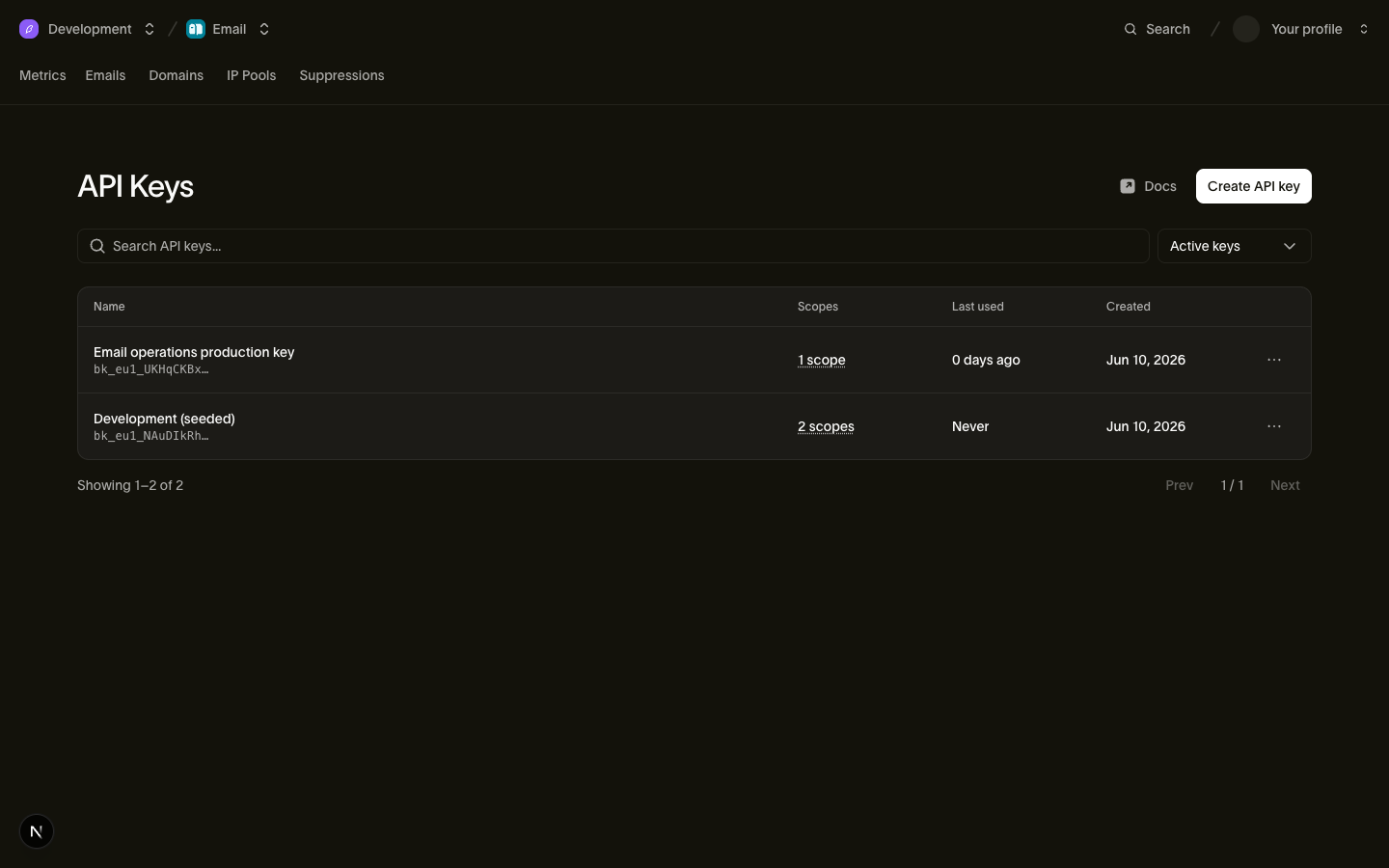
Creating and revoking keys requires the right workspace role — Admins and Developers have it. See Users, teams & roles.
Creating a key
- On the API keys page, choose to create a new key.
- Name it for its job, not its owner — "Billing service production" beats "Dave's key". Keys outlive the people who create them.
- Pick scopes. Each scope is granted at read or write level and controls what the key can do — for example, sending email versus only reading delivery status. Grant the narrowest set that works: a key that only sends email shouldn't be able to manage suppressions.
- Create the key and copy the secret immediately.
The secret is shown once
The full key appears exactly once, at creation. Bird stores only a one-way hash — after you leave that screen, nobody (including Bird) can show it to you again. Paste it straight into your secret manager or deployment configuration. If you lose it, you don't recover it; you revoke the key and create a new one.
A key's scopes are fixed at creation and can't be edited later. To change what a key can do, create a new key with the right scopes and revoke the old one — that way every key's permissions are exactly what they were when it was issued.
Revoking a key
Revoke a key from its detail page when it's no longer needed, when the person who had access to it leaves, or any time you suspect it leaked. Revocation is permanent — there is no un-revoke — and takes effect almost immediately: within a few minutes at most, every request using that key is rejected.
If you suspect a key has leaked, revoke first and ask questions later. Your application goes down for the time it takes to deploy a replacement key; a leaked key in the wrong hands costs far more.
To rotate a key without downtime: create a new key with the same scopes, deploy it, watch the old key's last-used time until traffic has moved, then revoke the old one.
Everything is recorded
Key creation and revocation are recorded in your organization's audit log — who did it, to which key, and when. Revoked keys also stay visible in the key list's history, so the record of what existed never disappears.
Good habits
- One key per application or environment. Separate keys for staging and production mean revoking one doesn't take down the other, and the audit trail tells you which system did what.
- Watch the last-used column. A key that hasn't been used in months is risk with no benefit — revoke it.
- Never put keys in client-side code or public repositories. Keys belong in server-side configuration and secret managers only.
Related
- Authentication & API keys — key anatomy, scope details, and the API contract
- Audit log — reviewing key creation and revocation events
- Users, teams & roles — who can manage keys