WhatsApp preferences
A preference is a statement about what a person wants, recorded against their handle on one channel. On WhatsApp the handle is a phone number in E.164 format. It is a separate record from a suppression, and both are checked before a send.
Preferences reach your workspace three ways: WhatsApp reports one, a recipient types a keyword, or you record one yourself. What you can do about each depends on who stated it.
What a preference carries
A statement is either revoked, an opt-out, or granted, consent.
It also carries a coverage, which decides how much traffic it stops. non_transactional covers marketing and other non-essential messages while transactional messages such as receipts and verification codes keep flowing. all covers every message. The Preferences tab shows these in its Covers column as Non-transactional and All messages.
A statement can narrow to one sender with sender_scope, which on WhatsApp identifies the business account. Without it, the statement covers the channel across your workspace, including accounts you connect later.
A person can hold several rows on one channel, such as a channel-wide opt-out next to a sender-scoped one. The most restrictive statement decides whether a message goes out.
Preferences Bird records for you
When Bird receives a Meta event saying a recipient has stopped marketing messages, it records a recipient-origin preference for that WhatsApp Business Account. The preference covers non-transactional messages. It does not create an all-message suppression, and it does not opt the person out of every account in your workspace.
A recipient can state the same thing by replying STOP. That preference is scoped to the business account they messaged, like the one above. It covers all messages, because a typed STOP is broader than WhatsApp's marketing opt-out. See keyword rules for what Bird recognizes and how to change the reply.
A later resume event updates that account's preference. Suppressions and other applicable preferences still apply, so a resume event on its own does not prove that a send is eligible.
Preferences you record
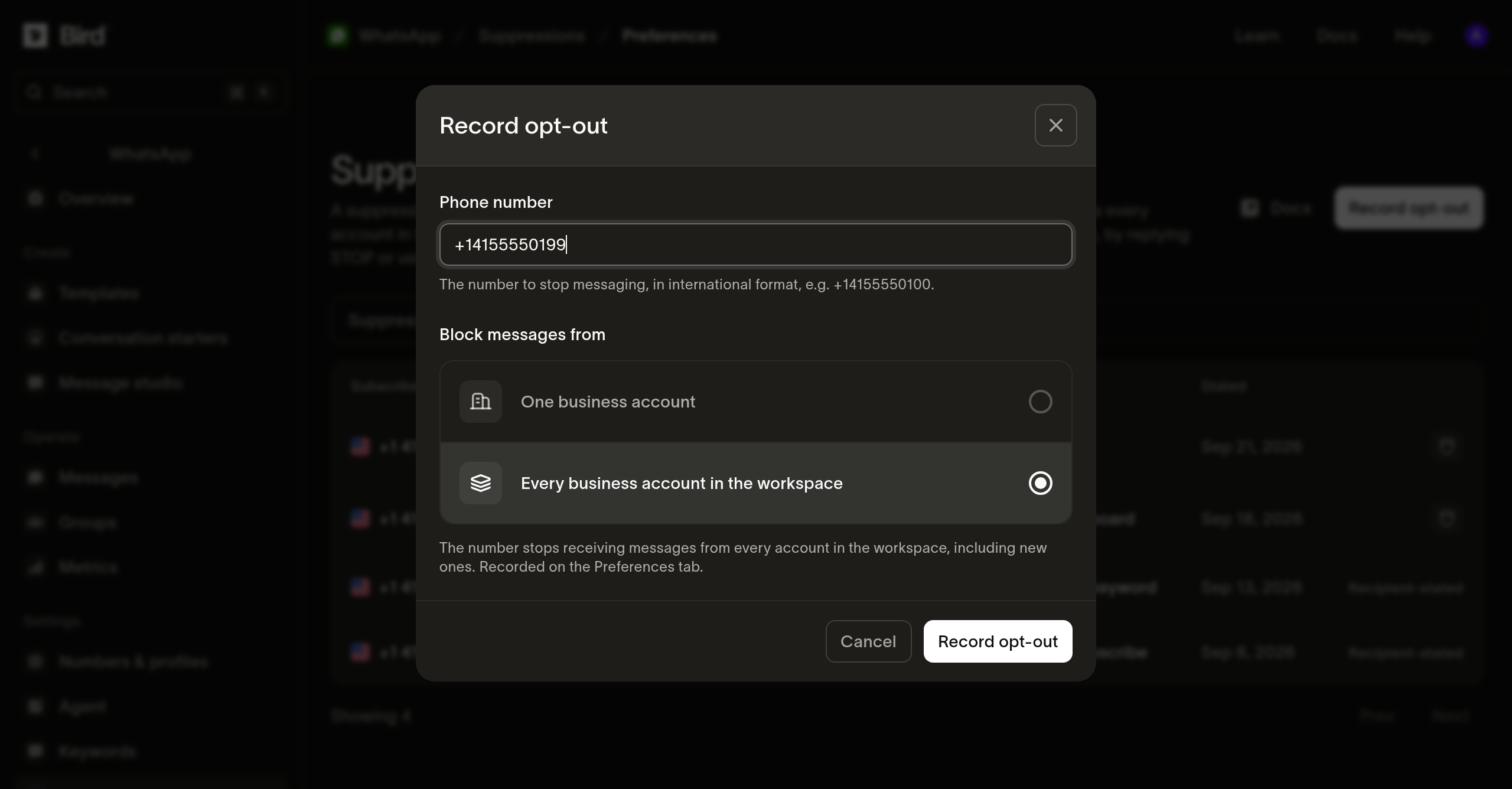
Open the Suppressions page and switch to the Preferences tab. Recording one there with Every business account in the workspace stops the address receiving WhatsApp messages from every account you hold, including accounts you connect later.
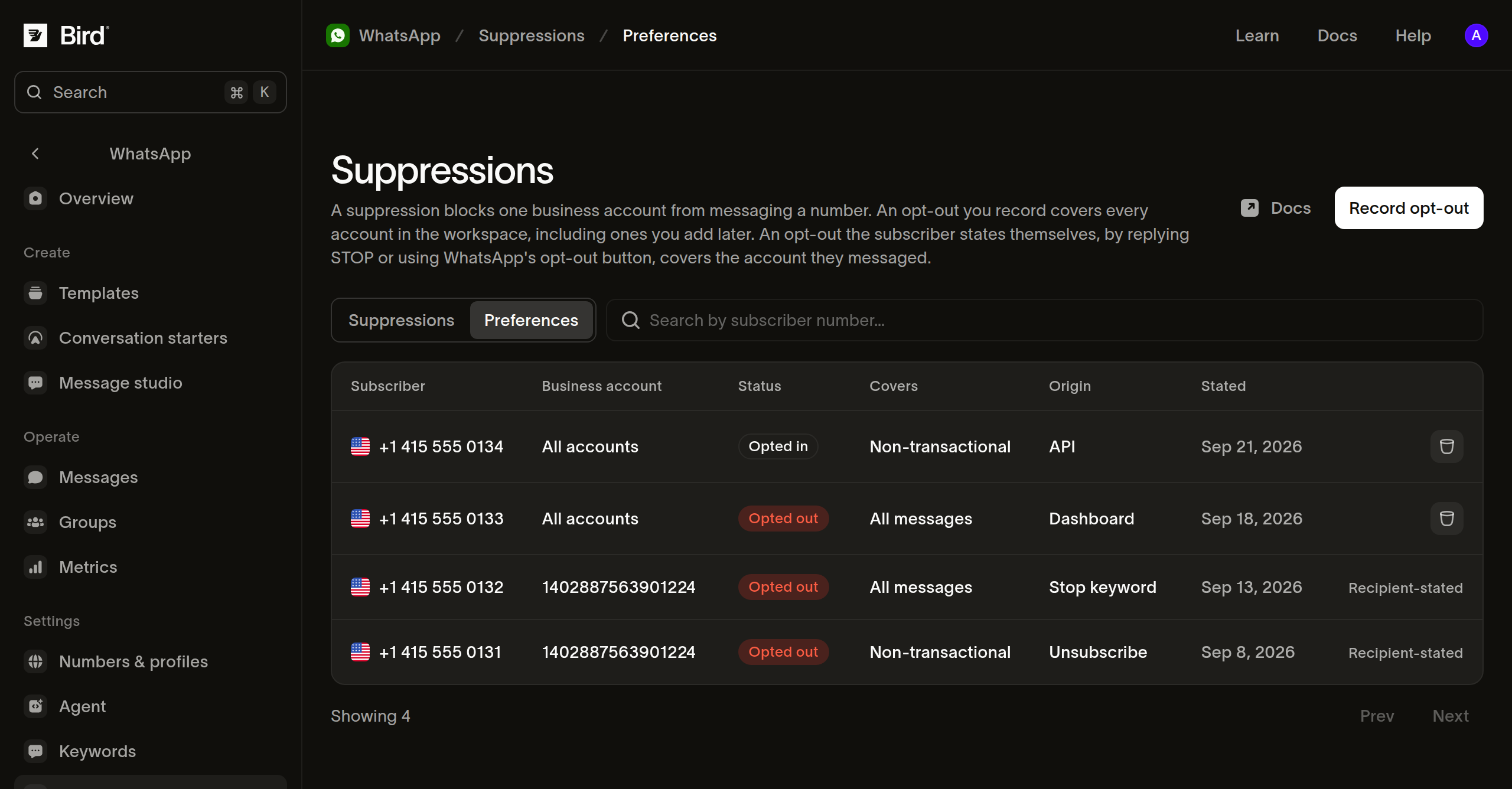
The Record opt-out dialog on that tab records all-message coverage.
To record one that stops marketing alone, use the workspace-wide Contacts > Preferences page, whose dialog offers Marketing messages as well as All messages.
Reading preferences from code
GET /v1/preferences returns the workspace's recorded preferences, most recently created first. Pass channel=whatsapp to narrow to this channel, and handle with it to look up everything on record for one number before messaging them:
for await (const preference of bird.preferences.list({
  channel: "whatsapp",
  handle: "+15550001234",
})) {
  console.log(preference.status, preference.coverage, preference.sender_scope);
}
for preference in client.preferences.list(channel="whatsapp", handle="+15550001234"):
print(preference.status, preference.coverage, preference.sender_scope)for pref, err := range client.Preferences.List(context.Background(), bird.PreferencesListParams{
Channel: bird.PreferenceChannelWhatsapp,
Handle: "+15550001234",
}) {
if err != nil {
log.Fatal(err)
}
fmt.Println(*pref.Status, *pref.Coverage)
}foreach ($bird->preferences->list(['channel' => 'whatsapp', 'handle' => '+15550001234']) as $preference) {
echo $preference->getStatus(), ' ', $preference->getCoverage(), PHP_EOL;
}bird preferences list --channel whatsapp --handle +15550001234curl "https://us1.platform.bird.com/v1/preferences?channel=whatsapp&handle=%2B15550001234" \
-H "Authorization: Bearer $BIRD_API_KEY"handle requires channel, since the same handle can exist on more than one channel.
Recording a preference from code
POST /v1/preferences records one statement. Writing is an upsert keyed on the channel, handle, and sender scope, so a new statement replaces the key's current one:
const result = await bird.preferences.create({
  channel: "whatsapp",
  handle: "+15550001234",
  status: "revoked",
  coverage: "non_transactional",
});
console.log(result.applied, result.preference?.id);
result = client.preferences.create(
channel="whatsapp",
handle="+15550001234",
status="revoked",
coverage="non_transactional",
)
print(result.applied, result.preference.id)result, err := client.Preferences.Create(context.Background(), bird.PreferencesCreateParams{
Channel: bird.PreferenceChannelWhatsapp,
Handle: "+15550001234",
Status: bird.PreferenceStatusRevoked,
Coverage: bird.PreferenceCoverageNonTransactional,
})
if err != nil {
log.Fatal(err)
}
// A newer statement already on file answers Applied false instead of an
// error, with the surviving statement in Preference.
if result.Applied != nil && *result.Applied {
fmt.Println("opt-out recorded")
}$result = $bird->preferences->create(
channel: 'whatsapp',
handle: '+15550001234',
status: 'revoked',
coverage: 'non_transactional',
);
echo var_export($result->getApplied(), true);bird preferences create \
--channel whatsapp \
--handle +15550001234 \
--status revoked \
--coverage non_transactionalcurl -X POST https://us1.platform.bird.com/v1/preferences \
-H "Authorization: Bearer $BIRD_API_KEY" \
-H "Content-Type: application/json" \
-d '{"channel":"whatsapp","handle":"+15550001234","status":"revoked","coverage":"non_transactional"}'Statements are ordered by when they were made rather than when they arrive. The API refuses a statement dated earlier than the key's current one and returns applied: false with the statement that survived. The refusal stays on the key's history.
A 201 means the key had no record and this statement created one. A 200 returns the key's surviving record, whether this statement replaced it, repeated it, or was refused.
What you can reverse
One you recorded, you can remove from the Preferences tab or with DELETE /v1/preferences/{preference_id} once the recipient asks you to resume sending.
A statement the person made themselves is theirs to reverse. An unsubscribe or a stop keyword ends when they opt back in, and a delete returns 422. To resume messaging with their consent, record a granted statement carrying consented_at, the moment they consented. The grant applies when that moment is later than the opt-out it reverses, so it records the change of mind rather than erasing the original statement.
A delete is ordered like any other statement, using the time it is received. If the record carries a statement made after that moment, the delete is refused and returned with applied: false alongside the surviving record.
When a delivery error arrives first
A provider delivery error can report a stop before Bird has recorded a matching event. Preserve the recipient's choice and investigate the preference and event history rather than treating a missing local record as permission to send.
Next steps
- Suppressions: the addresses your workspace blocks directly.
- Keyword rules: the words that record a preference on your numbers.
- Message status webhooks: the
whatsapp.rejectedpayload a blocked send produces.
Related resources
Continue with the documentation, guides and examples for this topic.