Sender reputation monitoring
Your sender reputation is the track record mailbox providers keep on your domain and IPs, and it decides whether your mail reaches the inbox at all. You can't read providers' internal scores directly, but the metrics that drive them are visible in your own sending data. Watching them is how you catch a problem while it is still small.
The metrics that matter
- Bounce rate is the share of mail that couldn't be delivered. Hard bounces (the address doesn't exist) are the damaging kind: they signal stale or bad data, and providers read a high hard-bounce rate as the mark of a purchased or scraped list.
- Complaint (spam) rate is the share of delivered mail that recipients marked as junk. A sustained increase is a strong signal that recipients did not expect or want the mail.
- Unsubscribe rate is people opting out. Unsubscribes do not hurt your reputation by themselves because they are the healthy alternative to a complaint. A sudden spike still indicates that a send missed the mark, and other recipients may complain next time.
Where to see them
The Metrics page in the Bird dashboard shows your delivery, open, bounce, and complaint rates over time, with breakdowns by sending domain and more.
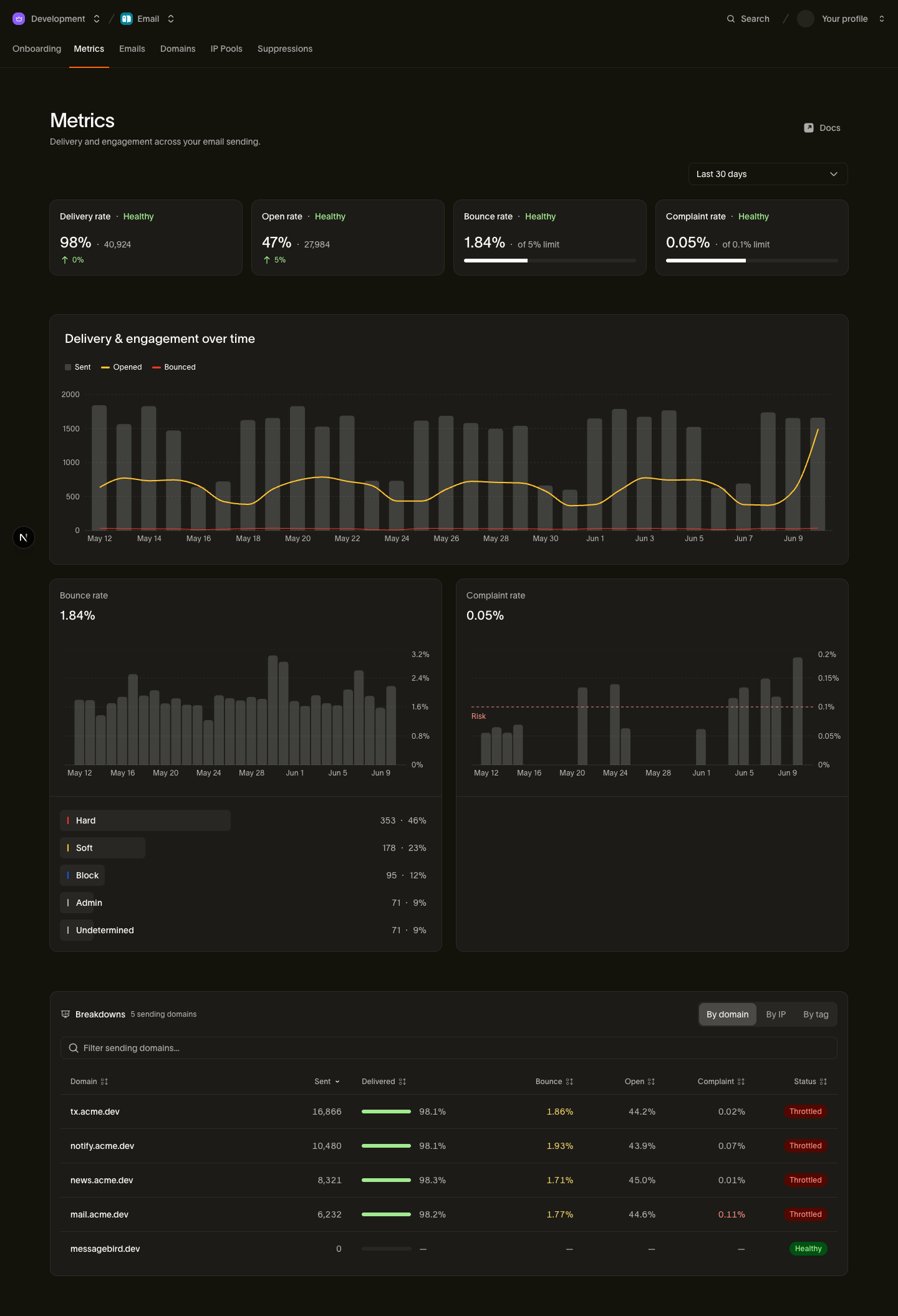
Review these metrics after large campaigns and at an interval that fits your sending cadence. The same data is available through the stats API.
These numbers show the inputs to your reputation. To see the outcome, where your mail actually lands, the Inbox Insights page measures inbox and spam placement per mailbox provider for your verified domains. The Inbox Insights guide explains the measurements.
What good looks like
- Complaint rate: under 0.3%, ideally below 0.1%. A 0.3% rate is about three complaints per 1,000 delivered messages. Aim for fewer than one per 1,000.
- Bounce rate: investigate well before the 5% Risk threshold on the Metrics summary. The Breakdowns panel classifies a sender above 0.6% as Throttled, so review sustained increases early, especially when hard bounces drive them.
- Watch the value and trend. A complaint rate that doubles week over week is a warning even while the absolute number remains below the limit.
What happens when rates stay high
Sustained high bounce or complaint rates hurt your standing with mailbox providers. They may filter, defer, or block more of your mail as that reputation declines.
Bird classifies email health as Healthy, Watching, or Throttled so you can see the risk. These labels are diagnostic. The Throttled label does not slow or pause your sending. Why does email health show Throttled? explains the distinction and the problems to investigate separately.
How to react when a metric climbs
- Find the source. Use the Breakdowns panel on the Metrics page to isolate the problem. A spike usually has a single cause.
- Stop or shrink the offending send. Don't keep mailing the segment that's bouncing or complaining while you investigate.
- Fix the list. The addresses that hard-bounced or complained are already suppressed; your job is the rest of the segment they came from. List hygiene has the routine.
- Rebuild gradually. Reputation recovers the way it's built: steady volume to engaged recipients. If the damage was significant, treat the recovery like a warmup: start with your best audience and widen slowly, as described in warming best practices.
Next steps
- Why does email health show Throttled?: what the diagnostic label means and how to respond
- Warming best practices: ramping volume safely
- List hygiene: keeping bounces and complaints down at the source
- Email stats API: the developer guide to the stats behind the Metrics page
Related resources
Continue with the documentation, guides and examples for this topic.