Webhooks & events
When something happens in your workspace — an email is delivered, a recipient bounces, a sending domain verifies — Bird POSTs a signed JSON event to every webhook endpoint you have subscribed to that event type. Bird follows the Standard Webhooks specification for headers, signing, and payload structure, so if you already verify webhooks from another Standard Webhooks platform, the same verification code works here unchanged.
Create an endpoint
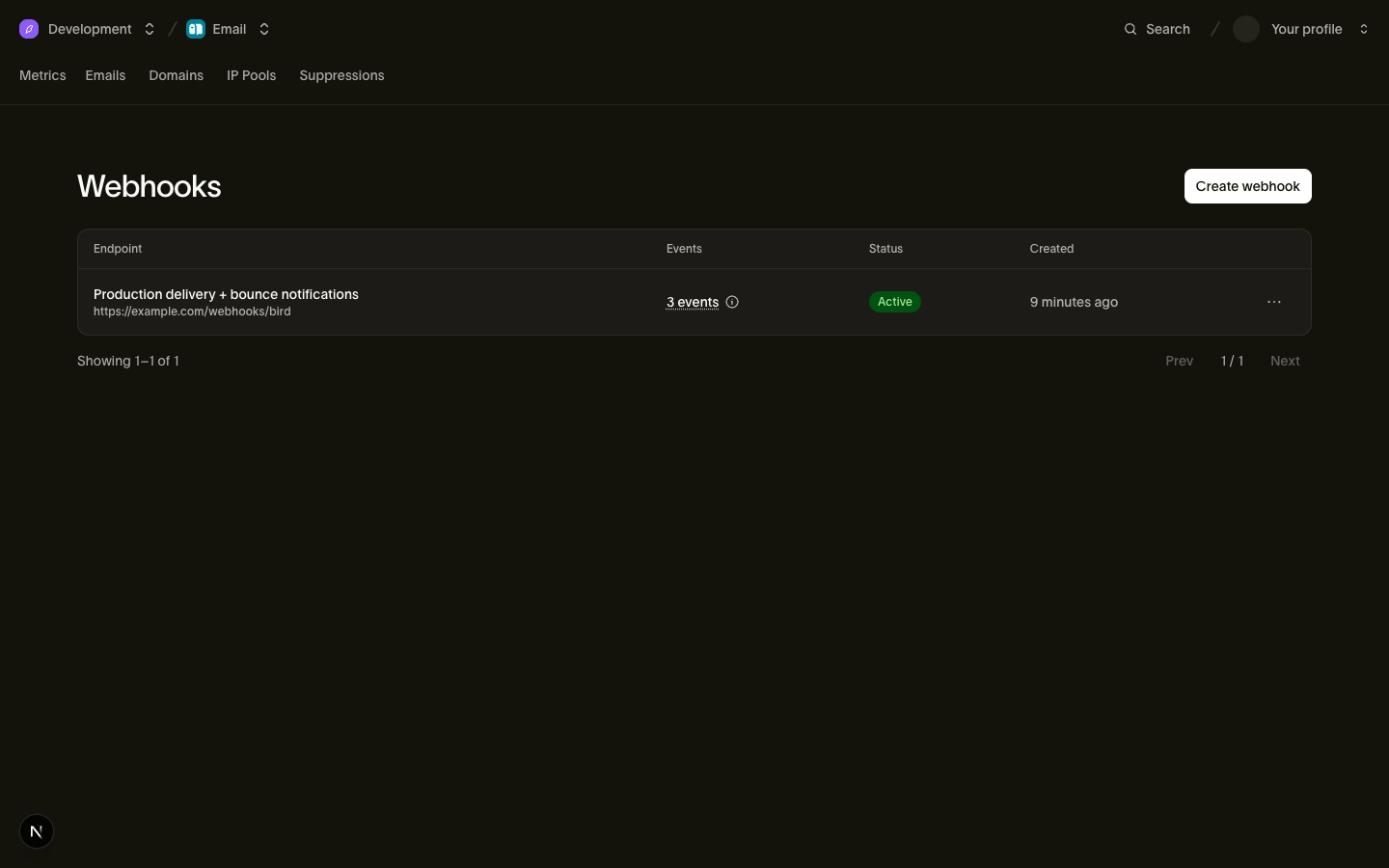
Register an endpoint in the dashboard under Developers → Webhooks, or via POST /v1/webhooks. Endpoint URLs must be HTTPS, and Bird rejects URLs that resolve to private, loopback, link-local, or otherwise internal addresses — the check runs at creation time and again at every delivery, so DNS tricks can't redirect deliveries to an internal target.
Codevoorbeeld
curl -X POST https://us1.platform.bird.com/v1/webhooks \
  -H "Authorization: Bearer bk_us1_..." \
  -H "Content-Type: application/json" \
  -d '{
    "url": "https://example.com/webhooks/bird",
    "events": ["email.delivered", "email.bounced", "email.complained"],
    "description": "Production delivery + bounce notifications"
  }'
The events array is an explicit list of event types from the catalog below — an endpoint receives only the types it lists, and you can change the list at any time with PATCH /v1/webhooks/{webhook_id} (the new filter applies to future deliveries). To receive everything, subscribe to every type; check back here when new event types ship, since subscriptions never expand on their own.
The 201 response includes the endpoint's signing secret (prefixed whsec_) exactly once — store it in your secret manager immediately. It cannot be retrieved again; if you lose it, rotate it.
Codevoorbeeld
{
  "id": "whk_01krdgeqcxet5s7t44vh8rt9mg",
  "url": "https://example.com/webhooks/bird",
  "events": ["email.delivered", "email.bounced", "email.complained"],
  "description": "Production delivery + bounce notifications",
  "status": "active",
  "secret": "whsec_MfKQ9r8GKYqrTwjUPD8ILPZIo2LaLaSw"
}
Endpoints support full CRUD: GET /v1/webhooks lists them, GET /v1/webhooks/{webhook_id} fetches one, PATCH updates any field, and DELETE removes the endpoint and stops all deliveries. A workspace can register multiple endpoints, each with its own URL, event filter, and secret.
Verify signatures
Every delivery carries three headers:
| Header | Value |
|---|---|
| webhook-id | Stable ID for this delivery — automatic retries of the same delivery reuse it |
| webhook-timestamp | Unix timestamp (seconds) of the delivery attempt |
| webhook-signature | v1,<base64 HMAC-SHA256> — may contain multiple space-delimited signatures |
The signature is an HMAC-SHA256 over the string {webhook-id}.{webhook-timestamp}.{raw request body}, keyed with your endpoint's secret (strip the whsec_ prefix and base64-decode the remainder to get the key bytes). Your handler should verify the signature, reject deliveries whose webhook-timestamp is more than 5 minutes old, and deduplicate on webhook-id — Bird delivers at-least-once, so the same delivery can arrive more than once.
With the Bird SDK, all three checks are one call:
Codevoorbeeld
// Pass the RAW request body; set the secret via new BirdClient({ webhooks: { secret } }).
const event = bird.webhooks.unwrap(rawBody, headers);
console.log(event.type); // discriminated union — narrow on event.type
Any Standard Webhooks reference library works too. If you verify by hand, the recipe is:
Codevoorbeeld
import { createHmac, timingSafeEqual } from "node:crypto";

function verify(rawBody: string, headers: Record<string, string>, secret: string): boolean {
  const id = headers["webhook-id"];
  const timestamp = headers["webhook-timestamp"];
  if (Math.abs(Date.now() / 1000 - Number(timestamp)) > 300) return false; // 5-minute tolerance

  const key = Buffer.from(secret.slice("whsec_".length), "base64");
  const expected = createHmac("sha256", key)
    .update(`${id}.${timestamp}.${rawBody}`)
    .digest("base64");

  // The header can hold several signatures (e.g. during secret rotation) — accept if any matches.
  return headers["webhook-signature"].split(" ").some((part) => {
    const sig = Buffer.from(part.replace(/^v1,/, ""), "base64");
    return (
      sig.length === Buffer.byteLength(expected, "base64") &&
      timingSafeEqual(sig, Buffer.from(expected, "base64"))
    );
  });
}
Always compute the HMAC over the raw request body bytes — parsing and re-serializing the JSON will change whitespace or key order and break the signature.
Delivery semantics
Each delivery is one event per HTTP POST with Content-Type: application/json — no batching. Your endpoint has 5 seconds to respond; any 2xx status counts as success, and anything else (including 3xx redirects and timeouts) counts as a failure. Respond quickly and process asynchronously — queue the event and return 200 before doing real work.
Failed deliveries are retried up to 10 attempts with exponential backoff (plus a little jitter so retries don't synchronize):
| Attempt | Delay after previous failure |
|---|---|
| 1 | Immediate |
| 2 | 5 seconds |
| 3 | 30 seconds |
| 4 | 2 minutes |
| 5 | 10 minutes |
| 6 | 30 minutes |
| 7 | 1 hour |
| 8 | 2 hours |
| 9 | 4 hours |
| 10 | 8 hours |
All retries of a delivery carry the same webhook-id, which is what makes deduplication work. After the tenth attempt the delivery is permanently failed — the source event is retained and can be replayed, and a replay is a new delivery with a new webhook-id.
Deliveries are not ordered. An email.delivered can arrive before the email.accepted for the same message, especially when retries are involved — sort by the timestamp field inside the event payload, never by arrival order.
Operate your endpoints
Test sends
POST /v1/webhooks/{webhook_id}/test sends a synthetic, fully-signed event to your endpoint and returns the outcome synchronously — whether your endpoint accepted it, the HTTP status it returned, and the round-trip latency. Pass {"event_type": "email.delivered"} to simulate a specific event type, or omit the body for a generic test ping. An unreachable endpoint is reported in the response body, not as a request error, so you can use this to debug connectivity. For end-to-end testing with real event flows, send to the sandbox addresses — sandbox sends emit real webhook events through the normal delivery path, which is the best way to exercise your handler before going live.
Replaying failed events
POST /v1/webhooks/{webhook_id}/replay queues failed events for redelivery — pass since/until timestamps to bound the window (default: the last 24 hours). The request returns 202 and events are redelivered asynchronously; each replayed event is a new delivery with a new webhook-id, and the standard retry schedule applies if it fails again. GET /v1/webhooks/{webhook_id}/attempts lists recent delivery attempts with status codes and latency when you need to see what failed and why.
Rotating the signing secret
POST /v1/webhooks/{webhook_id}/rotate-secret generates a new secret and returns it once. For the next 24 hours every delivery is signed with both the old and the new secret — the webhook-signature header carries both signatures space-delimited (v1,<old> v1,<new>), so you can deploy the new secret without dropping a single event. Standard Webhooks libraries try all signatures automatically. After 24 hours the old secret stops signing.
Auto-pause and re-enable
Endpoint status is active, degraded, or paused. Sustained delivery failures mark an endpoint degraded (a health warning — delivery continues, and the status clears itself when deliveries succeed again), and an endpoint that keeps failing for several days is automatically paused: all delivery stops and you're notified by email. A paused endpoint never resumes on its own — re-enable it with PATCH /v1/webhooks/{webhook_id} and {"status": "active"} (or from the dashboard) once it's healthy.
Event catalog
Event payloads are compact, recipient-scoped facts: enough to know what happened and correlate it to your system (email_id + recipient_id + workspace_id), not the full resource. If you need more context, fetch the email by email_id. Per-event payload schemas live in the email events reference.
| Event | When it fires |
|---|---|
| email.accepted | Bird accepted the send and is preparing to deliver |
| email.processed | Bird processed the message and queued it for delivery |
| email.rejected | A recipient was rejected before the delivery pipeline (e.g. suppressed) |
| email.delivered | The recipient's mail server accepted the message |
| email.deferred | Temporary delivery failure — Bird is retrying |
| email.bounced | Permanent delivery failure for a recipient |
| email.out_of_band_bounce | A late bounce arrived after the message was already delivered |
| email.complained | The recipient marked the message as spam |
| email.opened | The tracking pixel loaded |
| email.clicked | A tracked link was clicked |
| email.unsubscribed | The recipient unsubscribed via a footer or link |
| email.list_unsubscribed | RFC 8058 one-click list-unsubscribe |
| domain.verified | A sending domain passed DNS verification |
| domain.failed | A previously verified domain failed a re-check |
| email_suppression.created | An address was automatically suppressed after a bounce, complaint, or unsubscribe |
Every delivery body is the Standard Webhooks nested envelope — exactly three fields: a type, a timestamp, and a type-specific data object. The event's identity rides in the webhook-id header, not the body. The envelope timestamp is when the event occurred (for email.delivered, the moment the receiving server accepted the message) — distinct from the webhook-timestamp header, which is the time of this delivery attempt and changes on every retry.
Codevoorbeeld
{
  "type": "email.delivered",
  "timestamp": "2026-06-10T14:30:00Z",
  "data": {
    "email_id": "em_01krdgeqcxet5s7t44vh8rt9mg",
    "recipient_id": "er_01krdgeqcxet5s7t44vh8rt9mg",
    "workspace_id": "ws_01krdgeqcxet5s7t44vh8rt9mg",
    "recipient": "user@example.com",
    "recipient_role": "to",
    "tags": [{ "name": "category", "value": "welcome" }],
    "metadata": { "order_id": "ord_123" }
  }
}
Every email event's data carries this identity base (email_id, recipient_id, workspace_id, the recipient address, and its envelope recipient_role) plus the tags and metadata from the send request (null when not provided); event types with more to say extend it with type-specific fields. Within a variant the field set is stable — fields are required by default, and presence never varies by anything other than the event type.
Event names follow resource.action and are never renamed; new types are added as products ship, so write your handler to ignore types it doesn't recognize.
Related
- Webhooks API reference — full endpoint and schema documentation
- Email events reference — per-event payload fields
- Testing & sandbox — sandbox sends drive real webhook deliveries, ideal for testing handlers