Authentication & API keys
Every programmatic request to the Bird API authenticates with an API key passed as a bearer token. Keys belong to a workspace, carry a fixed set of permissions chosen at creation, and are shown in full exactly once.
How requests authenticate
Pass your key in the Authorization header on every request:
Esempio di codice
curl -X POST https://us1.platform.bird.com/v1/email/messages \
  -H "Authorization: Bearer bk_us1_Ab3xKq9mP2wR5tY8uI1oL4nJ..." \
  -H "Content-Type: application/json" \
  -d '{ "from": "hello@yourdomain.com", "to": ["delivered@messagebird.dev"], "subject": "Hi", "text": "Hello." }'
The region in the key prefix tells you which host to call: bk_us1_... keys go to https://us1.platform.bird.com, bk_eu1_... keys to https://eu1.platform.bird.com. Sending a key to the wrong regional host returns 421 misdirected_request — see Regions.
A missing or invalid key returns 401. A valid key that lacks the permission an endpoint requires returns 403. Full request/response semantics live in the authentication reference.
Anatomy of a key
Esempio di codice
bk_us1_Ab3xKq9mP2wR5tY8uI1oL4nJ...
└┬┘└┬┘ └──────────┬──────────┘└┬┘
 │  │          payload      checksum
 │  └ region (routes the request)
└ Bird key prefix- Prefix — bk_{region}_ identifies the credential type and region. The fixed prefix means GitHub secret scanning can detect a leaked Bird key in a public repository, and the region segment routes your request to the right host.
- Payload — a long random string with 128+ bits of entropy.
- Checksum — the last 6 characters are a checksum of the rest of the key, so an SDK or the API can reject a mistyped or truncated key immediately, before it is ever looked up.
The full key is returned once, in the response that creates it. Bird stores only a cryptographic hash (HMAC-SHA-256) — there is no way to retrieve the plaintext again, for you or for Bird. What you can see afterwards is the key_prefix (the first 12 characters, e.g. bk_us1_Ab3x) and a stable 12-character fingerprint for matching a key in logs and audit trails without exposing its value.
If you lose a key, you don't recover it — you revoke it and create a new one.
Creating a key
Create keys in the dashboard under Developers → API keys, or programmatically via POST /v1/api-keys. Creating and revoking keys requires the api_keys:write permission, which the Admin and Developer workspace roles hold — see Users, teams & roles.
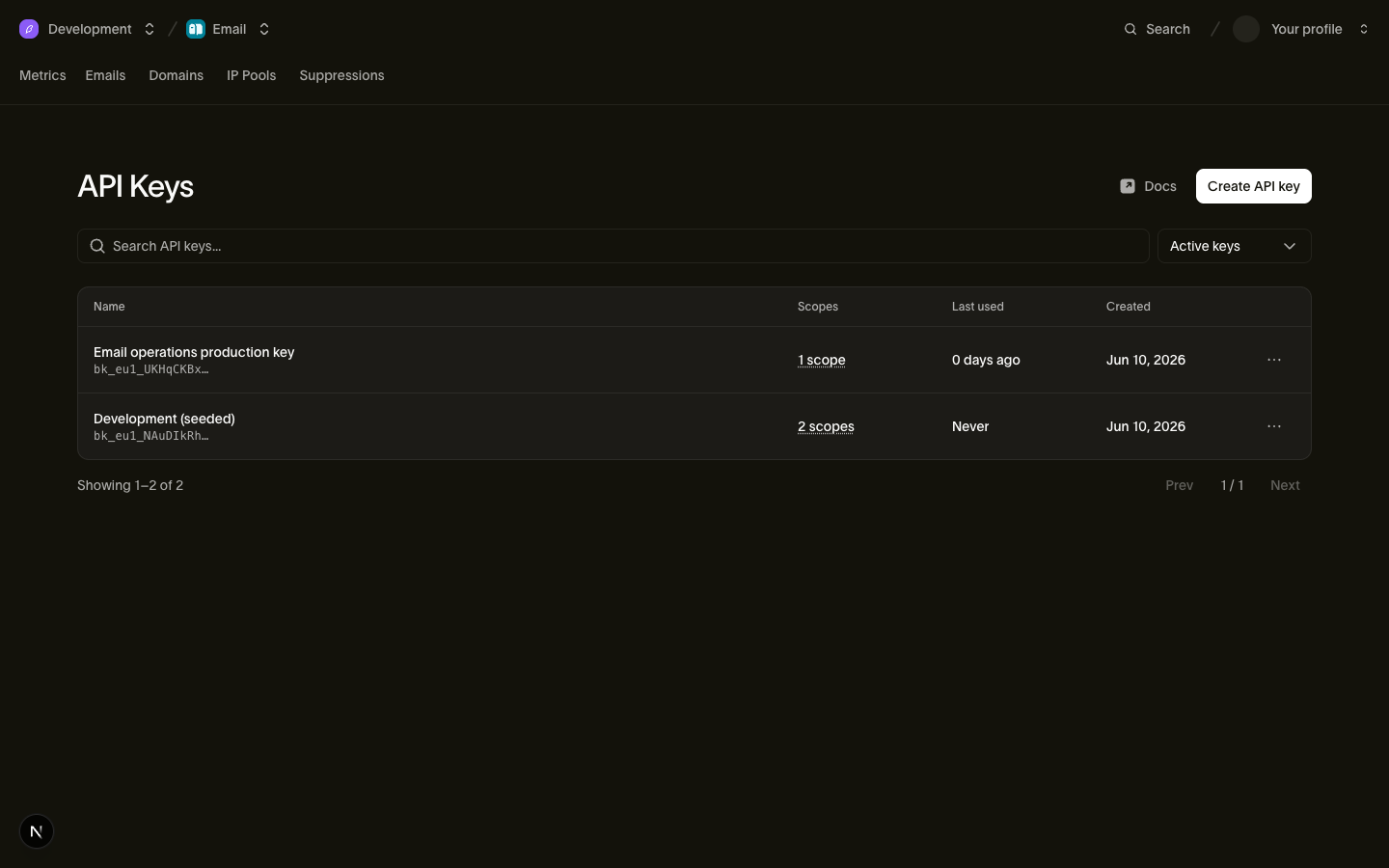
A key is created with a name and one or more scopes:
Esempio di codice
curl -X POST https://us1.platform.bird.com/v1/api-keys \
  -H "Authorization: Bearer <your-credential>" \
  -H "Content-Type: application/json" \
  -d '{ "name": "Email operations production key", "scopes": [{ "scope": "emails", "level": "write" }] }'
The 201 response includes the token field — the only time the full key is ever returned. Store it in your secret manager immediately.
The scope set is immutable: there is no endpoint to add or remove scopes on an existing key. To change what a key can do, create a new key with the right scopes and revoke the old one. This keeps every key's permissions exactly what they were when it was issued and audited.
You can list keys with GET /v1/api-keys (revoked keys are excluded unless you pass include_revoked=true) and fetch one with GET /v1/api-keys/{api_key_id}. Each key reports last_used_on (day precision) so you can spot stale keys.
Scopes & levels
Each scope on a key is a {scope, level} pair, where level is read or write (write includes read). API keys can hold data-plane scopes:
| Scope | read | write |
|---|---|---|
| emails | Read sent messages and delivery status | Send email |
| email_management | Read suppressions and email configuration | Manage suppressions and email configuration |
Control-plane operations — workspace members, settings, key issuance, IP pools — are deliberately not grantable to API keys; they remain dashboard-only. More scopes will be added as products gain programmatic surfaces. Grant the narrowest set that works: a key that only sends email should hold emails:write and nothing else.
Revoking a key
Esempio di codice
curl -X POST https://us1.platform.bird.com/v1/api-keys/{api_key_id}/revoke \
  -H "Authorization: Bearer <your-credential>"
Revocation is permanent — there is no un-revoke. The key record is preserved (with revoked_at set) for audit, and revoking an already-revoked key returns 409.
Revocation takes effect almost immediately: the revoked key is invalidated in Bird's validation cache as soon as you revoke it, and in the worst case a request may still succeed for up to a few minutes (the cache window is 1–5 minutes) before every request with that key returns 401.
There is no rotate endpoint. To rotate a key with zero downtime, overlap two keys:
- Create a new key with the same scopes.
- Deploy the new key to your services.
- Watch the old key's last_used_on until traffic has moved.
- Revoke the old key.
Keys belong to the workspace
An API key is bound to exactly one workspace — it authenticates as the workspace, not as the person who created it. That has two practical consequences:
- Keys survive departures. When an employee leaves and their user account is removed, the keys they created keep working. You never have a production outage because the person who clicked "create" left the company. (Their departure is still a good prompt to rotate keys they had access to.)
- One workspace per key. A key cannot reach resources in another workspace, and it can never perform organization-level operations (billing, org members, org settings). If you operate multiple workspaces, create a key in each.
The delegated path: OAuth tokens for the CLI and MCP server
API keys are for services. When a person uses the Bird CLI or the Bird MCP server, those tools authenticate via OAuth instead: you log in as yourself in the browser, choose a workspace and a subset of your own permissions, and the tool receives a short-lived bt_{region}_... user token. These tokens are capped to what you personally hold, revocable per tool, and are never something you copy-paste or store in a secret manager — don't use them in place of API keys for server workloads.
Related
- API keys reference — full endpoint and schema documentation
- Authentication reference — header semantics and error responses
- Regions — regional hosts and routing
- Users, teams & roles — who can manage keys