IP warmup
A brand-new IP address has no sending history, and mailbox providers treat mail from an unknown IP with suspicion: sudden high volume from a cold IP looks exactly like a spammer spinning up infrastructure, so Gmail, Outlook, and the rest throttle or junk it. Warmup is the process of earning a reputation gradually — starting with a small volume and ramping up over weeks so providers learn to trust the address. Every dedicated IP you purchase from Bird goes through it before it can carry your full volume.
You don't manage warmup yourself. Every newly purchased dedicated IP starts in the warming status, and Bird's sending infrastructure warms it automatically over roughly 30 days: the volume routed through the new IP increases on a fixed schedule, and any traffic beyond what the IP can safely carry at its current stage overflows through Bird's shared pool. Your mail keeps flowing at full volume the entire time — only the split between the new IP and the shared infrastructure changes as the ramp progresses.
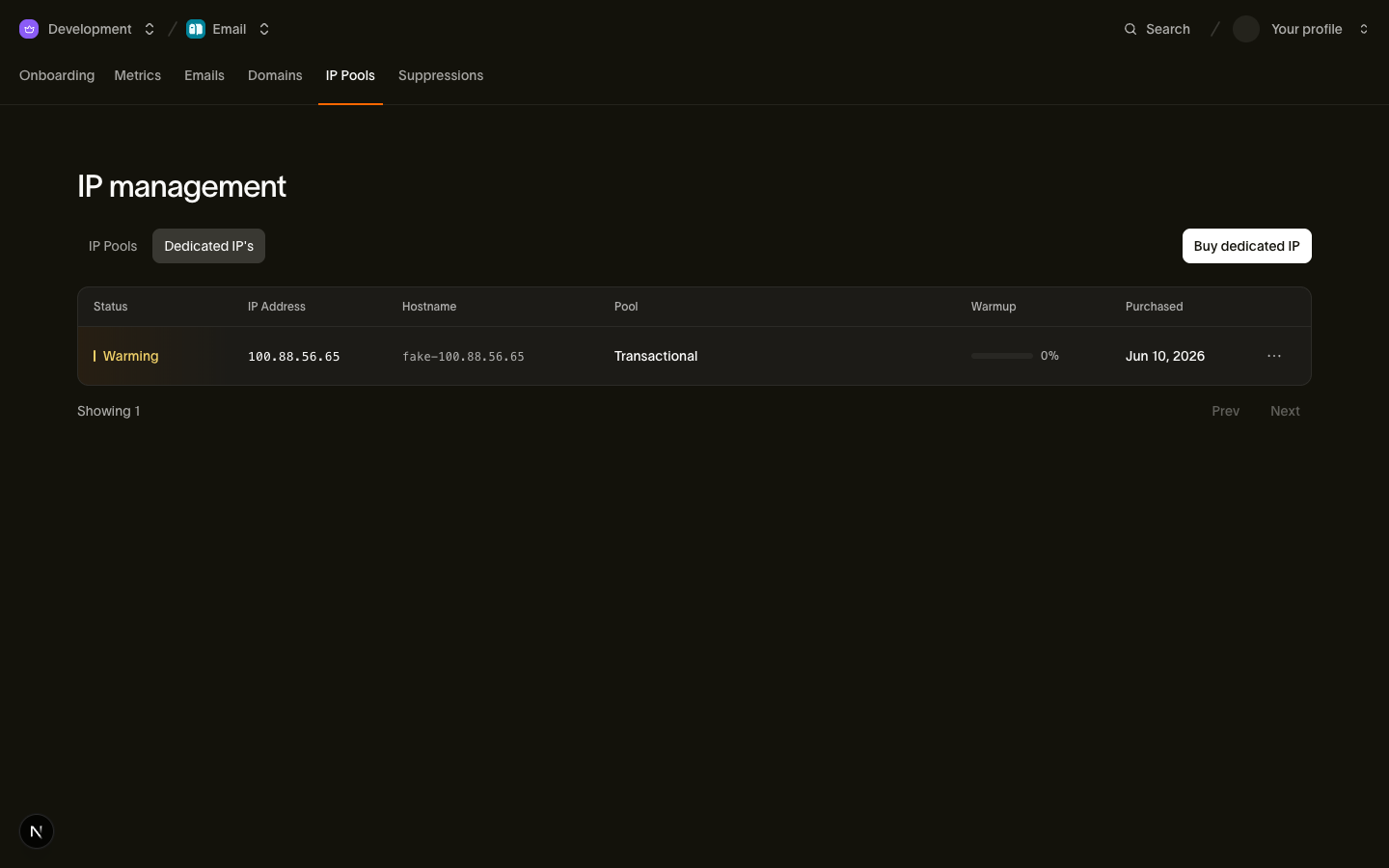
Monitoring warmup progress
Bird syncs each warming IP's state from the sending infrastructure hourly and exposes it on the IP resource. Poll GET /v1/organization/dedicated-ips/:id to check where an IP is in its ramp:
Ejemplo de código
curl https://us1.platform.bird.com/v1/organization/dedicated-ips/dip_01krdgeqcxet5s7t44vh8rt9mg \
  -H "Authorization: Bearer $BIRD_API_KEY"
Ejemplo de código
{
  "id": "dip_01krdgeqcxet5s7t44vh8rt9mg",
  "address": "192.0.2.10",
  "hostname": "mta123.example-infra.com",
  "status": "warming",
  "warmup_progress": 45,
  "warmup_started_at": "2026-05-07T14:30:00Z",
  "warmup_completed_at": null,
  "pool_id": "ipp_01krdgeqcxet5s7t44vh8rt9mg",
  "purchased_at": "2026-05-07T14:30:00Z"
}
The warmup fields:
- warmup_progress — completion percentage, 0–100. The ramp runs through a fixed series of stages, so progress is the current stage as a fraction of the final one; expect it to advance steadily rather than jump.
- warmup_started_at — when warmup began, normally the moment of purchase.
- warmup_completed_at — set when warmup finishes and the IP transitions to active. null while warming.
Because the state syncs hourly, a progress change can take up to an hour to appear — there is no need to poll more often than that.
IP statuses
| Status | Meaning |
|---|---|
| warming | The IP is new and undergoing automatic warmup. It carries a growing share of your traffic; the rest overflows to the shared pool. |
| active | Warmup is complete. The IP handles its full assigned volume. |
| suspended | The IP is temporarily suspended — for example for abuse or billing reasons. It carries no traffic until reinstated. |
| pending_cancellation | You cancelled the IP. It remains fully usable until the end of the current billing period, then it is removed. |
active is the steady state: the ramp is done, warmup_progress is 100, warmup_completed_at is set, and the IP carries whatever volume its pool sends with no overflow to shared infrastructure.
Deliverability guidance
The warmup schedule protects you from the volume ramp, but two decisions stay in your hands:
- The shared pool stays your default until you flip it. Buying a dedicated IP never changes where your traffic goes: the shared pool remains your organization's default pool, so sends that don't specify a pool keep riding Bird's warmed shared infrastructure. Traffic is never forced onto a cold IP. When you're ready, make your dedicated pool the default by setting is_default on it — see Dedicated IPs and pools.
- Wait for active before flipping the default. You can point traffic at a pool whose IPs are still warming — overflow routing means the mail will still be delivered — but the cleanest pattern is to leave the shared pool as default until warmup_completed_at is set, then switch. Never plan around dumping your full volume on a freshly purchased IP; the reputation you're building during warmup is the whole point of the exercise.
If you send through multiple pools, warm each new IP the same way: purchase it into the pool, watch warmup_progress, and only route dedicated traffic deliberately once the IP is active.
Related pages
- Dedicated IPs and pools — purchasing IPs, organizing pools, and default-pool rules
- API reference: Dedicated IPs — full request and response schemas