Tracking & metrics
This guide covers the two halves of measuring your email: tracking (how Bird instruments each message for opens and clicks) and metrics (the aggregate view of delivery and engagement in the Bird dashboard). Per-recipient outcomes for a single message live in events and webhooks; this page is about instrumentation and the aggregate view.
Tracking
Open tracking
When open tracking is enabled, Bird injects a transparent tracking pixel into the HTML part of your message. When a recipient's mail client fetches the pixel, Bird records an email.opened event.
Modern inboxes complicate this signal: Apple Mail Privacy Protection and Gmail's image proxy auto-fetch images on the recipient's behalf, producing opens that no human triggered. These are flagged as prefetched (is_prefetched: true) on the resulting open events, and Bird counts raw and non-prefetched opens separately. Your open rate is based on unique non-prefetched opens over delivered, so privacy-proxy noise doesn't inflate it.
Treat opens as a soft signal either way: a missing open doesn't mean the message went unread (text-only clients, blocked images), and a recorded open may be a proxy prefetch. For decisions that matter — re-engagement, list pruning — prefer clicks, which require a deliberate action.
Click tracking
When click tracking is enabled, Bird rewrites the links in your HTML through a tracking redirect: the recipient clicks the rewritten URL, Bird records an email.clicked event (including the original url), and immediately redirects to the destination.
Rewritten links are served from your domain's branded tracking hostname — the tracking CNAME you configure on your sending domain (by default links. under your sending domain). Click and open tracking only run once that CNAME has verified; until then nothing is rewritten or pixelled. Once it verifies, tracked links are served over HTTPS from your own branded hostname. Tracking readiness is reported separately from sending readiness (capabilities.tracking vs capabilities.sending on the domain resource) — an unverified tracking CNAME never blocks sending, only tracking.
Per-send toggles
track_opens and track_clicks are per-send booleans on POST /v1/email/messages, and both default to true. Set either to false to skip pixel injection or link rewriting for that send — common for transactional mail where rewritten links are undesirable (password resets, security notifications).
Effective tracking is the AND of the per-send flag and your domain's tracking settings: a message is tracked only when the per-send flag is true, your domain's open or click tracking setting is enabled, and the tracking CNAME has verified. Those domain-level settings default to off, so even though track_opens and track_clicks default to true, opens and clicks aren't tracked until you set up and verify a branded tracking domain and turn the setting on — a per-send true can't enable tracking on its own. A per-send false always suppresses tracking for that message. The message resource echoes the resolved values back on reads.
Metrics
Your email metrics live on the Metrics page in the Bird dashboard — delivery, open, bounce, and complaint rates, delivery and engagement over time, bounce classification, and per-domain breakdowns, across everything your workspace sends.
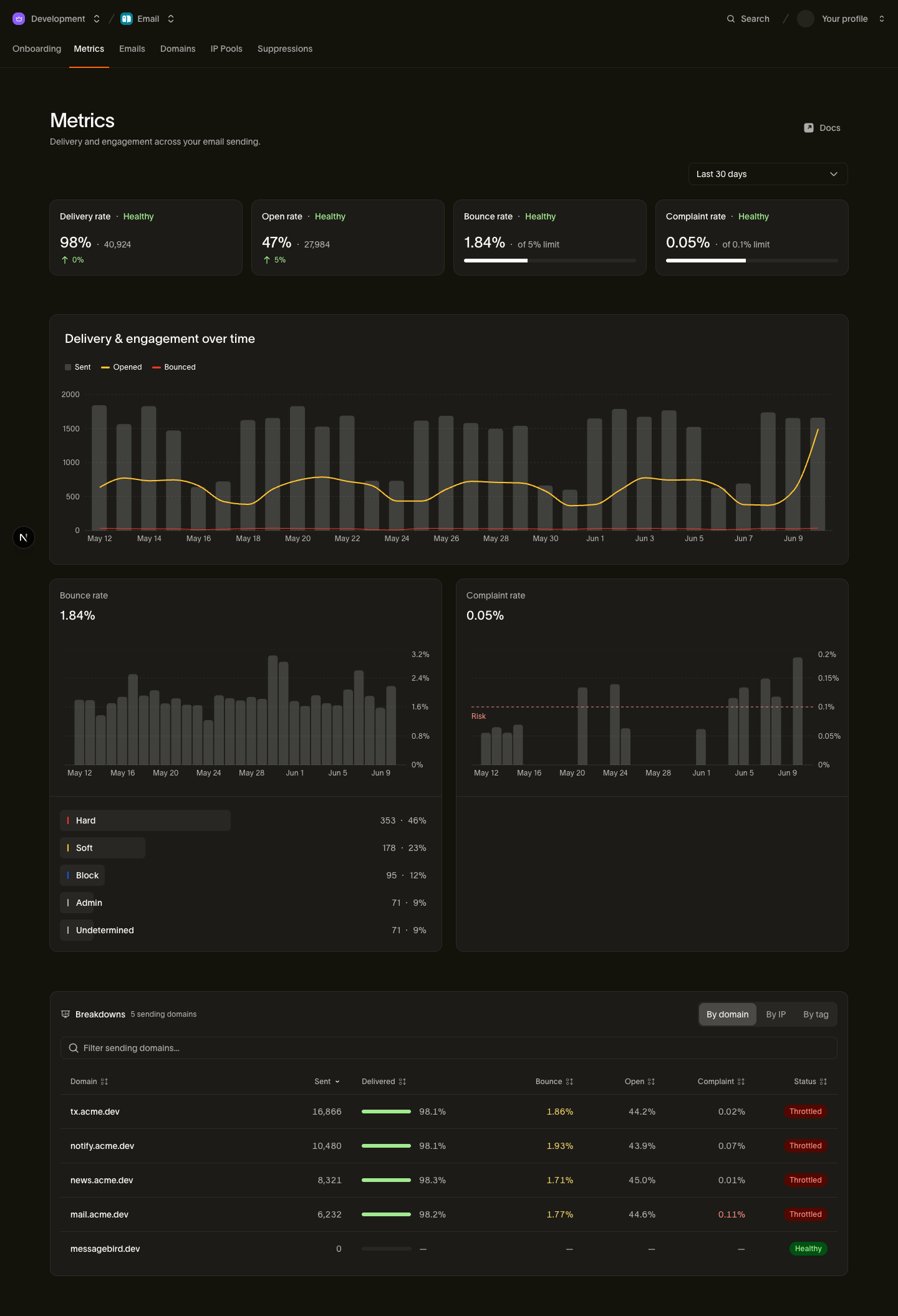
Rates are computed against event time rather than send time, so engagement earned today for a message sent last week lands in today's numbers. Open rate uses unique non-prefetched opens over delivered, so inbox-privacy prefetches don't inflate it — prefer click rate for engagement decisions, since clicks require a deliberate action.
You can break the numbers down by tag, sending domain, sending IP, mailbox provider, recipient domain, and more. Tags you set at send time are the most flexible cut: tag a campaign, template, or experiment variant and compare them side by side.
Sandbox traffic counts toward your metrics. Sends to sandbox addresses on messagebird.dev show up in your dashboard counts and bounce/complaint rates, so a heavy test run moves the numbers. Because sandbox sends never leave Bird, they never affect your sending reputation.
Next steps
- Events and webhooks — the per-recipient event stream behind the aggregate view
- Sending domains — setting up the tracking CNAME for branded links
- Sending email — track_opens, track_clicks, and tags on the send payload